


ARTICLE CONTENTSOn this page 8 sections
Basic Components of Mobile Phone
Performance Objectives
By the end of the lesson, students should be able to:
- identify types of mobile phone;
- identify parts of mobile phone;
- describe the hardware components of mobile phone such as keyboard, motherboard;
- describe software components of mobile phone such as RAM, ROM, operating system;
- assemble mobile phone component parts.
Mobile phones have become a common part of daily life. They allow people to communicate, learn, and stay connected. To understand how mobile phones work, it is important to know their basic parts and how they function.
What is a Mobile Phone?
A mobile phone is a portable electronic device used for communication, especially for making and receiving calls and sending messages.
Modern mobile phones can do much more than just make calls. They can be used to browse the internet, take pictures, play games, and run many different applications.
Types of Mobile Phones
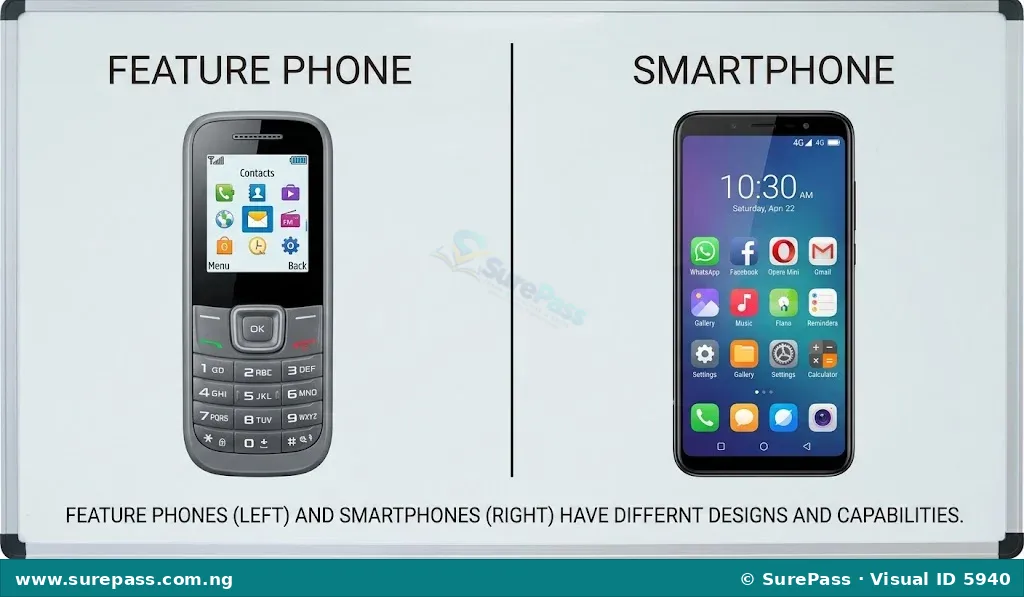
Mobile phones can be grouped into different types based on their features and capabilities. The two main types are feature phones and smartphones.
Feature Phones
Feature phones are basic mobile phones that offer essential functions like making calls, sending text messages, and sometimes playing simple games or listening to radio. They usually have a physical keypad and a small screen.
Feature phones are known for their long battery life and durability. They are often simpler to use and less expensive than smartphones.
Smartphones
Smartphones are advanced mobile phones that offer many computer-like functions. They have large touchscreens, powerful processors, and can run a wide variety of applications (apps).
Smartphones allow users to browse the internet, use social media, take high-quality photos and videos, and perform many tasks that were once only possible on computers. Examples include phones from brands like Samsung, Apple, Tecno, and Infinix.
Components of a Mobile Phone
Every mobile phone is made up of many different parts that work together. These parts can be divided into two main categories: hardware components and software components.
Hardware Components of a Mobile Phone
Hardware components are the physical parts of the mobile phone that can be seen and touched.
These are the electronic and mechanical parts that make up the phone’s structure and allow it to perform its functions. Without hardware, a mobile phone cannot exist.
Common hardware components of a mobile phone include:
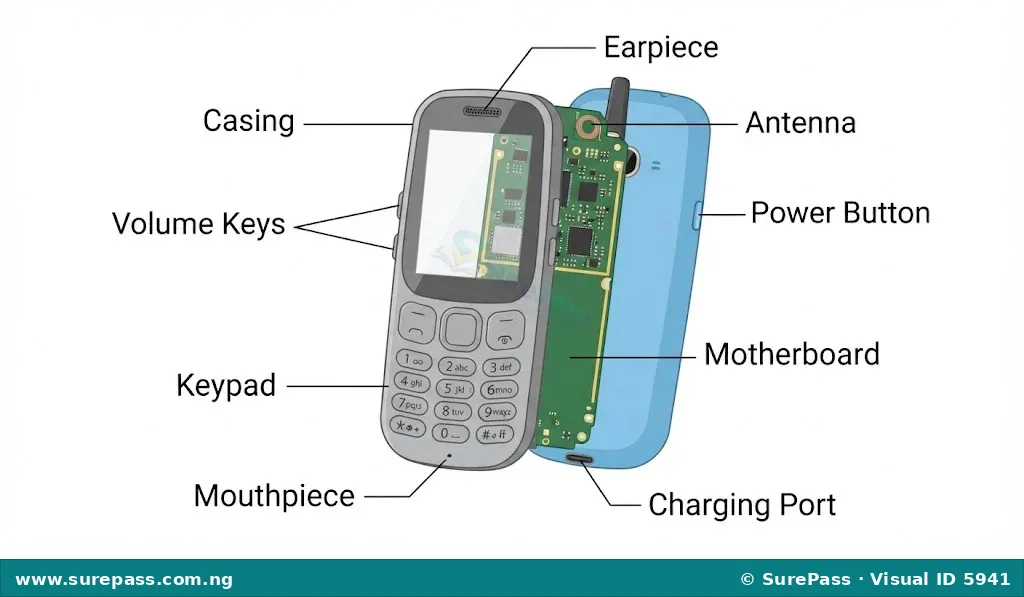
- Casing: This is the outer body or shell of the phone. It protects the internal components from damage, dust, and moisture. The casing also gives the phone its shape and design.
- Motherboard: This is the main circuit board inside the phone. It connects all the other components together, allowing them to communicate with each other. The motherboard is like the “brain” of the phone, where most of the important electronic parts are located.
- Keypad (or Keyboard): This is a set of buttons used to input numbers, letters, and commands. Feature phones typically have physical keypads, while smartphones use virtual keypads on their touchscreens.
- Earpiece: This is a small speaker located at the top of the phone. It allows the user to hear the voice of the person they are talking to during a call.
- Mouthpiece: Also known as a microphone, this component is located at the bottom of the phone. It captures the user’s voice and converts it into electrical signals to be sent to the person on the other end of the call.
- Antenna: This component is responsible for sending and receiving radio signals. It allows the phone to connect to mobile networks for calls, messages, and internet access.
- Charging Port: This is the connector on the phone where the charger cable is plugged in. It allows the phone’s battery to be recharged.
- Power Button (On/Off): This button is used to turn the phone on or off, or to put it into sleep mode.
- Volume Keys (Up/Down): These buttons are used to adjust the sound level of the phone, such as the ringtone volume or the volume during a call.
Software Components of a Mobile Phone
Software components are the programs, applications, and data that tell the hardware what to do. They are not physical parts but are stored electronically.
Software makes the phone smart and functional. Without software, the hardware would just be a collection of inert parts.
Important software components of a mobile phone include:
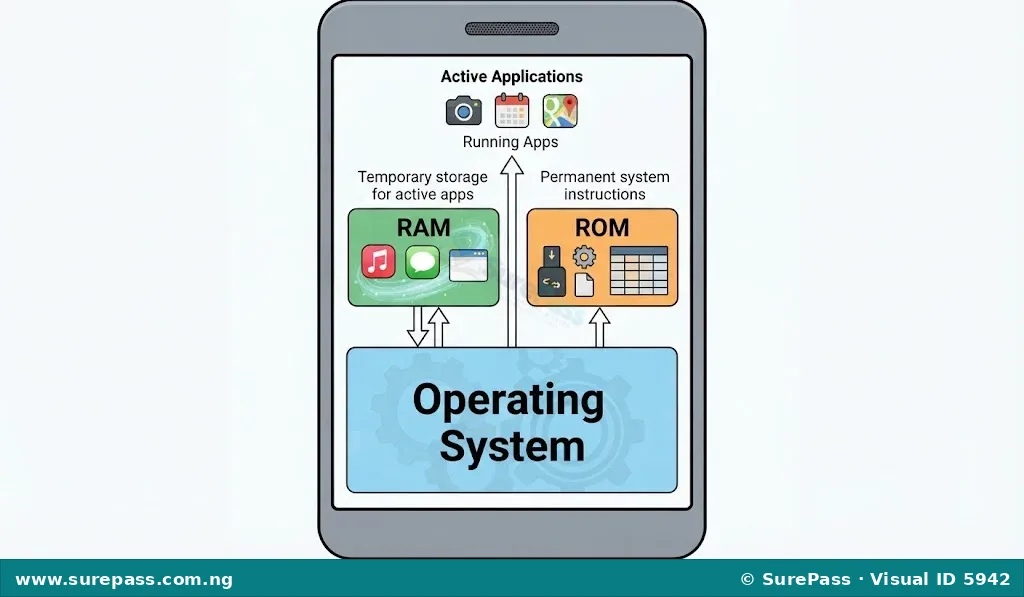
- Operating System (OS): This is the main software that manages all the hardware and other software on the phone. It provides the user interface, allowing users to interact with the phone. Popular mobile operating systems include Android and iOS. The OS controls how applications run, how the phone connects to networks, and how it manages memory.
- RAM (Random Access Memory): This is a type of memory that the operating system and applications use to store data temporarily while the phone is running. When you open an app, it loads into RAM so the phone can access it quickly. When the phone is turned off, the data in RAM is lost. RAM helps the phone run multiple apps smoothly.
- ROM (Read-Only Memory): This is a type of memory that stores permanent instructions and data needed for the phone to start up and function correctly. The information in ROM is usually put there by the manufacturer and cannot be easily changed or deleted by the user. It contains the basic software that allows the phone to boot up and load the operating system.
Assembling Mobile Phone Component Parts
Assembling mobile phone components means putting different parts of the phone together correctly. This skill is important for understanding how phones are built and for basic maintenance.
For JSS1, this usually involves simple, user-level assembly, such as inserting a battery, SIM card, or memory card, and attaching the back cover. More complex assembly or repair should always be done under the supervision of an adult or a trained professional.
Important Safety Tips for Assembling Mobile Phone Parts:
- Always ensure the phone is turned off before attempting to assemble or disassemble any parts.
- Use the correct tools, such as small screwdrivers, if required.
- Handle all components gently to avoid damage.
- Keep small parts organised so they do not get lost.
- If unsure about any step, ask an adult or teacher for help.
How to Assemble Basic Mobile Phone Components (e.g., Battery, SIM Card, Back Cover)
This procedure demonstrates how to assemble common user-replaceable parts of a mobile phone.
The required materials are:
- A mobile phone (turned off)
- A battery
- A SIM card
- A memory card (optional)
- The phone’s back cover
The procedure involves the following steps:
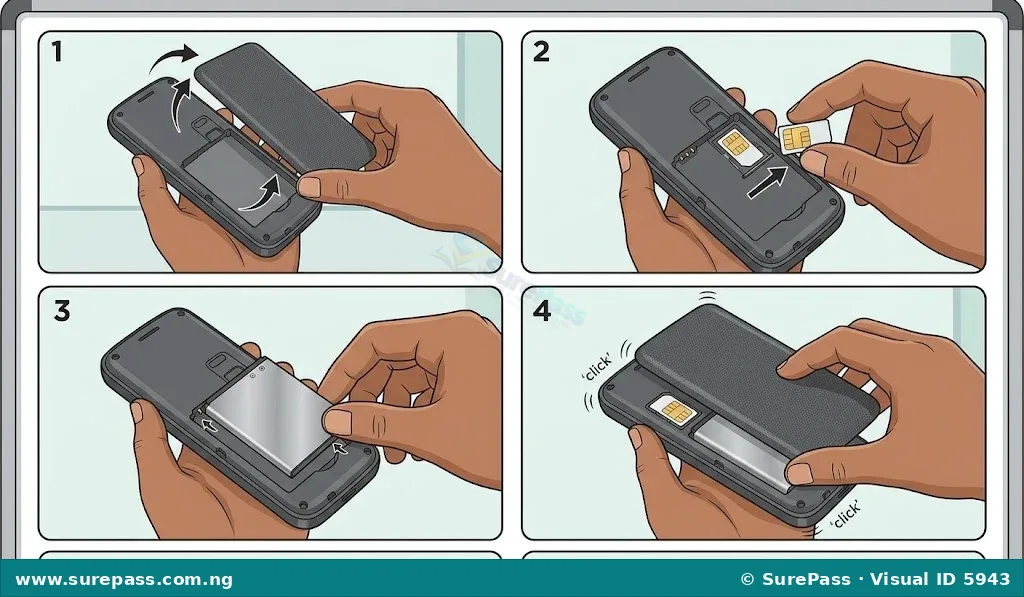
- Remove the Back Cover: If the back cover is already on, gently slide or lift it off the phone. Some phones have a small notch to help open the cover.
- Insert the SIM Card: Locate the SIM card slot. It is usually a small tray or a slot where the SIM card slides in. Ensure the SIM card is oriented correctly, matching the shape of the slot. Push it in gently until it clicks into place or is fully inserted.
- Insert the Memory Card (if applicable): If the phone has a memory card slot, insert the memory card in the correct orientation, similar to the SIM card.
- Insert the Battery: Locate the battery compartment. Place the battery into the compartment, making sure the metal contacts on the battery align with the contacts inside the phone. Press down gently until the battery sits firmly.
- Attach the Back Cover: Align the back cover with the phone’s body. Gently press it down and slide it into place until it clicks securely. Ensure all edges are properly closed.
- Turn On the Phone: Press and hold the power button until the phone turns on. Check if the phone recognises the SIM card and battery.



0 comments
Open the discussion when you need it. Comments stay collapsed until requested so the initial article remains light.