


ARTICLE CONTENTSOn this page 6 sections
Parts of Digital Devices
Performance Objectives
By the end of the lesson, students should be able to:
- describe the functions of the basic parts of a computer;
- describe the functions of the basic parts of a mobile digital device.
What Are Digital Devices?
A digital device is an electronic machine that uses computer technology to do different tasks.
Digital devices help people to work, learn, play, and communicate. Examples of digital devices include desktop computers, laptop computers, mobile phones, and tablets.
Common Parts of Digital Devices
Just like a car has different parts that work together, digital devices also have many parts. Each part has a special job or function that helps the device work properly.
Understanding the function of each part helps a person to use digital devices effectively.
Functions of Computer Parts
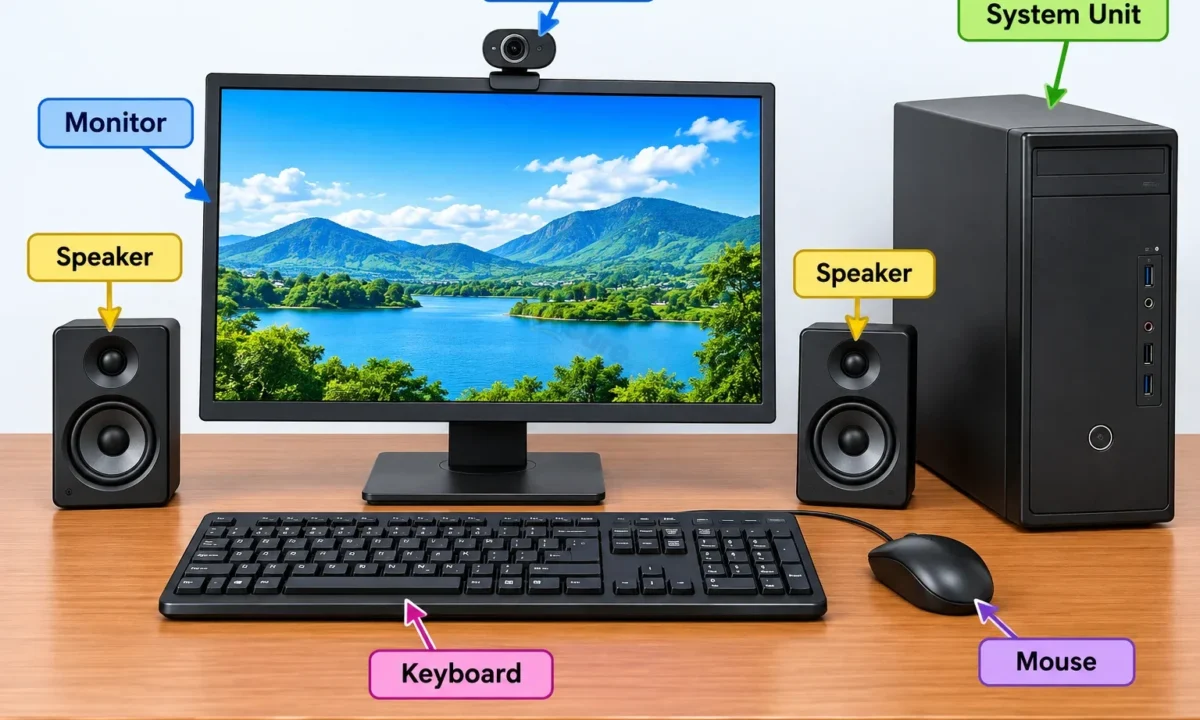
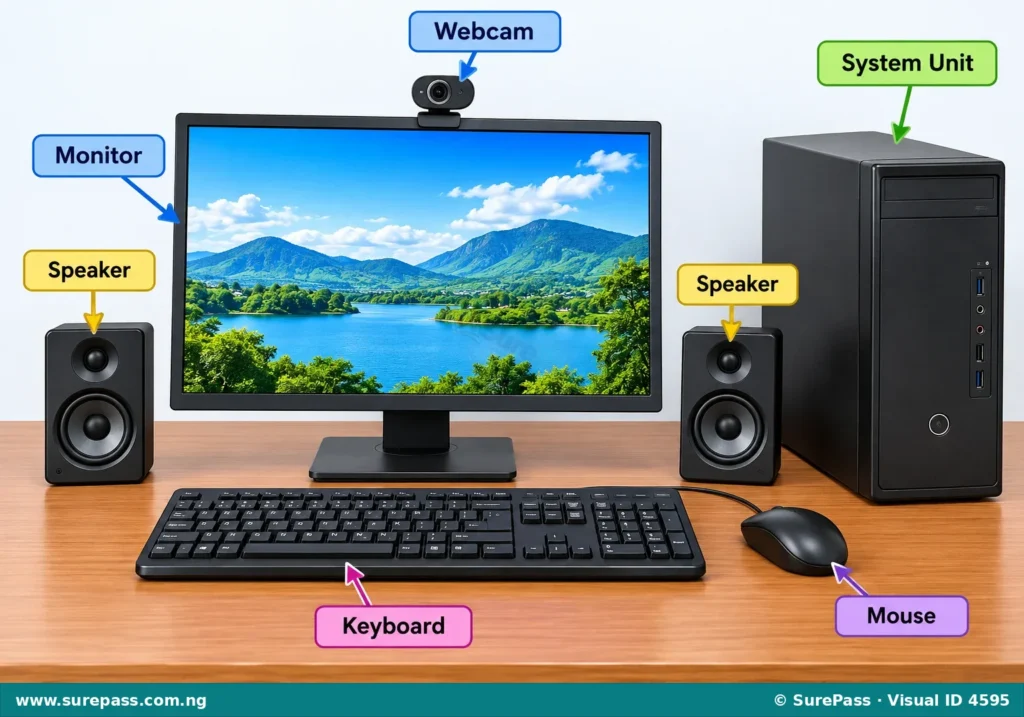
A computer is a common digital device found in homes, schools, and offices. It has several important parts, each with a specific function.
Monitor
The monitor is like the television screen of the computer. Its function is to show pictures, words, and videos.
When a person types on the keyboard or moves the mouse, the monitor displays what is happening. It allows a person to see the programs, documents, and websites being used.
Keyboard
The keyboard is a set of keys arranged like a typewriter. Its function is to type letters, numbers, and symbols into the computer.
A person uses the keyboard to write documents, send messages, and enter commands. Each key on the keyboard has a specific letter, number, or function.
Mouse
The mouse is a small device that fits under the hand. Its function is to move a pointer on the screen and select items.
By moving the mouse on a flat surface, the pointer on the monitor also moves. Clicking the buttons on the mouse helps to open programs, select text, or choose options.
Microphone
A microphone is a device that takes in sound. Its function is to put sound, such as a person’s voice, into the computer.
Microphones are used for recording voice notes, making video calls, or giving voice commands to the computer. Some computers have a microphone built-in, while others use an external microphone.
Speakers
Speakers are devices that produce sound. Their function is to play sound out of the computer, so a person can hear music, voices, or alerts.
Speakers allow a person to listen to audio from videos, music, or online calls. Computers can have built-in speakers or external speakers that connect to the computer.
Camera
A computer camera, often called a webcam, is a small camera that can capture images and videos. Its function is to take pictures and record videos.
Webcams are commonly used for video calls, online meetings, and recording short videos. Many laptops have a webcam built into the screen, while desktop computers may use an external webcam.
Functions of Mobile Digital Device Parts
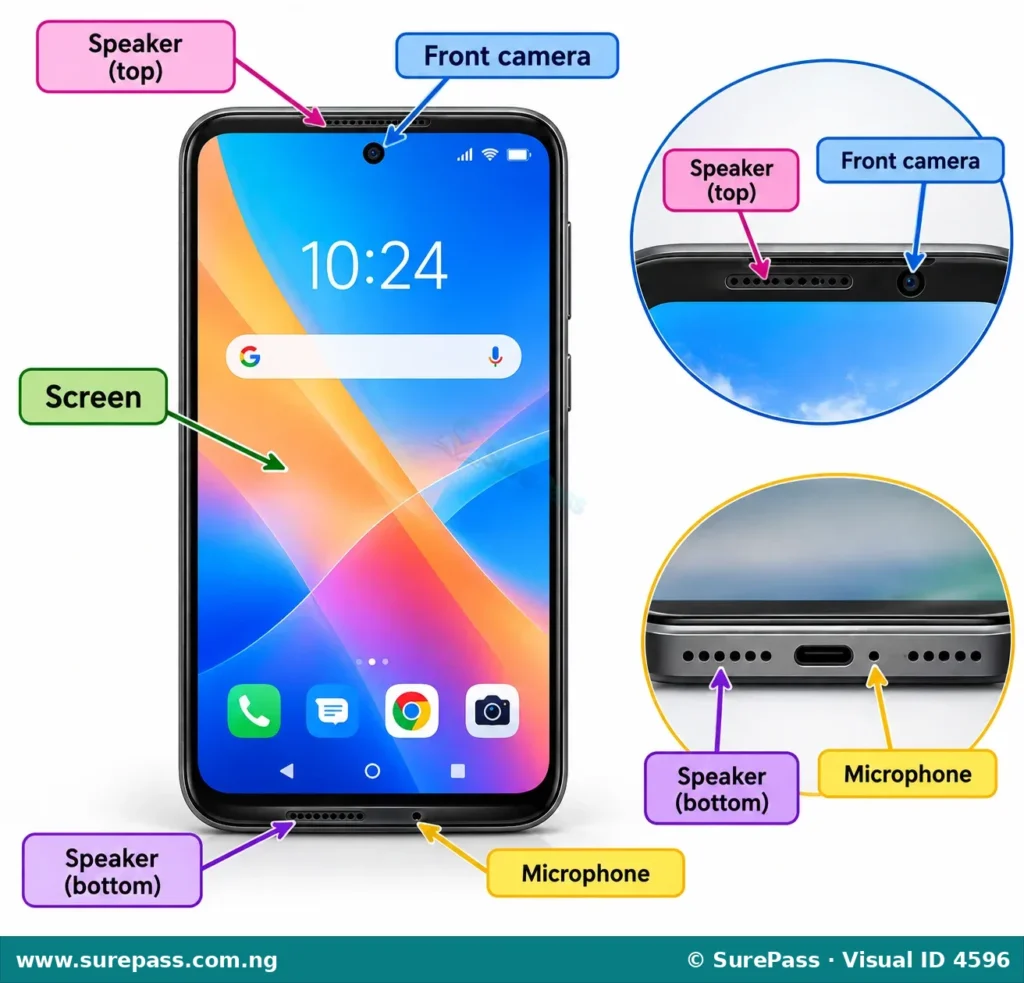
Mobile digital devices, such as mobile phones and tablets, are portable and have many parts similar to a computer, but they are designed for on-the-go use.
Screen
The screen on a mobile digital device is usually a touch screen. Its function is to display information, pictures, and videos, and also to allow a person to interact with the device by touching it.
A person uses the screen to see apps, messages, and websites. Touching the screen helps to open apps, type, and navigate through different functions.
Keypad
Mobile digital devices mostly use a virtual keypad, which appears on the screen. Its function is to type letters, numbers, and symbols into the device.
When a person needs to type a message or dial a number, the keypad appears on the screen. Some older mobile phones may have a small physical keypad.
Unlike computers, mobile devices do not typically use a mouse or trackpad for navigation. Instead, a person uses their fingers to touch and swipe on the screen.
Microphone
A mobile device has a built-in microphone. Its function is to capture sound, especially a person’s voice, for calls and recordings.
The microphone is essential for making phone calls, sending voice notes, and using voice commands or voice assistants on the device.
Speakers
Mobile devices have small built-in speakers. Their function is to play sound, such as voices during calls, music, and notification alerts.
Speakers allow a person to hear the person they are talking to on a call, listen to music, or hear sounds from videos and games.
Camera
Mobile digital devices usually have one or more cameras. Their function is to take pictures and record videos.
Most mobile phones have a camera on the back for taking general photos and videos, and a front camera for selfies and video calls.


0 comments
Open the discussion when you need it. Comments stay collapsed until requested so the initial article remains light.