



ARTICLE CONTENTSOn this page 7 sections
Artificial Intelligence (AI)
Performance Objectives
By the end of the lesson, students should be able to:
- Explain the meaning of artificial intelligence
- explain the advantages of AI;
- explain Face detection as example of application of AI;
- create a program with face detection functionality.
Imagine a world where machines can think, learn and solve problems just like humans. This amazing idea is called Artificial Intelligence, or AI. AI is all around us, helping with many tasks every day.
Meaning of Artificial Intelligence
Artificial Intelligence (AI) is when computers or machines are programmed to think, learn and make decisions in ways that are similar to how humans think.
These machines can understand information, recognise patterns and even solve problems. They are designed to perform tasks that usually require human intelligence.
Applications of Artificial Intelligence
AI is used in many different places to make our lives easier and more interesting. These are called applications of AI.
Some common applications of AI include:
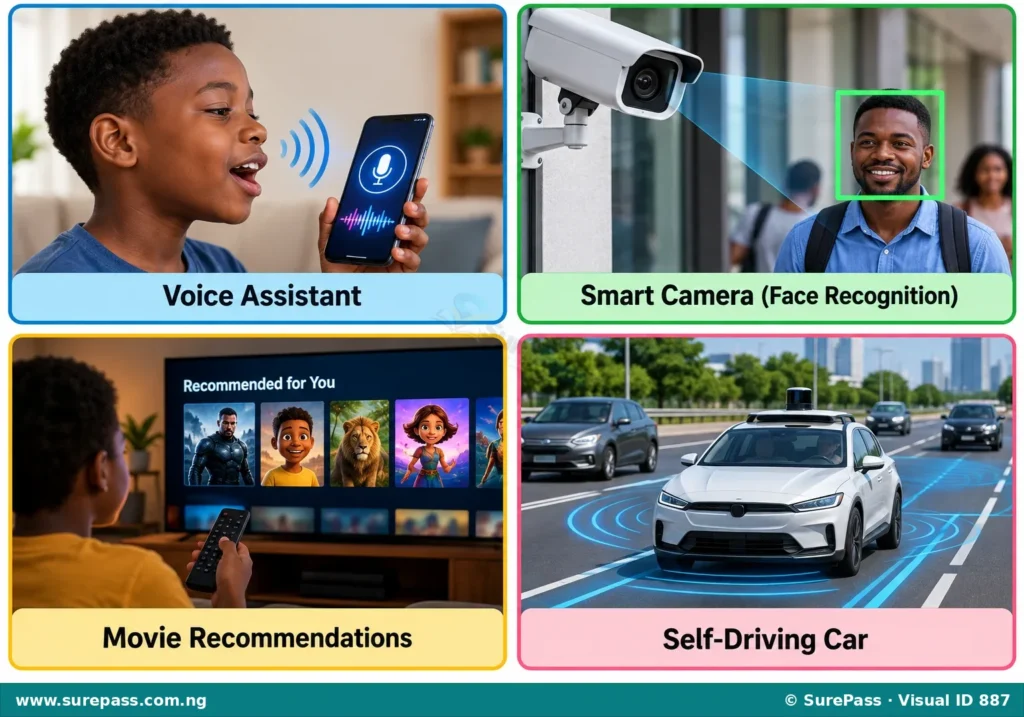
- Voice Assistants: These are programs like Siri, Alexa or Google Assistant that can understand what people say and answer questions or follow commands. For example, a person can ask a voice assistant to play music or tell them the weather.
- Smart Cameras: AI helps cameras to recognise objects, animals or even people’s faces. This is used in security systems or in phones to unlock them with a face.
- Recommendation Systems: When a person watches videos on YouTube or movies on Netflix, AI suggests other videos or movies they might like based on what they have watched before.
- Self-Driving Cars: AI helps cars to see the road, understand traffic signs and drive safely without a human driver.
- Games: Many computer games use AI to make the computer-controlled characters act smart and challenging for players.
Advantages of Artificial Intelligence
AI brings many benefits to people and society. Some advantages of AI are:
- Helps with Difficult Tasks: AI can perform tasks that are too dangerous, difficult or boring for humans, such as exploring dangerous places or doing repetitive work.
- Saves Time: AI can process large amounts of information very quickly, helping people to find answers or complete tasks faster.
- Makes Life Easier: AI-powered devices and systems can automate daily routines, making homes smarter and tasks simpler.
- Improves Accuracy: AI can make fewer mistakes than humans in certain tasks, leading to more accurate results in areas like medical diagnosis or financial analysis.
- Assists People with Disabilities: AI tools can help people with visual or hearing impairments to communicate, navigate or access information more easily.
Face Detection in Artificial Intelligence
Face detection is a special application of AI that allows computers to find and identify human faces in images or videos.
It is different from face recognition. Face detection only finds if there is a face and where it is. Face recognition then tries to figure out whose face it is.
How Face Detection Works
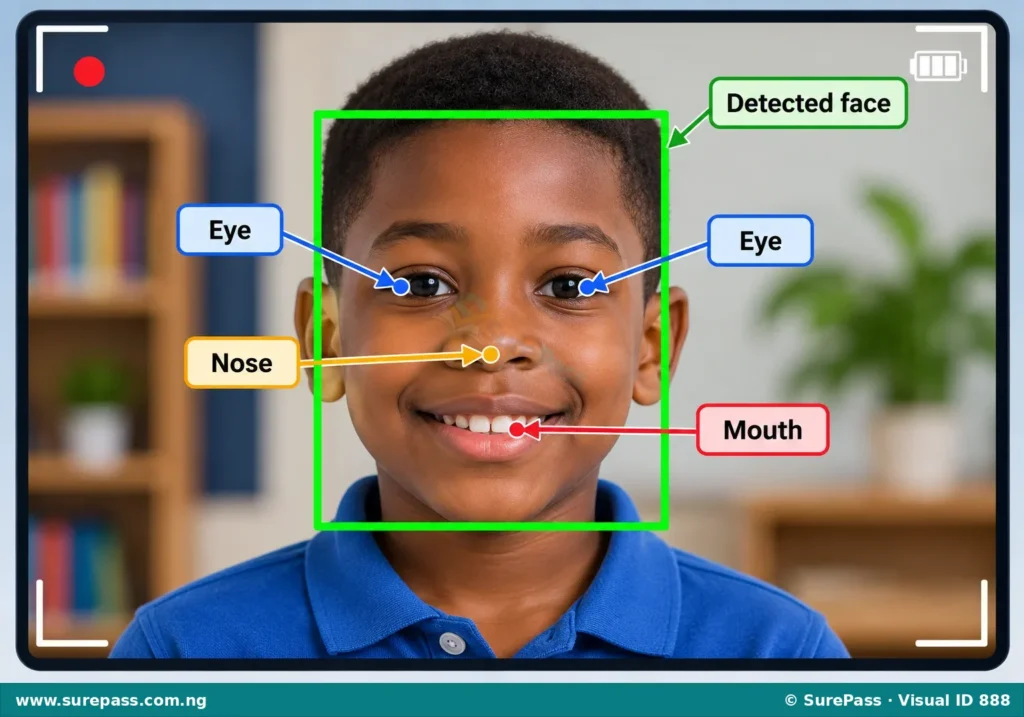
When a computer uses face detection, it looks for specific patterns that make up a human face. These patterns include:
- Eyes: The computer looks for two dark, round shapes that are usually close together.
- Nose: It searches for a shape that is typically found below the eyes.
- Mouth: It looks for a horizontal line or shape below the nose.
- Face Shape: The computer also considers the overall oval or round shape of a human head.
The AI system has been trained with many pictures of faces and non-faces. This training helps it learn what a face looks like. When it sees a new image, it scans the image for these learned patterns. If it finds enough of these patterns in the right arrangement, it marks that area as a detected face, often by drawing a box around it.
Uses of Face Detection
Face detection is used in many places, such as:
- Unlocking Phones: Many smartphones use face detection to unlock the device when the owner looks at it.
- Security Cameras: Security systems use face detection to alert people when a human face appears in a monitored area.
- Photo Tagging: Social media platforms use face detection to suggest tagging friends in photos.
- Camera Focus: Digital cameras use face detection to automatically focus on people’s faces in a picture.
Creating a Program with Face Detection Functionality
It is possible to create simple programs that use face detection. These programs can react when a human face is seen by the computer’s camera. For Primary 4, we can imagine using a block-based programming tool like Pictoblox to do this.
How to Create a Program to Display “Hello” on Face Detection
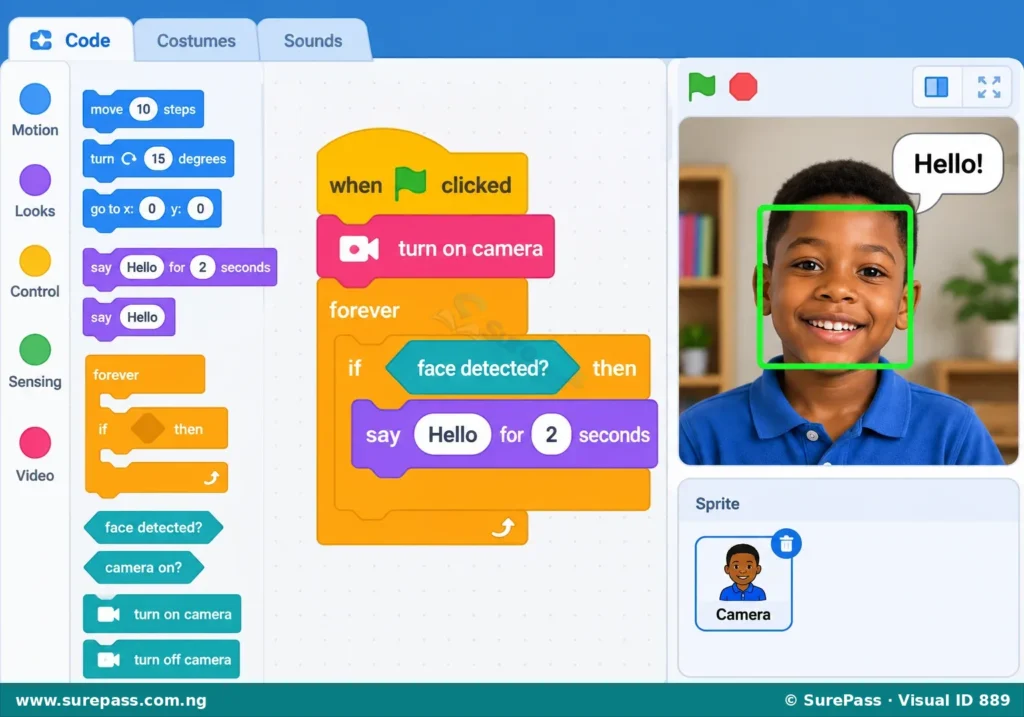
This program will use the computer’s camera to look for a face. If a face is detected, the program will display the word “Hello” on the screen.
The procedure involves the following steps:
- Start the Program: Begin by dragging a “when green flag clicked” block (or similar start block) to the programming area. This block tells the program when to begin running.
- Turn on the Camera: Add a block that turns on the computer’s camera. This allows the program to see what is in front of the camera.
- Use a “Forever” Loop: Place a “forever” loop block around the next steps. This makes the program continuously check for a face.
- Add a Face Detection Block: Inside the “forever” loop, add a special block that tells the computer to “detect face” or “analyse video from camera”. This block will check if a face is present.
- Add an “If-Then” Condition: Use an “if-then” block. This block checks if a certain condition is true. The condition here is “if a face is detected”.
- Display “Hello”: Inside the “if-then” block, add a “say ‘Hello'” block (or similar display block). This block will make the program show the word “Hello” on the screen if a face is detected.
- Test the Program: Run the program and point the camera at a person’s face. The program should display “Hello” when a face is seen. If no face is seen, it should not display “Hello”.





0 comments
Open the discussion when you need it. Comments stay collapsed until requested so the initial article remains light.