



ARTICLE CONTENTSOn this page 6 sections
Passwords, Strong Passwords and Device Protection
Performance Objectives
By the end of the lesson, students should be able to:
- explain the meaning of passwording digital devices;
- identify types of password;
- create a strong password in a digital device.
What is Passwording?
Passwording is the act of setting a secret word or combination of characters to protect a digital device or account.
A password acts like a key to a lock. Just as a key keeps a house safe, a password keeps digital information safe. It prevents other people from using a device or accessing personal information without permission.
Digital devices that can be protected with passwords include mobile phones, tablets, laptops and desktop computers. Online accounts like email, social media and banking apps also use passwords for protection.
Types of Passwords
A password is a secret combination of letters, numbers or symbols used to prove identity or gain access to something.
Passwords can be categorised into two main types based on how easy or difficult they are for others to guess:
- Weak passwords
- Strong passwords
Weak Passwords
Weak passwords are easy for other people to guess or figure out. They do not offer much protection for digital devices or accounts.
Examples of weak passwords include:
- Simple words like “password” or “qwerty”.
- Numbers in a sequence like “123456”.
- Personal information like a name, birthday or phone number.
- Common words or phrases.
Using weak passwords is risky because it makes it easy for unauthorised people to access personal information or use a device without permission.
Strong Passwords
Strong passwords are difficult for other people to guess. They provide good protection for digital devices and accounts because they are complex and unique.
Strong passwords combine different types of characters, making them much harder to crack. They are the best way to keep digital information safe from unauthorised access.
Characteristics of a Strong Password
A strong password has several important features that make it secure. These features help to protect digital devices and accounts from being accessed by others.
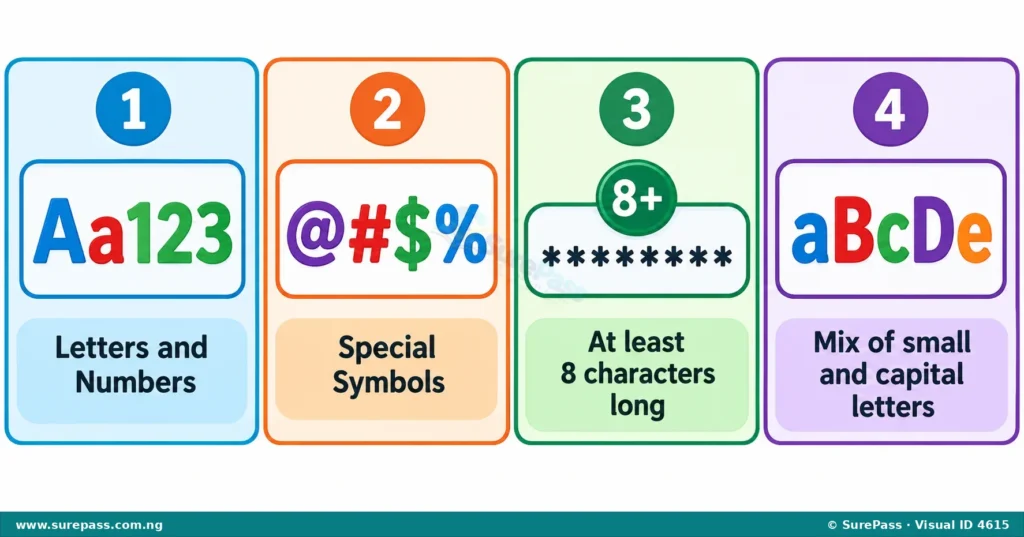
The characteristics of a strong password include:
- Should include alphanumeric text: This means the password should contain a mix of letters (A-Z, a-z) and numbers (0-9). For example, “school123” uses both letters and numbers.
- Should contain special characters: Special characters are symbols like @, #, $, %, &, *, !, ?. Including these makes a password much harder to guess. For example, “school@123” adds a special character.
- Should have a minimum of 8 characters: A strong password should be at least eight characters long. The longer a password is, the more difficult it is for others to guess. For example, “MySchoolBook” is 12 characters long.
- Should contain a combination of upper and lowercases: This means using both capital letters (A, B, C) and small letters (a, b, c) in the password. For example, “MySchool123” uses both uppercase ‘M’ and lowercase letters.
By combining all these characteristics, a password becomes very strong and provides good protection for digital devices and personal information.
Creating a Strong Password
Creating a strong password is an important skill for protecting digital devices and online accounts. It involves combining the characteristics discussed earlier.
The procedure for creating a strong password involves the following steps:
- Think of a phrase or sentence: Instead of a single word, think of a short, memorable phrase or sentence. For example, “I love my school in Lagos.”
- Take the first letter of each word: From the phrase “I love my school in Lagos,” you can get “IlmsiL”.
- Add numbers: Replace some letters with numbers or add numbers to the end. For example, “IlmsiL” could become “IlmsiL123”.
- Add special characters: Include one or more special characters. For example, “IlmsiL123” could become “IlmsiL123!”.
- Mix uppercase and lowercase letters: Change some letters to uppercase and others to lowercase. For example, “IlmsiL123!” could become “IlmSiL123!”. This password is now strong because it has a mix of letters, numbers, special characters, and is long enough.
- Do not use personal information: Avoid using your name, birthday, phone number, or other easily guessed information.
- Do not share your password: Keep your password a secret. Do not tell anyone, not even friends.
- Do not write your password down in plain sight: If you need to write it down, keep it in a very safe and hidden place.
Always remember to create different strong passwords for different important accounts. This way, if one password is ever guessed, your other accounts will still be safe.





0 comments
Open the discussion when you need it. Comments stay collapsed until requested so the initial article remains light.