



ARTICLE CONTENTSOn this page 6 sections
Output Devices
Performance Objectives
By the end of the lesson, students should be able to:
- explain the meaning of output devices;
- identify examples of output devices;
- use output devices to carry out some operations.
What Are Output Devices?
An output device is a part of a computer system that shows or gives out information after the computer has processed it.
Computers take in information (input), process it, and then give out results. These results are called “output”. Output devices help people see, hear, or feel these results in a way they can understand.
Examples of Output Devices
Different output devices show information in different ways. Some show pictures, some print text, and others play sounds. These devices help us interact with the computer’s results.
Common examples of output devices include:
- Monitor
- Printer
- Speakers
- Plotter
- Projector
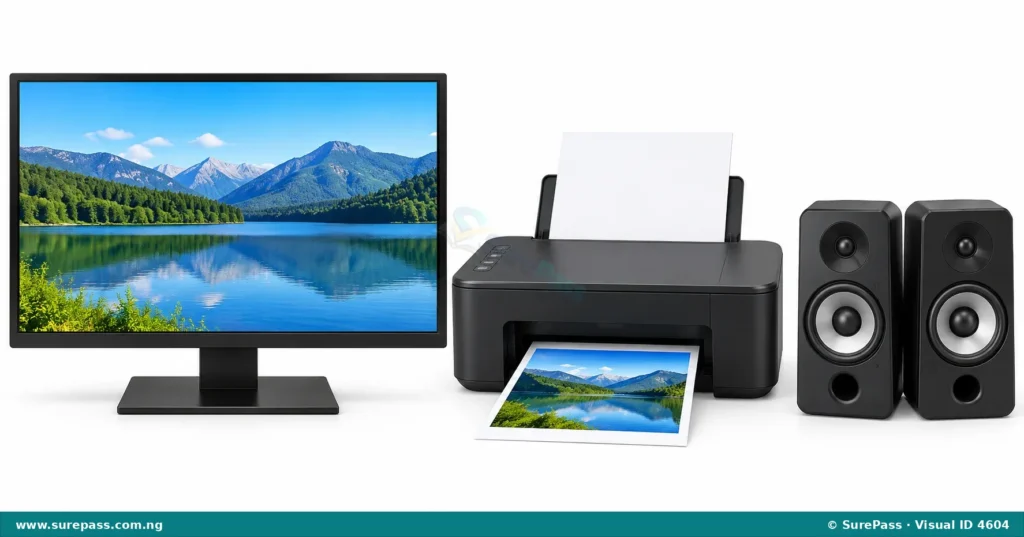
The image below shows some common output devices.
Monitor
A monitor is like a television screen that displays pictures and text from the computer. It is the most common output device for seeing what the computer is doing.
Monitors show images, videos, documents, and websites. Without a monitor, it would be difficult to see the information a computer produces.
Printer
A printer is a device that takes digital information from a computer and puts it onto paper.
Printers are used to create “hard copies” of documents, pictures, and other information. This means the information can be held in your hand.
Speakers
Speakers are devices that produce sound from a computer.
They allow people to hear music, voices, and other audio generated by the computer. Speakers are important for listening to songs, watching videos, and hearing notifications.
Plotter
A plotter is a special type of printer used for printing large, high-quality graphics, such as architectural blueprints, engineering designs, and large maps.
Unlike regular printers that use inkjets or lasers to print small documents, plotters use pens or other tools to draw continuous lines on large sheets of paper.
Projector
A projector is a device that takes images or videos from a computer and displays them onto a large screen or a wall.
Projectors are often used in classrooms, meeting rooms, and cinemas to show content to many people at once. They make it possible to share computer output on a much larger scale than a monitor.
Uses of Output Devices
Output devices are essential because they allow people to receive and understand the results of computer processing. Each device has specific uses:
- Monitor: Used for viewing documents, browsing the internet, watching videos, playing games, and seeing the results of typing or drawing.
- Printer: Used for printing school assignments, reports, photographs, tickets, and other documents that need to be on paper.
- Speakers: Used for listening to music, audio stories, educational videos, and sounds from games. They also allow people to hear voices during video calls.
- Plotter: Used by architects to print building plans, engineers to print machine designs, and cartographers to print large, detailed maps.
- Projector: Used for showing presentations in class, displaying movies for entertainment, or sharing computer screens with a large audience during meetings.
Using Output Devices
Understanding how to use output devices helps people get the most out of their computers. Here are some basic ways to use common output devices:
Using a Monitor
A monitor is used simply by turning it on and connecting it to a computer. The computer’s display will automatically appear on the monitor.
To use a monitor:
- Ensure the monitor is plugged into a power source.
- Connect the monitor cable to the computer’s video port.
- Turn on the computer and the monitor.
- The computer’s screen will appear on the monitor, allowing you to see and interact with the computer’s output.
Using a Printer
Printers are used to get a paper copy of what is on the computer screen. This is called printing a document.
The procedure for printing a document involves the following steps:
- Ensure the printer is connected to the computer and turned on.
- Make sure there is enough paper loaded in the printer’s paper tray.
- Open the document or image on the computer that needs to be printed.
- Go to the “File” menu in the program and select “Print”.
- A print window will appear. Check the settings, such as the number of copies.
- Click the “Print” button to send the document to the printer.
- The printer will then print the document onto the paper.
Using Speakers
Speakers allow sound from the computer to be heard. They are easy to use once connected.
To use speakers:
- Connect the speaker cable to the audio output port on the computer (usually a green port).
- Ensure the speakers are plugged into a power source and turned on.
- Play any audio on the computer, such as music or a video.
- Adjust the volume on the speakers or on the computer to a comfortable level.
Using a Projector
Projectors are used to display computer content on a large surface. While setting up a projector can sometimes be tricky, the basic use is simple.
To use a projector for displaying content:
- Connect the projector cable to the computer’s video output port.
- Plug the projector into a power source and turn it on.
- The projector will usually mirror what is on the computer screen onto the wall or screen.
- Adjust the focus and size of the projected image using the controls on the projector.



0 comments
Open the discussion when you need it. Comments stay collapsed until requested so the initial article remains light.