



ARTICLE CONTENTSOn this page 8 sections
Inclusivity in Digital Content Creation
Performance Objectives
By the end of the lesson, students should be able to:
- explain the meaning of inclusivity in digital content creation;
- list examples of inclusivity in digital content creation;
- discuss the importance of creating inclusive digital content;
- use basic inclusive features in digital devices.
Meaning of Inclusivity in Digital Content Creation
Inclusivity in digital content creation means making sure that everyone can use and understand digital materials, no matter their abilities or background.
This includes people with disabilities, different genders, and people from various cultures. Digital content should be designed so that it is easy for all people to access and enjoy.
Examples of Inclusivity in Digital Content Creation
Creating inclusive digital content means thinking about different people and their needs. This helps everyone to participate and learn.
Considering Disabilities
People with disabilities may need special features to use digital content. For example, someone who cannot see well might need text that can be read aloud by a computer.
Someone who cannot hear might need words written down for videos. These considerations make digital content fair for everyone.
Considering Gender
Digital content should also be fair to all genders. This means using language and images that do not favour one gender over another.
For example, when showing pictures of people doing different jobs, it is good to show both boys and girls, and men and women, in various roles. This helps all children feel included and see themselves in different possibilities.
Importance of Creating Inclusive Digital Content
Creating inclusive digital content is very important for several reasons. It helps to make sure that no one is left out when using computers, tablets, or phones.
When digital content is inclusive, more people can learn, play, and communicate online. This helps everyone to grow and share ideas, making the digital world a better place for all.
Inclusive content also teaches children to be kind and understanding of others who may be different from them. It promotes fairness and equal opportunities for everyone to access information and entertainment.
Inclusive Features in Digital Devices
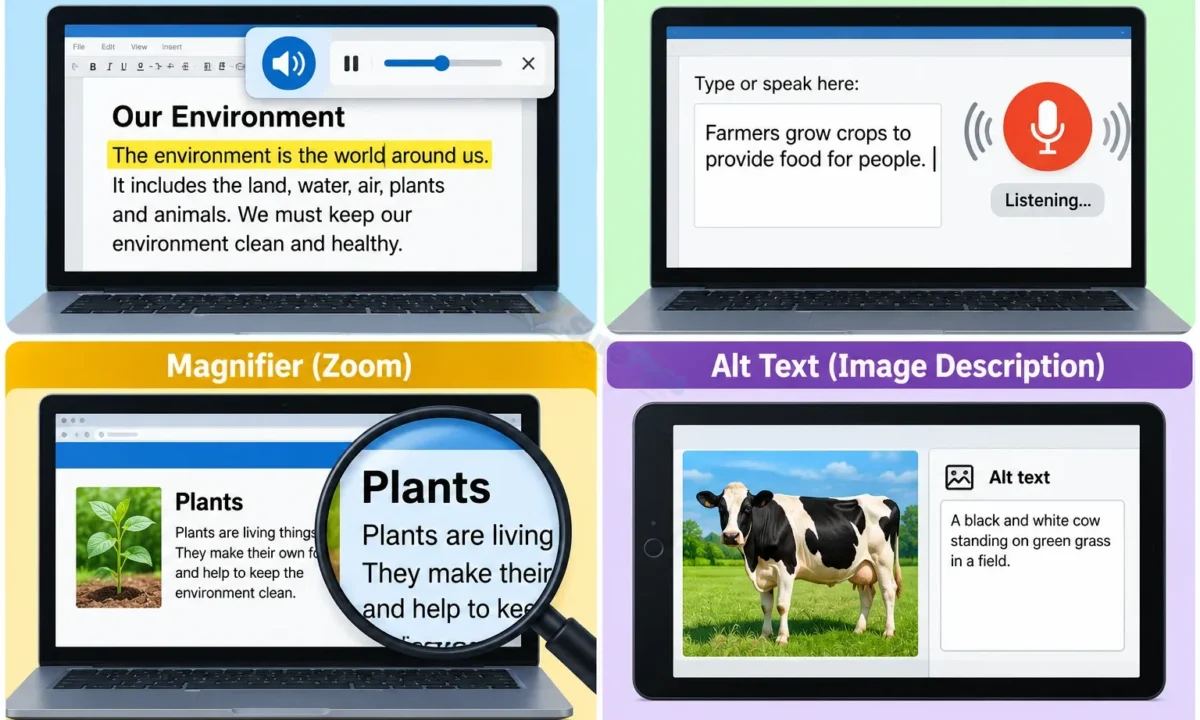
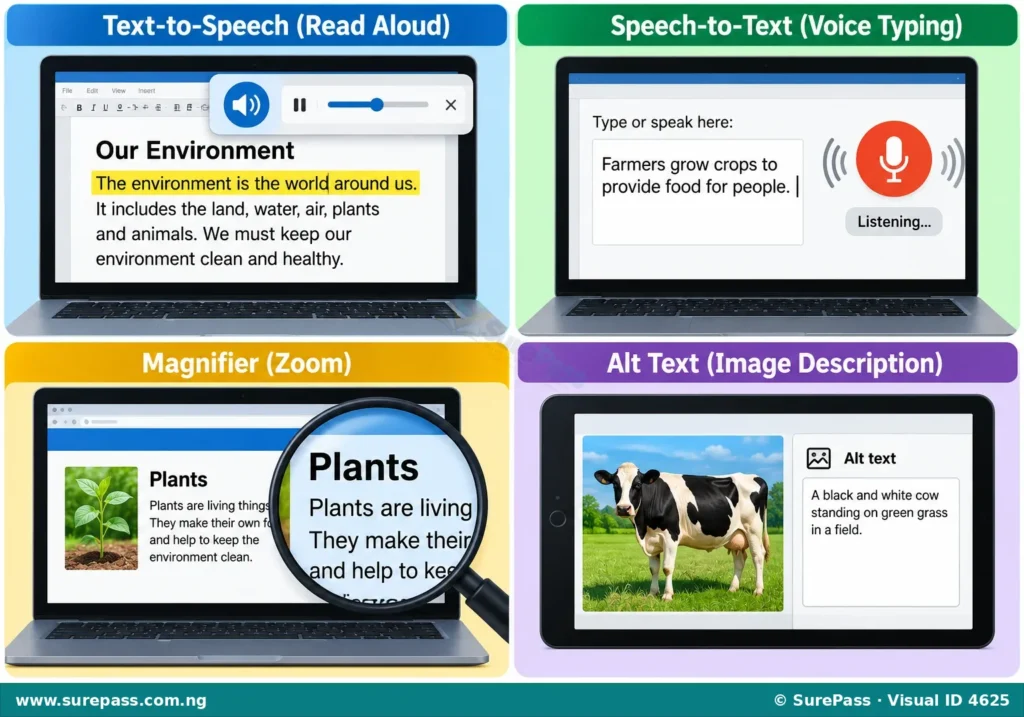
Many digital devices and apps have special features that help make content more inclusive. These features are designed to help people with different needs.
The following are some inclusive features:
- Accessibility Check: This is a tool that helps creators find problems in their digital content that might make it hard for some people to use. It checks if the content follows rules for inclusivity.
- Alt Text (Alternative Text): This is a short description of an image. It helps people who cannot see the image to understand what it is about. When a screen reader reads the page, it will read the alt text aloud.
- Text-to-Speech: This feature reads written text aloud. It is helpful for people who have difficulty reading or seeing the text on a screen.
- Speech-to-Text: This feature changes spoken words into written text. It is useful for people who have difficulty typing or writing.
- Transcription: This is a written record of spoken words, especially from audio or video. It helps people who cannot hear the audio to understand what is being said.
- Magnifier: This feature makes parts of the screen bigger. It helps people who have difficulty seeing small text or images on the screen.
Applying Inclusion in Digital Content Creation
Applying inclusion means actively thinking about how to make digital content usable by everyone. When creating a presentation, a document, or a simple webpage, it is important to remember these steps.
For example, when adding pictures, always include alt text so that people who cannot see the pictures still know what they are. When making a video, try to add captions or a transcript so that people who cannot hear can still understand the message.
Using clear and simple language also helps everyone understand the content better, including those who are learning English or have reading difficulties.
Checking for Inclusivity in Digital Content
It is important to check if digital content is inclusive after it has been created. Many digital tools have built-in accessibility checkers that can help with this.
The procedure for checking inclusivity involves the following steps:
- Use an Accessibility Checker: Many word processors and presentation software have an “Accessibility Checker” tool. This tool scans the content for common accessibility issues and suggests ways to fix them.
- Add Alt Text to Images: For every image, right-click on it and look for an option like “Format Picture” or “Alt Text.” Write a clear and short description of what the image shows.
- Provide Transcriptions for Audio/Video: If there is any audio or video content, make sure to include a written transcription or captions. This helps people who cannot hear the audio.
- Use Clear Fonts and Colours: Ensure that the text is easy to read with good contrast between the text colour and the background colour. Avoid very small fonts or colours that are too similar.
- Test with Inclusive Features: Try using the content with features like text-to-speech or a screen magnifier to see if it works well. This helps to understand the experience of people with different needs.


0 comments
Open the discussion when you need it. Comments stay collapsed until requested so the initial article remains light.