



ARTICLE CONTENTSOn this page 8 sections
Historical Development of Digital Devices
Performance Objectives
By the end of the lesson, students should be able to:
- narrate the history of early counting devices;
- differentiate between mechanical counting and calculating devices;
- explain electro-mechanical counting devices;
- differentiate electronic counting devices and modern computers;
- identify the five generations of computers;
- describe the features of each generation of computer.
Early Counting Tools
Early counting tools are natural objects used by early humans to perform basic counting and keep records of items such as animals, crops and days.
Before the invention of modern digital devices, early humans lived simple lives. They needed to keep track of their possessions, such as the number of cattle in a herd or the quantity of harvested crops. Since there were no calculators or computers, they used natural objects found in their immediate environment to count.
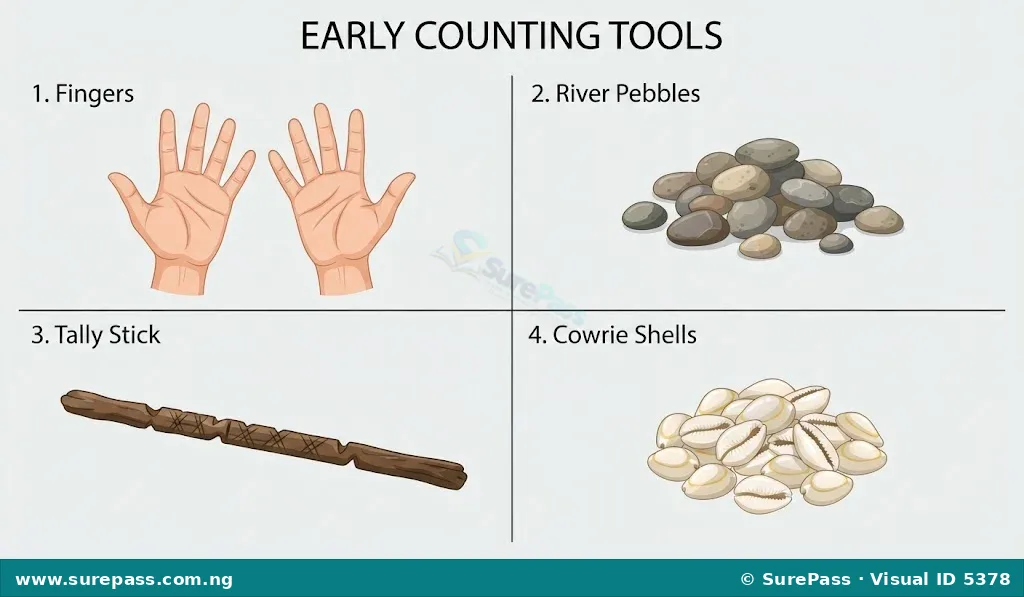
The history of early counting devices began with the human body and simple environmental objects. The most common early counting tools include:
- Fingers and Toes: The earliest and most natural counting tool. Humans used their ten fingers and ten toes to count small quantities. This practice led to the development of the base-10 (decimal) number system used globally today.
- Stones and Pebbles: For quantities larger than twenty, early humans gathered small stones or pebbles. A shepherd would match one pebble to one sheep leaving the pen. When the sheep returned, the shepherd matched each sheep back to a pebble to ensure none were lost.
- Sticks: Wooden sticks were used for counting. Early humans also made notches or cuts on sticks, known as tally sticks, to record transactions, track seasons or count days.
- Cowries: In ancient Africa, particularly in Nigeria, cowrie shells were highly valued. They were used both as a medium of exchange (money) and as tools for counting large quantities of goods.
- Grains and Seeds: Grains of corn, beans or other seeds were used to represent small units during trade and calculations.
Mechanical Counting and Calculating Devices
Mechanical counting and calculating devices are physical tools that require manual physical effort to move parts in order to perform mathematical operations.
As human societies grew, trade expanded, and the need for faster and more accurate calculations arose. Natural objects like stones and sticks became insufficient for large numbers. This led to the invention of mechanical devices. These devices did not use electricity; instead, they relied on human hands to slide beads, turn gears or move rulers.
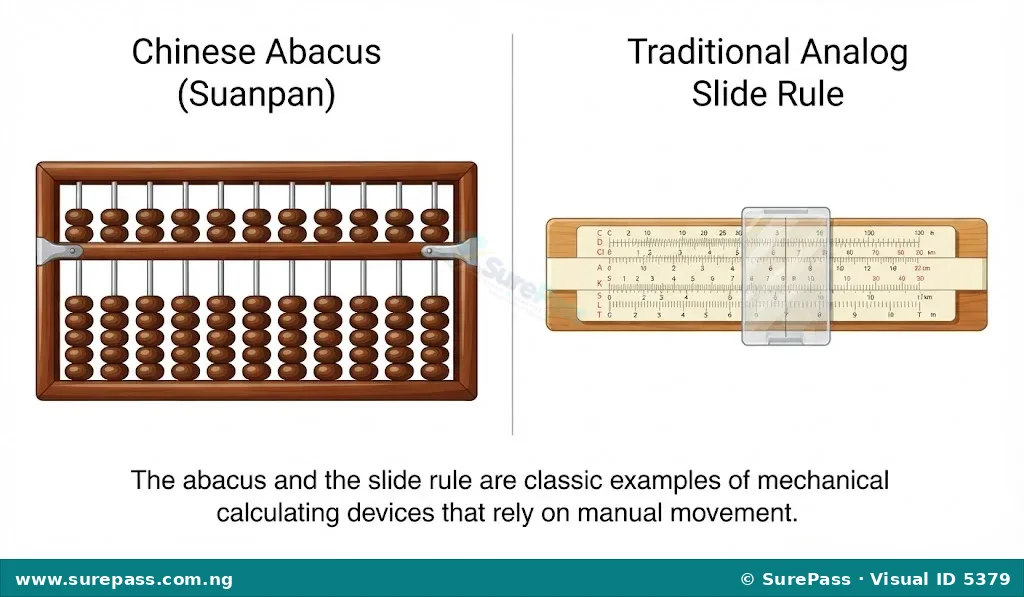
The two primary examples of mechanical devices from this era are:
- The Abacus: Invented in Asia thousands of years ago, the abacus consists of a wooden frame with parallel rods. Each rod holds sliding beads that represent units, tens, hundreds and thousands. By sliding these beads up and down, users can perform addition, subtraction, multiplication and division very quickly.
- The Slide Rule: Invented in the 17th century, the slide rule consists of sliding scales marked with logarithmic numbers. By sliding the central ruler and aligning the markings, mathematicians and engineers could perform complex multiplication, division and square root calculations without manual long division.
Differences Between Mechanical Counting and Calculating Devices
Although both types of devices are mechanical, they serve different purposes and operate differently. The differences include:
- Purpose: Mechanical counting devices are primarily used to keep track of quantities or tallies (such as counting items one by one). Mechanical calculating devices are designed to perform complex mathematical operations like multiplication, division and trigonometry.
- Complexity of Operation: Counting devices like the abacus require the user to manually count and group beads to find a total. Calculating devices like the slide rule use mathematical scales to provide instant answers to complex problems without the user counting individual units.
- User Skill: Counting devices are simple and can be used by children for basic arithmetic. Calculating devices require specialized knowledge of mathematical scales and formulas to operate.
Electro-Mechanical Counting Devices
Electro-mechanical devices are calculating machines that operate using a combination of moving mechanical parts and electrical power.
The transition from purely manual mechanical devices to modern electronic computers went through an important phase. Inventors designed machines that used gears, wheels and levers, but also incorporated electricity or automated control systems to speed up calculations. Some of these early inventions were purely mechanical but laid the direct logical foundation for electro-mechanical systems.
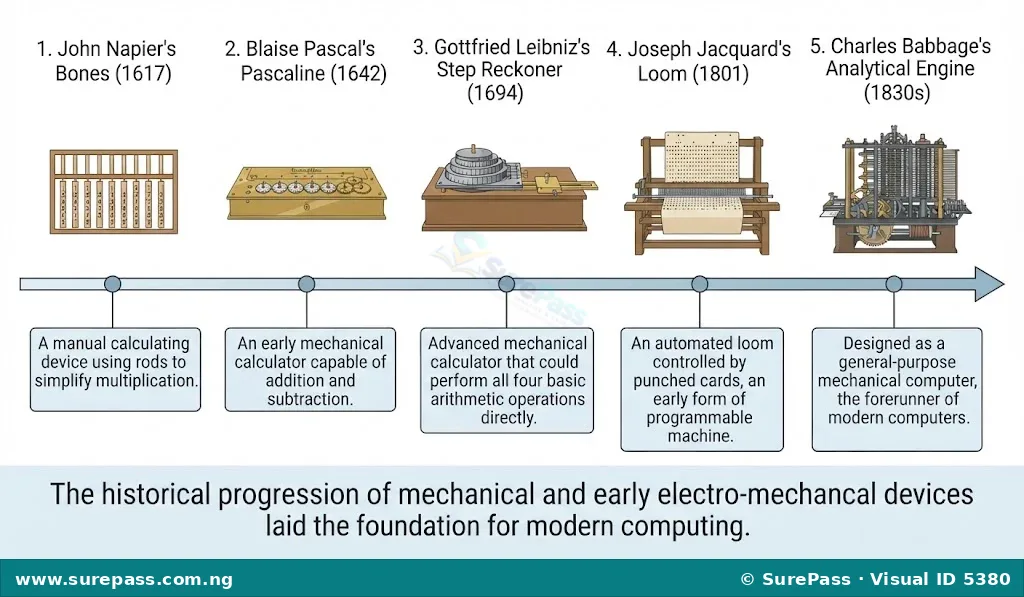
Key historical devices and inventors in this category include:
- John Napier’s Bones: Invented by John Napier in 1617, this device consisted of a set of rods carved from bone, wood or metal. Each rod was inscribed with multiplication tables. By placing these rods side-by-side, users could perform complex multiplication and division by simple addition and subtraction.
- Blaise Pascal’s Machine (The Pascaline): Invented in 1642, the Pascaline was the first mechanical calculator. It used a series of interlocking gears and wheels. When a wheel turned ten times, it moved the adjacent wheel once, representing the “carry-over” in addition. It could perform addition and subtraction.
- Gottfried Leibniz’s Machine (The Step Reckoner): Invented in 1694, this machine improved on Pascal’s design. It used a special stepped gear mechanism that allowed the machine to perform multiplication, division and find square roots automatically.
- Joseph Jacquard’s Loom: Invented in 1801, this was a mechanical weaving loom controlled by punched wooden cards. The holes in the cards determined which threads were lifted to weave patterns. This introduced the concept of using stored instructions (programming) to control a machine.
- Charles Babbage’s Analytical Machine: Designed in the 1830s, this machine is considered the first blueprint for a general-purpose computer. It was designed to have an input device, a processing unit called the “mill,” a memory unit called the “store,” and an output device. Because of this design, Charles Babbage is recognized as the “Father of the Computer.”
Electronic Counting Devices and Modern Computers
Electronic counting devices are machines that use electrical circuits and electronic components, without moving mechanical parts, to process data at high speeds.
The invention of electricity allowed scientists to replace slow, moving mechanical gears with fast electrical signals. This marked the birth of electronic computing, leading to the development of the modern computers used today.
Key milestones in electronic computing include:
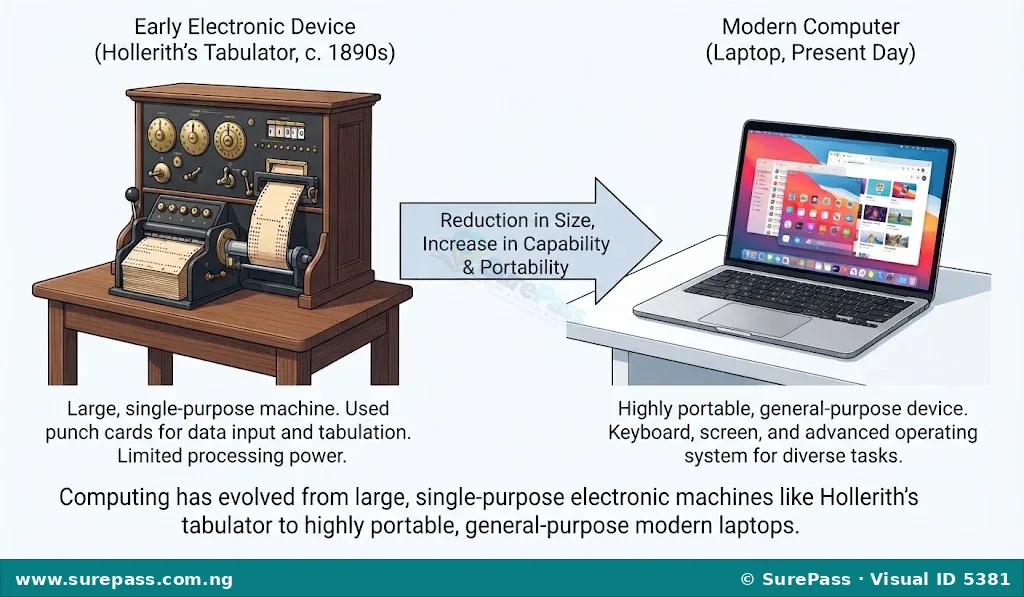
- Herman Hollerith’s Punch Cards: In 1890, Herman Hollerith invented an electro-mechanical tabulating machine that read data from cards with punched holes. This machine was used to process the United States census data in months instead of years. Hollerith’s company later merged with others to form IBM (International Business Machines).
- John Von Neumann Machine: In 1945, mathematician John Von Neumann proposed a computer design where both the program instructions and the data are stored together in the computer’s electronic memory. This design, known as the “Von Neumann Architecture,” is the standard layout used in almost all modern computers today.
- Philip Emeagwali: A world-renowned Nigerian computer scientist and mathematician. In 1989, Emeagwali designed a supercomputer computation system using 65,536 microprocessors working together at the same time. This concept, called massively parallel processing, allowed computers to perform billions of calculations per second and helped shape the development of modern high-speed internet and weather forecasting systems.
- Modern Machines: These are the digital devices used today, such as laptops, desktop computers, smartphones, tablets and smartwatches. They are small, extremely fast, consume little power and can perform billions of tasks in a single second.
Differences Between Electronic Counting Devices and Modern Computers
While electronic counting devices were the ancestors of modern computers, they differ in several ways. The differences include:
- Purpose and Flexibility: Early electronic counting devices were single-purpose machines designed to do specific tasks, such as sorting census data or solving specific mathematical equations. Modern computers are general-purpose machines that can perform thousands of different tasks, from typing documents and playing games to browsing the internet and controlling spacecraft.
- Speed and Storage: Early electronic devices had very limited memory and processed data slowly. Modern computers have massive storage capacities (gigabytes and terabytes) and process data at gigahertz speeds (billions of operations per second).
- Size and Portability: Early electronic machines were huge, often filling entire rooms. Modern computers use microprocessors, allowing them to fit into pockets, bags or onto wrists.
Generations of Computers and Their Features
Computer generations refer to the different stages of technological advancement in the development of modern computers, characterized by the primary electronic component used.
Since the mid-20th century, computers have gone through five distinct generations. Each generation is defined by a major technological breakthrough that made computers smaller, faster, cheaper, more powerful and more reliable.
First Generation (1940 – 1956): Vacuum Tubes
First-generation computers used vacuum tubes as their primary electronic components for circuitry. Vacuum tubes were glass tubes, similar to light bulbs, that controlled the flow of electricity.
The features of first-generation computers include:
- They were very large in size, often occupying entire rooms.
- They consumed a massive amount of electricity and generated extreme heat, requiring constant air conditioning.
- They were very expensive to build and maintain.
- They used magnetic drums for memory and punch cards for input.
- They relied on machine language (binary code of 0s and 1s) to perform operations.
- Examples include ENIAC (Electronic Numerical Integrator and Computer) and UNIVAC (Universal Automatic Computer).
Second Generation (1956 – 1963): Transistors
Second-generation computers replaced vacuum tubes with transistors. A transistor is a small semiconductor device used to control the flow of electricity.
The features of second-generation computers include:
- They were significantly smaller, faster and cheaper than first-generation computers.
- They consumed less power and generated much less heat.
- They used magnetic core memory instead of magnetic drums.
- They introduced assembly language and early high-level programming languages like COBOL and FORTRAN.
- They still relied on punch cards for input and printouts for output.
- An example is the IBM 1401.
Third Generation (1964 – 1971): Integrated Circuits (ICs)
Third-generation computers used Integrated Circuits (ICs). An Integrated Circuit, often called a silicon chip, combines hundreds of transistors onto a single small piece of silicon.
The features of third-generation computers include:
- They were much smaller, faster and more reliable than previous generations.
- They used keyboards for input and monitors for output instead of punch cards and printouts.
- They used operating systems, which allowed the computer to run multiple programs at the same time.
- They became available to a wider audience because they were cheaper to produce.
- An example is the IBM 360 series.
Fourth Generation (1971 – Present): Microprocessors
Fourth-generation computers use microprocessors. A microprocessor contains millions of integrated circuits built onto a single silicon chip, using Very Large Scale Integration (VLSI) technology.
The features of fourth-generation computers include:
- They are extremely small, powerful and fast.
- They led to the development of Personal Computers (PCs), laptops and handheld devices.
- They use modern input devices like the mouse, scanner and touchscreen.
- They support advanced operating systems with Graphical User Interfaces (GUI), such as Windows and macOS.
- They can be linked together to form networks, which led to the development of the internet.
- Examples include modern desktop computers, laptops, smartphones and tablets.
Fifth Generation (Present and Beyond): Artificial Intelligence (AI)
Fifth-generation computers are based on Artificial Intelligence (AI) and Ultra Large Scale Integration (ULSI) technology. These computers are designed to think, learn and make decisions like humans.
The features of fifth-generation computers include:
- They use voice recognition, allowing users to give commands by speaking.
- They can process natural human languages.
- They use parallel processing, allowing thousands of processors to work on a task at the same time.
- They are used in advanced fields like robotics, self-driving cars, medical diagnosis and expert systems.
- Examples include smart assistants (like Google Assistant and Siri), humanoid robots and supercomputers.
Summary of Computer Generations
The table below summarizes the key differences and features of the five generations of computers:
| Generation | Period | Core Technology | Key Features | Examples |
|---|---|---|---|---|
| First | 1940 – 1956 | Vacuum Tubes | Very large, generated high heat, used machine language, expensive. | ENIAC, UNIVAC |
| Second | 1956 – 1963 | Transistors | Smaller, faster, used assembly language, magnetic core memory. | IBM 1401 |
| Third | 1964 – 1971 | Integrated Circuits (ICs) | Used keyboards and monitors, ran operating systems, affordable. | IBM 360 |
| Fourth | 1971 – Present | Microprocessors | Very small, personal computers, internet access, mouse and GUI. | Laptops, Smartphones |
| Fifth | Present & Beyond | Artificial Intelligence (AI) | Voice recognition, decision making, parallel processing, robotics. | Siri, Humanoid Robots |



0 comments
Open the discussion when you need it. Comments stay collapsed until requested so the initial article remains light.