


ARTICLE CONTENTSOn this page 10 sections
Jump to what you needUse the links below to move directly to a section of this guide.
Basic Computer communication
Performance Objectives
By the end of the lesson, students should be able to:- state the meaning of computer communication;
- describe the components of computer communication
- describe the relationship of the components of computer communication
Meaning of Computer Communication
Computer communication is the exchange of data or information between two or more computer systems or digital devices through a communication medium. Communication occurs when information moves from one point to another. In computer communication, the information may be text, numbers, pictures or other forms of digital data. For the communication to take place, there must be a source from which the data is sent, a destination that receives the data and a means through which the data travels. For example, when one computer sends information to another computer through a network cable, computer communication has taken place. Communication can also occur when computers and other digital devices exchange information through a network connected to the Internet. The basic relationship involved in computer communication can be represented as: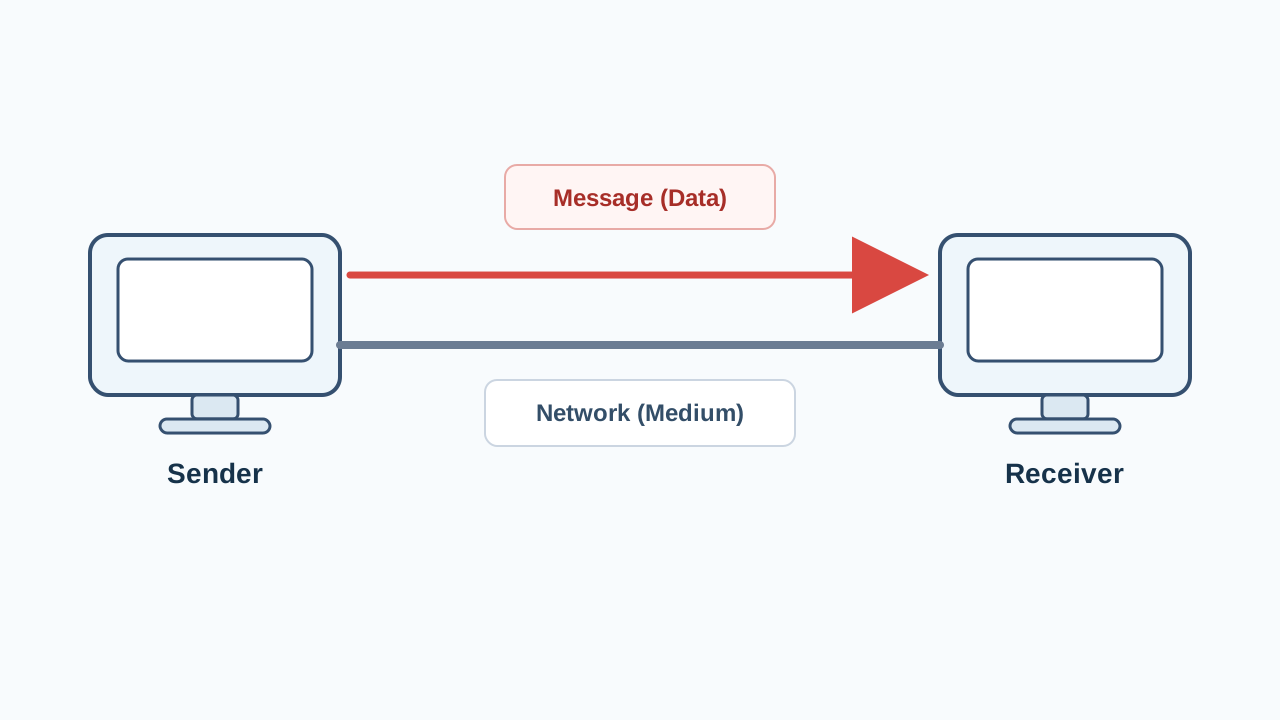
Basic Components of Computer Communication
Computer communication depends on four basic components. Each component performs a particular role in moving data from one point to another. The basic components of computer communication are:- Sender
- Receiver
- Message (data)
- Network (medium)
Sender
A sender is the computer system or digital device that starts a communication by sending data or information. The sender is the source of the message. It prepares or provides the data that needs to be transmitted and sends the data through the available network medium. For example, when a computer sends a file to another computer, the computer from which the file is sent acts as the sender. A computer system used as a sender may be connected to other devices through a network cable, a network switch or another suitable network connection.Receiver
A receiver is the computer system or digital device that receives data or information sent from another device. The receiver is the destination of the message. It accepts the data that has travelled through the communication medium. For example, when one computer receives a file sent by another computer, the computer that accepts the file acts as the receiver. The terms sender and receiver describe the roles of the devices during a particular communication. A device that receives information in one communication may send information in another communication.Message (Data)
A message is the data or information that is sent from the sender to the receiver. The message is the actual content being communicated. In a computer system, data can take different familiar forms. Examples of data that may form a message include:- Text
- Numbers
- Pictures
- Files containing digital information
Network (Medium)
A network medium is the path or means through which data travels from a sender to a receiver. The network medium connects the communicating devices and provides a route for the message. A network cable is one familiar example of a medium used to connect computer systems. A network switch can also be found in a computer network. It provides connection points through which several computers can be connected as part of the same network. The communication itself still requires a path through which the data can travel. Internet access may also allow connected computer systems to exchange information over a network beyond a single local group of connected computers. Observe the computer communication equipment below.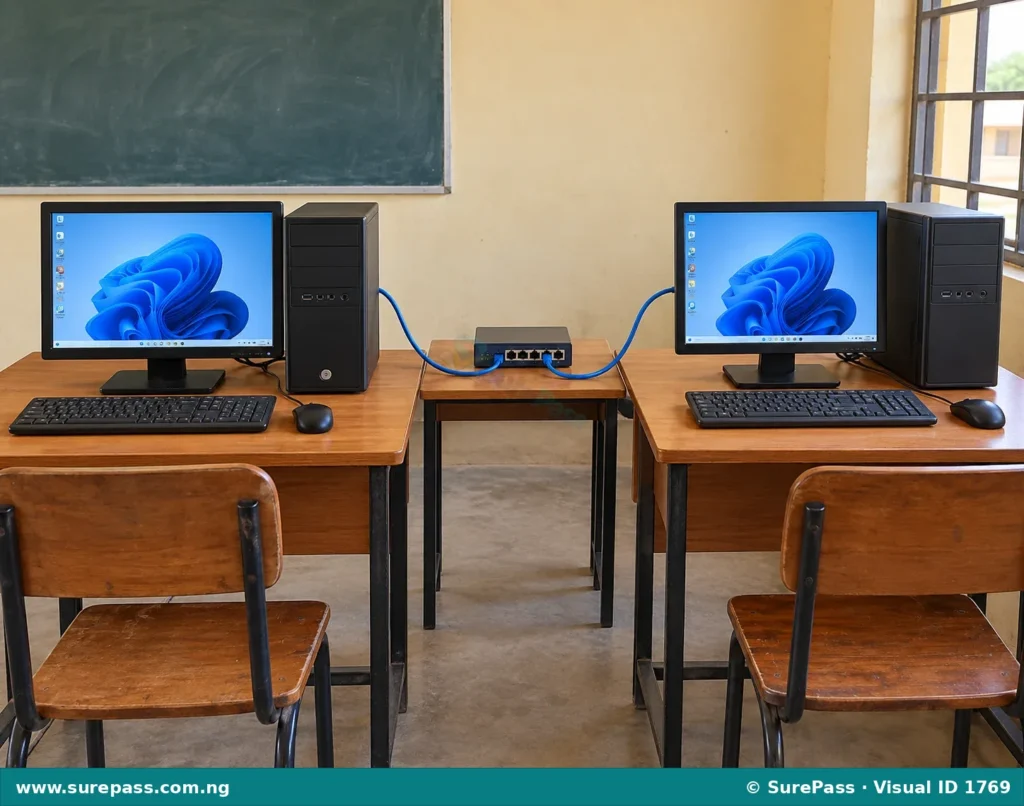
Relationship among the Components of Computer Communication
The four components work together during computer communication. None of the four terms describes the complete communication process on its own. The relationship begins with the sender. The sender has a message or data to transmit. The message travels through a network medium. The receiver accepts the transmitted message. The basic sequence is:- The sender provides or starts the message.
- The message enters the network medium.
- The network medium carries the message towards its destination.
- The receiver accepts the message.
Identifying the Components in a Communication Situation
The components of computer communication can be identified by examining the role played by each part of a communication situation. The main identification questions are:- Which computer or device sends the information?
- Which computer or device receives the information?
- What information is being sent?
- Through what connection does the information travel?
Example: Sending a File between Two Computers
Computer A and Computer B are connected through a network cable. Computer A sends a school timetable file to Computer B. The components in this communication are:- Sender: Computer A
- Receiver: Computer B
- Message: The school timetable file
- Network medium: The network connection through which the file travels
Example: Receiving a Picture through a Network
A computer in a school computer room receives a picture sent from another connected computer. The components in this communication are:- Sender: The computer that sends the picture
- Receiver: The computer that receives the picture
- Message: The picture
- Network medium: The connection carrying the picture between the computers
Direction of Communication
The direction of communication shows the movement of a message from the sender towards the receiver. In a simple communication situation, an arrow can be used in a diagram to show this movement. The arrow begins from the sender and points towards the receiver through the network medium. Look at the diagram below.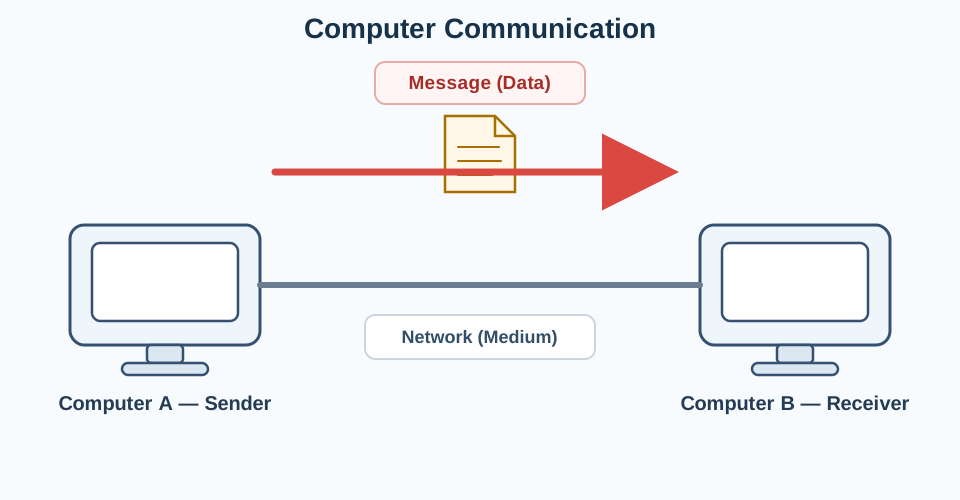
Computer Communication in a Simple Network
A simple computer network can contain several computer systems connected so that data can pass between them. A network switch and network cables may be used to provide connections among the computer systems. When one connected computer sends information to another, the sender, message, medium and receiver can still be identified. The presence of several connected computers does not change the basic relationship among these four components. For example, three computers may be connected to a network switch. If the first computer sends a file to the third computer, the first computer is the sender and the third computer is the receiver. The file is the message, while the network connection provides the medium through which the file travels. Observe the simple network below.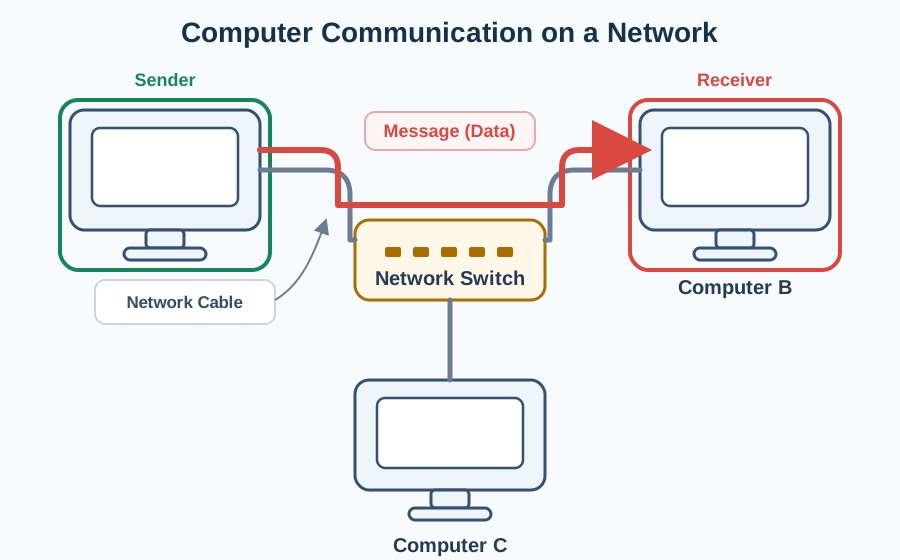
Describing a Computer Communication Process
A clear description of computer communication should identify all the required components and explain how they relate to one another. A suitable description can follow these steps:- Identify the device that begins the communication as the sender.
- State the data or information being transmitted as the message.
- Identify the network connection through which the message travels as the medium.
- Identify the device that accepts the message as the receiver.
- Describe the movement of the message from the sender through the medium to the receiver.
Worked Communication Situations
Situation One
A computer sends a text document to another computer through a network connection. The components are:- Sender: The computer sending the document
- Receiver: The computer receiving the document
- Message: The text document
- Network medium: The network connection carrying the document
Situation Two
Computer B sends a picture to Computer C through a network connected by cables and a switch. The components are:- Sender: Computer B
- Receiver: Computer C
- Message: The picture
- Network medium: The network connection linking the computers
Situation Three
A computer connected to the Internet sends digital information to another connected computer. The components are:- Sender: The computer transmitting the information
- Receiver: The computer accepting the information
- Message: The digital information being transmitted
- Network medium: The network connection through which the information travels



0 comments
Open the discussion when you need it. Comments stay collapsed until requested so the initial article remains light.