




ARTICLE CONTENTSOn this page 9 sections
Variables in Programming
Performance Objectives
By the end of the lesson, students should be able to:
- describe variables in programming;
- name variables;
- state the data types in coding;
- state the types of variables in coding;
- predict the outcome of a simple sequence that includes variables;
- trace the values of variables within a sequence;
- perform arithmetic operations on variables;
- identify increment decrement operator in a program.
Meaning of Variables
A variable is a named storage location in a computer’s memory used to hold data that can change during the execution of a program.
To understand variables, imagine a physical storage box. The box has a label written on the outside, which is the name of the variable. Inside the box, a single item or value is stored. If a new item is placed into the box, the old item is removed. In programming, the computer sets aside a small space in its memory to hold a value, and the programmer gives this space a specific name to easily find and change the value later.
Variables are essential in programming because they allow programs to be dynamic. Instead of using fixed values, a program can use variables to handle different information every time it runs. For example, a game program uses a variable to keep track of a player’s score, which increases as the player performs tasks.
Rules for Naming Variables
When creating variables in programming, certain guidelines must be followed to ensure the computer understands the code and other programmers can read it easily.
The standard rules for naming variables in programming include:
- Start with a letter or underscore: Variable names must begin with an alphabetic letter or an underscore character. They cannot begin with a number.
- No spaces allowed: Variable names must be a single continuous word. If a name contains multiple words, they can be joined using an underscore or camelCase.
- Use meaningful names: Names should describe the data being stored, making the program easier to understand.
- Do not use reserved keywords: Words that already have special meanings in the programming language, such as “if”, “repeat”, or “stop”, cannot be used as variable names.
- Avoid special characters: Symbols such as punctuation marks, brackets, or mathematical operators cannot be used within a variable name.
The table below shows examples of correct and incorrect variable names based on these rules:
| Proposed Name | Status | Reason |
|---|---|---|
| player_score | Correct | Uses an underscore instead of a space. |
| playerScore | Correct | Uses camelCase to separate words. |
| 2nd_player | Incorrect | Starts with a number. |
| player score | Incorrect | Contains a space. |
| total$ | Incorrect | Contains a special character ($). |
Data Types in Coding
A data type is a classification that specifies what kind of value a variable can hold and what operations can be performed on it.
Computers process different kinds of information, such as numbers, words, and logical decisions. Specifying the data type helps the computer allocate the correct amount of memory and prevent errors during calculations.
The primary data types used in programming include:
- Integer: This data type represents whole numbers without any fractional or decimal parts. Examples include 15, -7, and 0.
- Float or Real: This data type represents numbers that contain decimal points. Examples include 3.14, -0.5, and 98.6.
- String: This data type represents text. It consists of a sequence of characters, letters, numbers, or symbols enclosed in quotation marks. Examples include “game_over”, “Player 1”, and “1234”.
- Boolean: This data type represents logical values that can only be either True or False. It is used to make decisions in programs.
Types of Variables in Block Coding
In block-based programming environments, such as Scratch, variables are classified based on where they can be accessed and modified within the program.
The two main types of variables in block coding are:
- Global Variables: These are variables that can be accessed and changed by any sprite or script within the entire project.
- Local Variables: These are variables that can only be accessed and changed by the specific sprite or script in which they were created.
A global variable is useful for sharing information across different parts of a program, such as a game score that affects multiple characters. A local variable is useful for tasks confined to a single character, such as tracking the speed of one specific moving object.
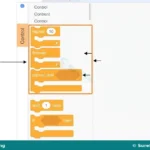
Observe the image below to see how these options are selected during variable creation in Scratch.
Operators in Programming
Operators are special symbols or blocks used to perform calculations, assign values, or modify variables within a program.
Arithmetic Operators
An arithmetic operator is a mathematical symbol used to perform calculations on numbers.
The standard arithmetic operators used in programming include:
- Addition (+): Adds two values together. For example, 5 + 3 results in 8.
- Subtraction (-): Subtracts one value from another. For example, 10 – 4 results in 6.
- Multiplication (*): Multiplies two values. The asterisk symbol is used instead of the traditional multiplication sign. For example, 4 * 3 results in 12.
- Division (/): Divides one value by another. The forward slash is used instead of the traditional division sign. For example, 20 / 5 results in 4.
Assignment Operators
An assignment operator is a symbol or block used to store a specific value inside a variable.
In text-based programming languages, the equals sign (=) is commonly used as the assignment operator. In block-based programming languages like Scratch, assignment is performed using a specific block, such as “set variable to value”. This operation overwrites any previous value stored in the variable with the new value.
Increment and Decrement Operators
An increment operator is an instruction that increases the value of a variable by a specific amount.
A decrement operator is an instruction that decreases the value of a variable by a specific amount.
In text-based programming, shorthand symbols like “++” (increment by 1) and “–” (decrement by 1) are often used. In block-based programming, the “change variable by value” block is used. To increment, a positive number is placed in the block. To decrement, a negative number is placed in the block.
Predicting Outcomes and Tracing Variables
Tracing is the process of manually stepping through a sequence of instructions to track how the values of variables change at each step.
This skill helps programmers find errors in their logic and predict exactly what a program will do before running it on a computer.
Consider the following sequence of instructions:
- Set
scoreto 10 - Set
bonusto 5 - Set
totaltoscore+bonus - Change
totalby 2 - Change
scoreby -3
To trace this sequence, a table can be constructed to record the value of each variable after each instruction is executed:
| Step | Instruction | Value of score |
Value of bonus |
Value of total |
|---|---|---|---|---|
| 1 | Set score to 10 |
10 | Undefined | Undefined |
| 2 | Set bonus to 5 |
10 | 5 | Undefined |
| 3 | Set total to score + bonus |
10 | 5 | 15 |
| 4 | Change total by 2 |
10 | 5 | 17 |
| 5 | Change score by -3 |
7 | 5 | 17 |
By tracing the sequence, the final values of the variables are predicted as: score is 7, bonus is 5, and total is 17.
How to Perform Arithmetic Operations in Block Coding
This practical activity demonstrates how to create a simple program in Scratch 3.0 that uses variables and arithmetic operators to perform calculations.
The required materials are:
- A computer or tablet with Scratch 3.0 installed or accessed online.
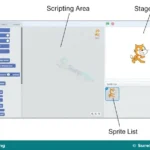
- An active Scratch workspace.
The procedure involves the following steps:
- Open the Scratch 3.0 application or website.
- Navigate to the Variables category in the block palette on the left side of the screen.
- Click on the Make a Variable button.
- Type the name
number1in the dialog box, select For all sprites, and click OK. - Repeat the process to create two more variables named
number2andsum_result. - Navigate to the Events category and drag the
when green flag clickedblock into the workspace. - Go back to the Variables category and drag two
set variable to 0blocks, placing them directly under the event block. - Change the dropdown of the first set block to
number1and type12in the value input. - Change the dropdown of the second set block to
number2and type8in the value input. - Drag a third
set variable to 0block and snap it below the others, changing its dropdown tosum_result. - Navigate to the Operators category and drag the green addition block
( ) + ( ). - Go to the Variables category, drag the rounded
number1variable block, and drop it into the first empty slot of the addition block. - Drag the rounded
number2variable block and drop it into the second empty slot of the addition block. - Insert the combined addition block into the value slot of the
set sum_result toblock. - Click the green flag above the stage to run the program.
- Observe the stage monitor to verify that
sum_resultdisplays the value20.


0 comments
Open the discussion when you need it. Comments stay collapsed until requested so the initial article remains light.