


ARTICLE CONTENTSOn this page 9 sections
Loops in Programming
Performance Objectives
By the end of the lesson, students should be able to:
- define iteration;
- describe the need for iteration;
- identify where count-controlled iteration can be used in a program;
- implement count-controlled iteration in a program;
- use loops to execute a block of code repetitively, based on a condition.
Meaning of Iteration
Iteration is the process of repeating a step or a set of instructions in a computer program.
In everyday life, many activities require repetition to achieve a goal. For example, when sweeping a classroom, a student repeats the motion of the broom until the floor is clean. When washing plates, a person repeats the washing process for each plate until all plates are clean. In computer programming, iteration allows a computer to perform similar repetitive tasks quickly and accurately without needing separate instructions for every single repetition.
The Need for Iteration
Writing programs without iteration can make the code extremely long, difficult to read, and prone to errors. Iteration is necessary in programming for several reasons.
The main reasons for using iteration in programming include:
- Reducing Code Length: Instead of writing the same line of code fifty times, a programmer can write it once inside an iteration structure and instruct the computer to repeat it fifty times.
- Saving Time and Effort: Writing fewer lines of code allows programmers to build software much faster.
- Preventing Errors: Copying and pasting the same code multiple times increases the chance of making mistakes. Iteration keeps the code clean and easy to correct.
- Handling Dynamic Data: Iteration allows a program to process lists of items where the exact number of items might change, such as a list of students in a class database.
Meaning and Benefits of Loops
A loop is a programming structure that repeats a block of code as long as a specified condition is met or for a set number of times.
While iteration is the general concept of repeating instructions, a loop is the actual tool or structure used in a programming language to make iteration happen. When a computer enters a loop, it executes the instructions inside the loop, checks if it needs to run them again, and continues this cycle until it is told to stop.
The benefits of using loops in programming include:
- Code Reusability: A single block of code can be reused multiple times throughout the execution of a program.
- Memory Efficiency: Programs with loops take up less storage space because they contain fewer lines of instructions.
- Ease of Maintenance: If a change needs to be made to a repetitive task, the programmer only needs to update the code inside the loop once, rather than updating multiple separate lines.
- Better Control: Loops allow programs to run continuously, such as keeping a video game running until the player decides to quit.
Types of Loops
Programming languages provide different types of loops to handle different repetitive situations. The three main types of loops are the While loop, the For loop, and the Nested loop.
1. The For Loop (Count-Controlled Iteration)
A For loop is a loop that repeats a block of code a specific, predetermined number of times.
This type of loop is also known as a count-controlled loop because the program knows exactly how many times the loop will run before the repetition starts. For example, if a program needs to print the numbers from 1 to 10, or draw a shape with a fixed number of sides, a For loop is the most appropriate tool.
2. The While Loop (Condition-Controlled Iteration)
A While loop is a loop that repeats a block of code as long as a specific condition remains true.
This type of loop is also known as a condition-controlled loop because the number of repetitions is not fixed beforehand. Instead, the loop keeps running until the condition changes to false. For example, a game program might use a While loop to keep the game running “while the player has more than zero lives.” The moment the lives reach zero, the condition becomes false, and the loop stops.
3. The Nested Loop
A nested loop is a loop that is placed inside another loop.
In a nested loop, the inner loop completes all of its iterations for every single iteration of the outer loop. A real-world example of a nested loop is the movement of hands on an analogue clock. The minute hand must complete sixty movements (the inner loop) for every single movement of the hour hand (the outer loop).
Identifying and Implementing Count-Controlled Iteration
Count-controlled iteration is used when the exact number of repetitions is known before the loop begins. Identifying these situations helps programmers choose the correct loop structure.
Common situations where count-controlled iteration is used include:
- Drawing Geometric Shapes: Drawing a square requires repeating the action of drawing a line and turning ninety degrees exactly four times. Drawing an octagon requires repeating the action eight times.
- Counting and Calculations: Displaying a multiplication table from 1 to 12 requires twelve steps of calculation.
- Processing Fixed Lists: Sending a notification to a list of ten registered students requires exactly ten repetitions.
To implement count-controlled iteration, programmers use a loop counter. The counter starts at a initial value, increases by a set number after each repetition, and stops when it reaches the target limit.
How to Implement Loops in Scratch 3.0
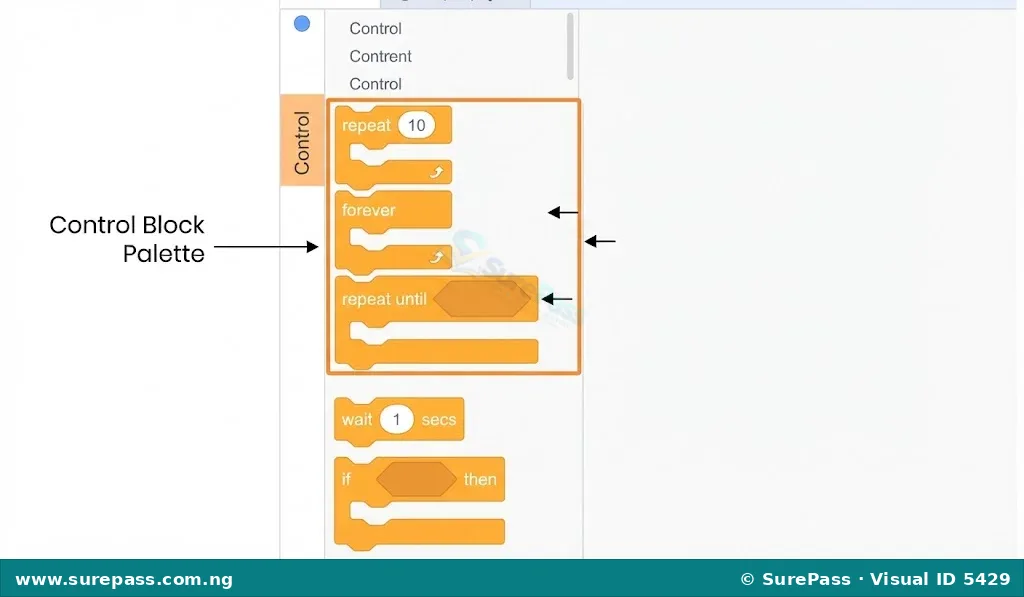
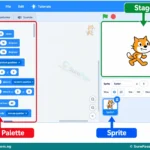
Scratch 3.0 is a block-based programming language that makes it easy to understand and implement loops. In Scratch, loops are found under the “Control” category and are represented by C-shaped blocks that wrap around other blocks.
How to Create a Program that Draws a Square
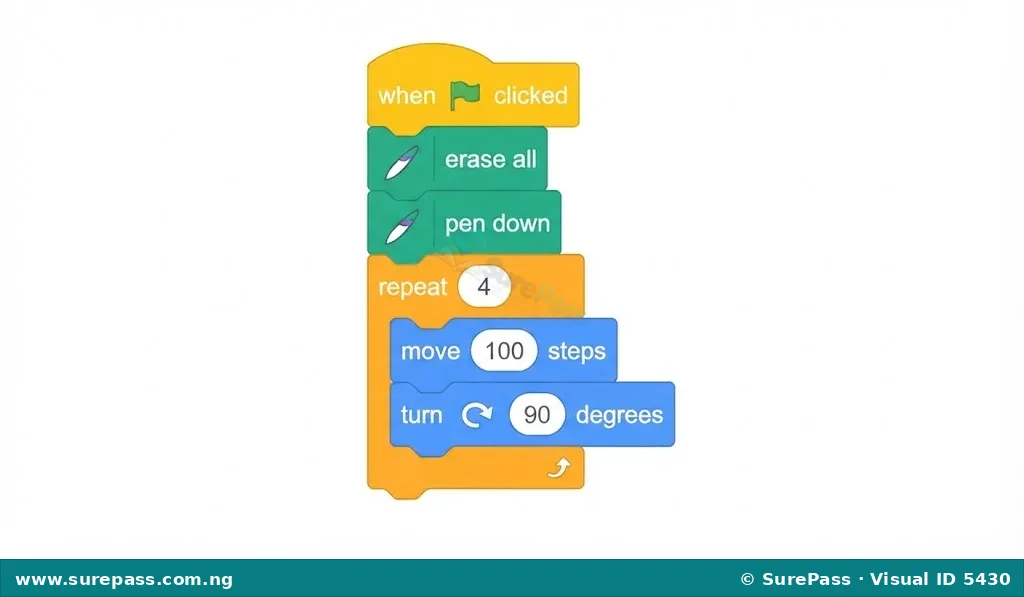
Drawing a square is a classic example of count-controlled iteration. A square has four equal sides and four ninety-degree angles. The program must repeat the actions of moving forward and turning ninety degrees exactly four times.
The required materials for this activity are:
- A computer or tablet with Scratch 3.0 installed or accessed online.
- The Pen extension added to the Scratch project.
The procedure involves the following steps:
- Open Scratch 3.0 on the digital device.
- Click on the “Add Extension” button at the bottom-left corner of the screen and select the “Pen” extension.
- Drag a “when green flag clicked” block from the Events category to the workspace.
- Drag an “erase all” block and a “pen down” block from the Pen category and place them under the event block.
- Go to the Control category, select the “repeat 10” block, and drag it to the workspace.
- Change the number inside the repeat block from “10” to “4” to set up the count-controlled loop.
- Inside the “repeat 4” block, insert a “move 100 steps” block from the Motion category.
- Directly below the move block, still inside the loop, insert a “turn right 90 degrees” block from the Motion category.
- Click the green flag above the stage to run the program and observe the sprite drawing a square.
How to Use Loops Based on a Condition
Condition-controlled iteration in Scratch is implemented using the “repeat until” block. This block keeps repeating the code inside it until a specific condition becomes true.
The procedure to create a condition-controlled program involves the following steps:
- Drag a “when green flag clicked” block to the workspace.
- Drag a “go to x: -150 y: 0” block from the Motion category to position the sprite on the left side of the stage.
- Go to the Control category and drag a “repeat until” block to the workspace, placing it under the motion block.
- Go to the Sensing category, select the “touching mouse-pointer?” block, drag it into the hexagonal input area of the “repeat until” block, and change “mouse-pointer” to “edge”.
- Inside the “repeat until touching edge” loop, insert a “move 10 steps” block from the Motion category.
- Click the green flag to run the program. Observe that the sprite moves continuously across the stage and stops immediately when it touches the edge of the screen.
Summary of Loop Types
To help choose the right loop for a program, the table below compares the characteristics of the loop types discussed.
| Loop Type | Control Method | When to Use | Scratch Block Example |
|---|---|---|---|
| For Loop | Count-controlled | When the exact number of repetitions is known beforehand. | “repeat [number]” block |
| While Loop | Condition-controlled | When repetition depends on a condition that can change. | “repeat until [condition]” block |
| Nested Loop | Combined control | When a repetitive task needs to occur inside another repetitive task. | A “repeat” block placed inside another “repeat” block |
0 comments
Open the discussion when you need it. Comments stay collapsed until requested so the initial article remains light.