


ARTICLE CONTENTSOn this page 7 sections
Basic Computer Hardware Components I
Performance Objectives
By the end of the lesson, students should be able to:
- Identify the internal hardware components of a computer.
Introduction to Internal Hardware Components
Internal hardware components are the physical parts of a computer that are located inside the system unit or computer case.
Unlike external components such as the monitor, keyboard and mouse, internal components are not immediately visible from the outside. These parts work together to power the computer, process data, store information and run software programs. To see these components, the outer casing of a desktop system unit or a laptop must be opened or disassembled.
The Central Processing Unit (CPU)
The Central Processing Unit is the primary component of a computer that acts as its brain by performing calculations, processing data and executing instructions.
The CPU is responsible for carrying out all the commands given to a computer by its software and users. Whenever a key is pressed, a mouse is clicked, or a program is opened, the CPU processes those actions. It is a small, square silicon chip that is mounted directly onto the motherboard, which is the main circuit board of the computer.
Because the CPU works very hard and generates a lot of heat, it is always covered by a metal cooling device called a heat sink, which often has a cooling fan attached to it to keep the processor cool.
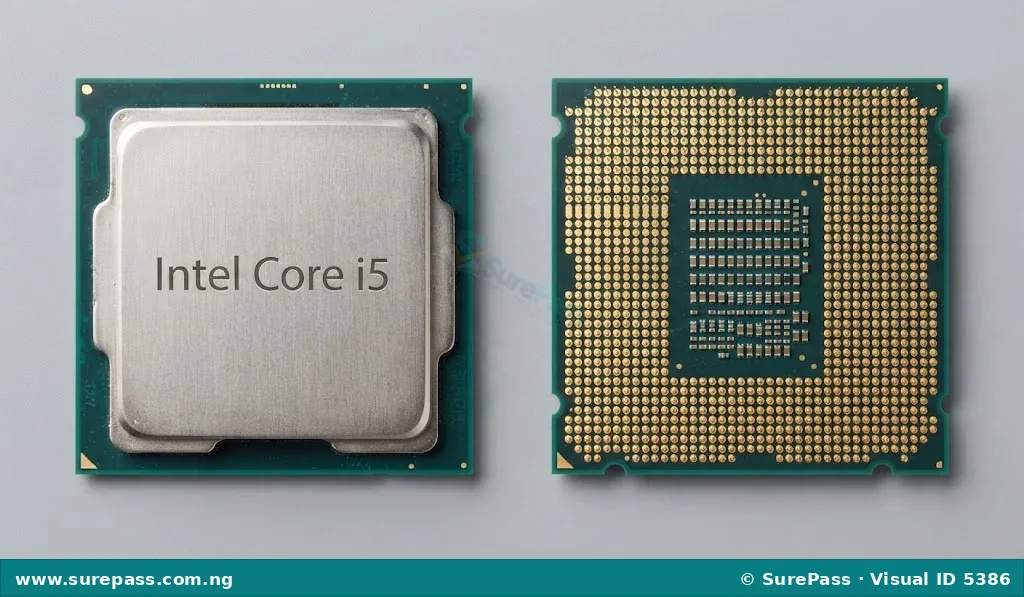
CPUs are manufactured by different companies and come in various models. A very common example of a modern CPU is the Intel Core i5. This processor is widely used in desktop and laptop computers found in schools, homes and offices. It provides a balance of speed and efficiency, making it suitable for tasks such as word processing, web browsing, playing educational games and running multimedia applications.
Observe the image below to see what a typical CPU looks like when removed from the computer.
Computer Memory
Computer memory is the internal workspace where a computer keeps data and instructions that are currently being used or processed.
Memory allows the CPU to access active information quickly. Without memory, the processor would not have a place to hold the instructions it needs to run programs. In computer hardware, there are different types of memory, each serving a specific purpose.
Random Access Memory (RAM)
Random Access Memory is a temporary workspace that holds data and instructions while the computer is turned on and actively running programs.
RAM is volatile memory. This means that any information stored in RAM is completely lost when the computer is turned off or restarted. RAM can be compared to a student’s study desk. When the student is studying, books and notebooks are placed on the desk for quick access. When the study session is over and the desk is cleared, nothing remains on the desk. A computer with more RAM can handle more tasks at the same time without slowing down.
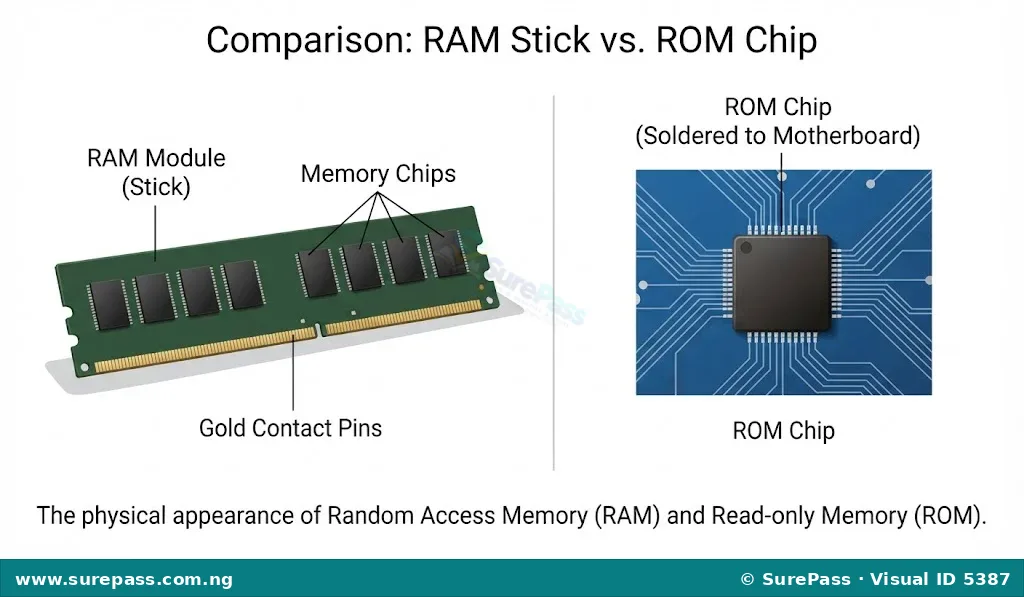
Physically, RAM consists of small, rectangular green circuit boards called memory modules or RAM sticks. These sticks are inserted into special slots on the motherboard.
Read-only Memory (ROM)
Read-only Memory is a permanent memory chip that contains essential instructions needed to start up the computer.
ROM is non-volatile memory. This means that the information stored on a ROM chip is permanent and is not lost when the computer is turned off. The data on ROM is written during manufacture and cannot be easily changed or deleted by the computer user. ROM contains the basic input/output system instructions that tell the computer how to load the operating system from the storage drive when the power button is pressed.
Physically, ROM is a small chip that is permanently soldered onto the motherboard.
Flash Memory
Flash memory is a type of non-volatile computer memory that can be electrically erased and reprogrammed.
Flash memory combines the best features of RAM and ROM. Like ROM, it keeps its data even when the power is turned off. Like RAM, the data on it can be written, erased and updated. Flash memory is used in many modern devices because it has no moving parts, making it fast and durable.
Common examples of devices that use flash memory include:
- USB flash drives (commonly called memory sticks or thumb drives)
- Memory cards used in digital cameras and mobile phones
- Solid-State Drives (SSDs) used inside modern computers
Look at the diagram below to identify the physical appearance of RAM and ROM components.
Differentiating Between Memory and Storage Devices
Storage devices are hardware components used to save and keep data, files and programs permanently, even when the computer is turned off.
It is common for beginners to confuse computer memory with computer storage. While both are used to hold data, they serve very different purposes in a computer system. Memory (specifically RAM) is the temporary, high-speed workspace used by the CPU, while storage (such as a Hard Disk Drive or Solid-State Drive) is the permanent filing cabinet where files are kept for future use.
The main differences between memory and storage devices are shown in the table below:
| Feature | Memory (RAM) | Storage Devices (Hard Drive / SSD) |
|---|---|---|
| Permanence | Temporary (Volatile). Data is lost when the computer is turned off. | Permanent (Non-volatile). Data remains saved even when the computer is turned off. |
| Speed | Extremely fast. The CPU can access data in RAM almost instantly. | Slower than RAM, though modern SSDs are faster than older hard drives. |
| Capacity | Smaller capacity (typically 4 Gigabytes to 16 Gigabytes in standard computers). | Much larger capacity (typically 256 Gigabytes to 2 Terabytes or more). |
| Purpose | Holds active programs and files that are currently open and in use. | Stores the operating system, software programs, documents, photos and music. |
| Analogy | A study desk where active work is placed. | A bookshelf or filing cabinet where books are stored when not in use. |
Summary of Internal Hardware Identification
When a computer is opened, the key internal hardware components can be identified by their unique features:
- The CPU is a small square chip located under a cooling fan and heat sink.
- The RAM consists of long, narrow green sticks slotted into the motherboard.
- The ROM is a small, permanent chip soldered directly onto the motherboard.
- The Hard Drive or Solid-State Drive is a larger, rectangular metal box connected to the motherboard by cables.



0 comments
Open the discussion when you need it. Comments stay collapsed until requested so the initial article remains light.