


ARTICLE CONTENTSOn this page 9 sections
Artificial Intelligence (AI)
Performance Objectives
By the end of the lesson, students should be able to:
- distinguish between AI and human intelligence.
- state the branches of AI.
- explain the meaning of Machine learning.
- list the machine learning applications.
- apply machine learning application in projects.
Meaning of Artificial Intelligence and Human Intelligence
Artificial Intelligence is the ability of a computer or a machine to perform tasks that normally require human intelligence, such as learning, reasoning, problem-solving and decision-making.
Computers are traditionally programmed to follow strict, step-by-step instructions. Artificial Intelligence allows computers to analyze data, recognize patterns and make decisions independently without being given every single instruction beforehand.
Human Intelligence is the mental capability of humans to learn from experience, adapt to new situations, understand complex ideas, solve problems and apply knowledge to manipulate the environment.
Human intelligence is natural and biological. It is driven by the human brain, which contains billions of interconnected cells called neurons. This intelligence allows humans to feel emotions, understand social contexts and create original works of art, music and literature.
Differences between Artificial Intelligence and Human Intelligence
While both human intelligence and artificial intelligence are used to process information and solve problems, they differ significantly in their origin, operation and capabilities.
The main differences between artificial intelligence and human intelligence are structured in the table below:
| Feature | Human Intelligence | Artificial Intelligence |
|---|---|---|
| Origin | Biological and natural, created through the human brain. | Man-made and digital, created using computer hardware and software. |
| Learning Method | Learns from personal experiences, mistakes, senses and formal education. | Learns from massive amounts of digital data and pre-programmed algorithms. |
| Processing Speed | Relatively slower when performing complex mathematical calculations. | Extremely fast, capable of processing millions of calculations per second. |
| Adaptability | Highly adaptable to completely new, unexpected situations. | Limited to the data it has been trained on; struggles with unfamiliar tasks. |
| Emotion and Empathy | Possesses emotions, feelings, self-awareness and moral values. | Lacks emotions, consciousness, feelings and genuine empathy. |
| Energy Consumption | Highly efficient, requiring only food and rest to function. | Requires continuous electrical power and cooling systems. |
Uses of Artificial Intelligence
Artificial Intelligence is used across various sectors to improve efficiency, accuracy and speed. Common uses of Artificial Intelligence include:
- Healthcare: AI systems assist doctors in diagnosing diseases, analyzing medical scans and discovering new medicines.
- Education: AI-powered educational platforms provide personalized learning paths, grade assignments automatically and tutor students in specific subjects.
- Transportation: Self-driving vehicles use AI to navigate roads safely, while traffic management systems use AI to reduce congestion in major cities.
- Entertainment: Video streaming platforms and music applications use AI algorithms to recommend movies and songs based on user preferences.
- Agriculture: AI systems analyze soil quality, predict weather patterns and detect crop diseases from camera images to help farmers improve crop yields.
- Finance: Banks use AI to detect fraudulent transactions, manage investment portfolios and provide automated customer service.
Branches of Artificial Intelligence
Artificial Intelligence is a broad field of study. It is divided into different branches, each focusing on specific capabilities and technologies.
The three major branches of Artificial Intelligence are:
- Machine Learning (ML): This branch focuses on developing algorithms that allow computers to learn from data and make predictions or decisions without being explicitly programmed.
- Natural Language Processing (NLP): This branch enables computers to understand, interpret, translate and generate human languages, allowing humans to interact with machines using natural speech or text.
- Deep Learning (DL): This is a specialized sub-branch of machine learning that uses multi-layered artificial neural networks, modeled after the human brain, to solve highly complex problems like facial recognition and autonomous driving.
Meaning of Machine Learning
Machine Learning is a branch of artificial intelligence that allows computer systems to learn from data and improve their performance over time without being explicitly programmed for every task.
Instead of writing specific code for every possible scenario, a programmer feeds a machine learning algorithm a large dataset. The algorithm analyzes this data, identifies patterns and builds a mathematical model. The computer then uses this model to make predictions or decisions on new, unseen data.
Machine Learning Applications and Operating Logic
Machine learning powers many modern applications. Two of the most common applications are image processing and voice processing.
Image Processing
Image processing is a machine learning application that involves analyzing, manipulating and extracting useful information from digital images or videos.
The background operating logic of image processing involves the following steps:
- Image Input: The system receives a digital image through a camera or a file upload.
- Pre-processing: The image is cleaned, resized and converted into a grid of numbers representing pixels, colours and brightness levels.
- Feature Extraction: The machine learning model scans the pixels to detect basic features such as edges, lines, shapes and textures.
- Pattern Matching: The extracted features are compared against thousands of pre-trained images stored in the system database.
- Classification and Output: The system identifies the object with a high level of probability and outputs the result, such as labeling an image as a traffic sign or a human face.
Voice Processing
Voice processing is a machine learning application that enables computer systems to receive, analyze, interpret and translate spoken human language into digital commands or text.
The background operating logic of voice processing involves the following steps:
- Sound Input: A microphone captures the spoken words and records them as analog sound waves.
- Analog-to-Digital Conversion: The analog sound waves are converted into digital audio signals that a computer can read.
- Acoustic Analysis: The system filters out background noise and breaks the digital audio into tiny sound segments called phonemes.
- Language Modeling: The machine learning model analyzes the sequence of phonemes, compares them with a digital dictionary and predicts the words being spoken based on grammar and context.
- Output Generation: The system converts the predicted words into written text on a screen or executes a specific digital command, such as playing a song or turning off a smart light.
Practical Projects
This section provides step-by-step guides for applying machine learning concepts in real-world projects using Scratch 3.0 software with AI extensions.
How to Create an Interactive Chatbot in Scratch 3.0
An interactive chatbot is a computer program designed to simulate conversation with human users. This project uses Natural Language Processing concepts to make a sprite respond to typed questions.
The required materials are:
- A computer with Scratch 3.0 installed.
- An active internet connection.
- The Scratch “Text to Speech” and “Translate” extensions.
The procedure involves the following steps:
- Open the Scratch 3.0 software on the computer.
- Click on the “Add Extension” button located at the bottom-left corner of the screen.
- Select the “Text to Speech” extension to add voice synthesis blocks to the project.
- Create a new sprite to act as the chatbot assistant.
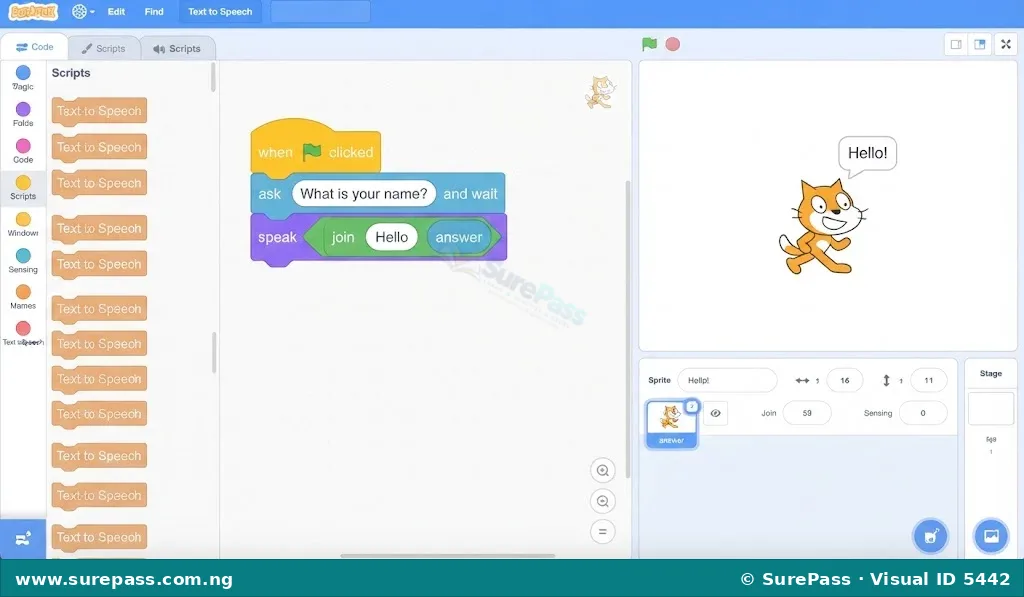
- Drag a “when green flag clicked” block from the Events category into the workspace.
- Add an “ask [What is your name?] and wait” block from the Sensing category.
- Drag a “speak [Hello]” block from the Text to Speech category, and place a “join [Hello ] [answer]” block inside it to make the sprite greet the user by name.
- Add a “forever” loop containing an “ask [How can I help you today?] and wait” block.
- Inside the loop, use “if-then” blocks to check the user’s input. For example, if the answer contains “weather”, program the sprite to speak: “The weather is sunny and warm.”
- Test the chatbot by clicking the green flag and typing different questions.
How to Build a Traffic Sign Interpreter System
This project applies image processing to recognize and interpret road traffic signs, such as “Stop” and “No Entry”. It simulates how self-driving cars read road signs.
The required materials are:
- A computer with Scratch 3.0 and a functional webcam.
- An active internet connection.
- Printed or hand-drawn traffic signs (Stop sign, No Entry sign, Turn Left sign).
- The “Machine Learning for Kids” extension or Scratch “Cognitive Services” extension.
The procedure involves the following steps:
- Open the machine learning tool integrated with Scratch 3.0.
- Create a new project named “Traffic Sign Interpreter” and set the model type to “Images”.
- Create three categories (buckets) for training: “Stop”, “No Entry” and “Clear Road”.
- Turn on the webcam and hold the “Stop” sign in front of the camera. Capture at least ten different images of the sign from various angles and distances to train the model.
- Repeat the capture process for the “No Entry” sign and the “Clear Road” (empty background) to fill their respective categories.
- Click on the “Train” button to allow the machine learning algorithm to analyze the images and learn the differences between the signs.
- Once training is complete, open the model inside Scratch 3.0.
- Create a script in Scratch that continuously captures the webcam feed using the “analyze image” block.
- Use conditional blocks to control a sprite based on the recognized sign. For example: if the recognized image is “Stop”, the sprite should say “Stop! Do not move.” If the recognized image is “No Entry”, the sprite should say “Turn back! Entry is forbidden.”
- Test the system by holding up different signs to the webcam and observing the sprite’s response.


0 comments
Open the discussion when you need it. Comments stay collapsed until requested so the initial article remains light.