



ARTICLE CONTENTSOn this page 6 sections
Meaning, Types and Uses of Source Documents
Performance Objectives
By the end of the lesson, students should be able to:
- explain the meaning of source documents;
- discuss the uses of source documents;
- identify types of source documents and their contents;
- create samples of source documents (hardcopies and soft copies).
Meaning of Source Documents
A source document is the original paper or electronic record that provides evidence of a business transaction.
Every time a business buys or sells something, or receives or pays money, a record of that event is created. These records are very important because they show what happened and when it happened. They are the first step in keeping accurate business records.
Uses of Source Documents
Source documents serve several important purposes in business. They are essential for proper record-keeping and for ensuring that all transactions are accurately accounted for.
The main uses of source documents include:
- Evidence of Transactions: Source documents provide proof that a business transaction actually took place. For example, a receipt proves that money was paid for goods or services.
- Basis for Recording: Information from source documents is used to record transactions in the books of account, such as ledgers and journals. Without these documents, it would be difficult to know what to record.
- Reference for Disputes: If there is a disagreement about a transaction, source documents can be used to clarify the details and resolve the issue. They act as official records.
- Auditing and Verification: Auditors examine source documents to check if a business’s financial records are accurate and complete. They help to prevent errors and fraud.
- Legal Requirements: Many laws require businesses to keep source documents for a certain period. This helps to ensure transparency and accountability.
Types of Source Documents and Their Contents
Different types of business transactions require different types of source documents. Each document is designed to capture specific information relevant to the transaction it represents.
Invoices
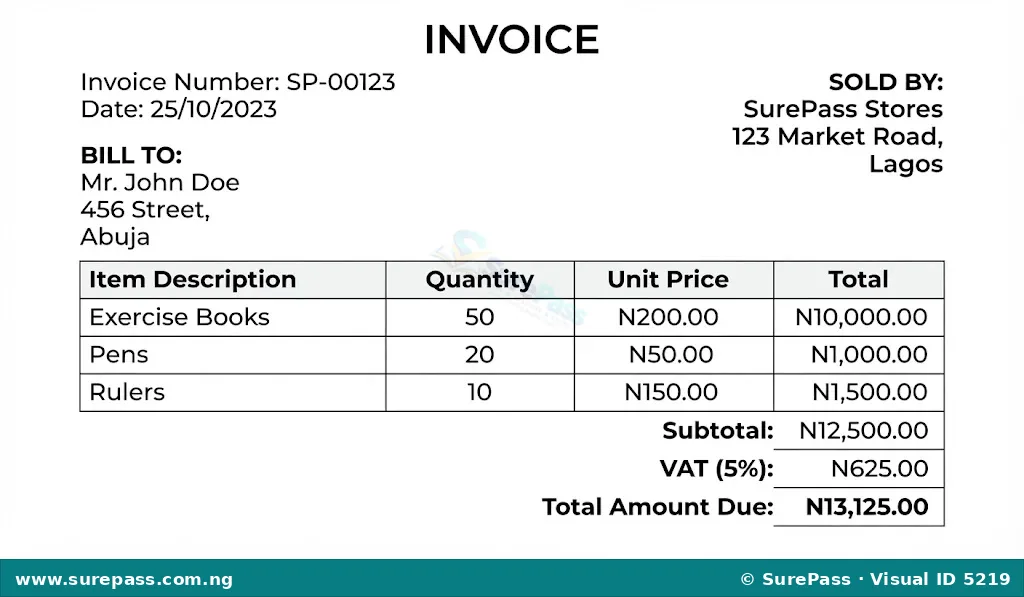
An invoice is a commercial document issued by a seller to a buyer, indicating the products, quantities, and agreed prices for products or services the seller has provided to the buyer.
Invoices are used when goods are bought or sold on credit, meaning the payment is not made immediately. They serve as a request for payment and a record of the sale.
The typical contents of an invoice include:
- The word “Invoice” clearly displayed.
- Invoice number (a unique identification number).
- Date of issue.
- Name and address of the seller (the business issuing the invoice).
- Name and address of the buyer (the customer).
- Description of goods or services sold.
- Quantity of each item.
- Unit price of each item.
- Total amount for each item.
- Total amount due for the entire invoice.
- Terms of payment (e.g., “Payment due in 30 days”).
Sales Invoice
A sales invoice is an invoice issued by a business to its customer when goods are sold on credit. For the seller, it is a record of a sale.
Purchases Invoice
A purchases invoice is an invoice received by a business from its supplier when goods are bought on credit. For the buyer, it is a record of a purchase.
Receipts
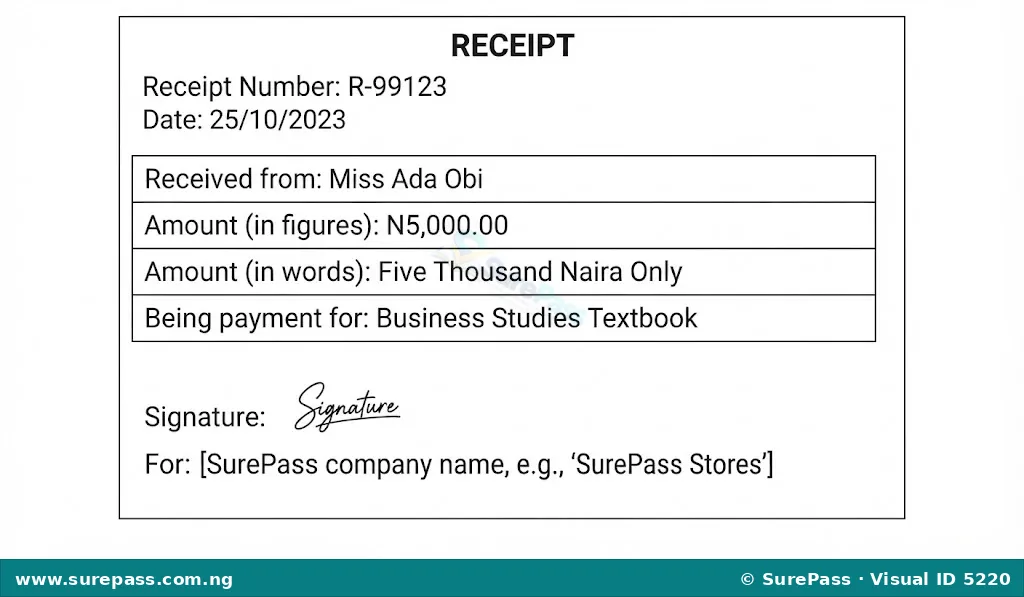
A receipt is a written acknowledgement that a specific article or sum of money has been received.
Receipts are issued when cash or cheque payments are received for goods or services. They confirm that payment has been made and received.
The typical contents of a receipt include:
- The word “Receipt” clearly displayed.
- Receipt number (a unique identification number).
- Date of issue.
- Name of the person or business receiving the money.
- Name of the person or business from whom the money was received.
- Amount received (in both figures and words).
- Reason for payment (e.g., “Payment for goods,” “School fees”).
- Signature of the person who issued the receipt.
Cash Register Tapes
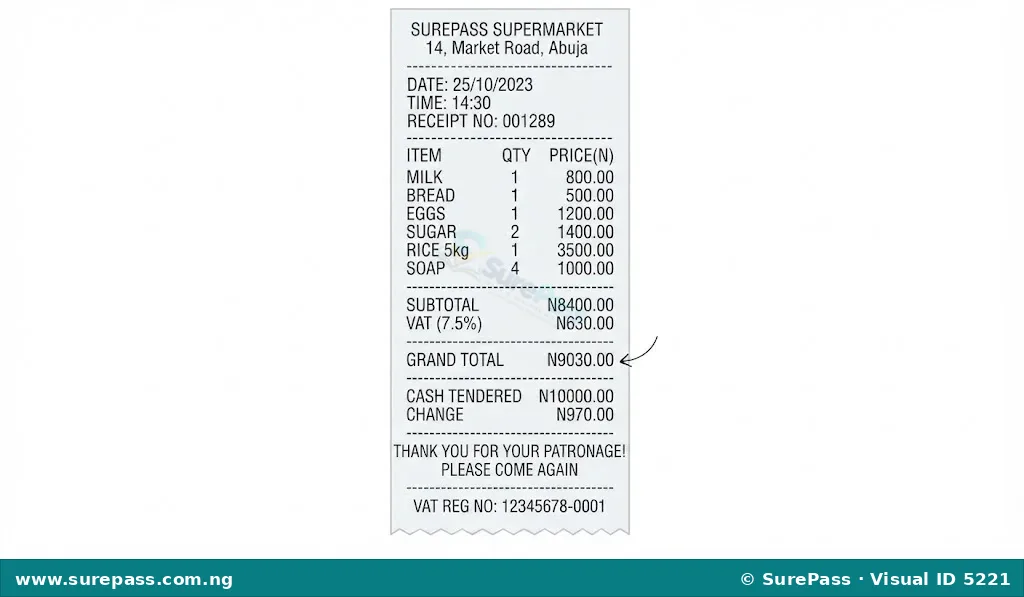
A cash register tape is a long strip of paper that records all sales transactions made through a cash register.
These tapes are commonly found in supermarkets, retail stores, and other businesses where many cash sales occur. They provide a detailed record of each sale, including the items purchased, their prices, and the total amount paid.
The typical contents of a cash register tape include:
- Date and time of transaction.
- Name of the store.
- Description of each item purchased.
- Price of each item.
- Quantity of each item.
- Subtotal.
- Any taxes applied.
- Total amount paid.
- Method of payment (e.g., cash, card).
- Change given (if applicable).
Credit Notes
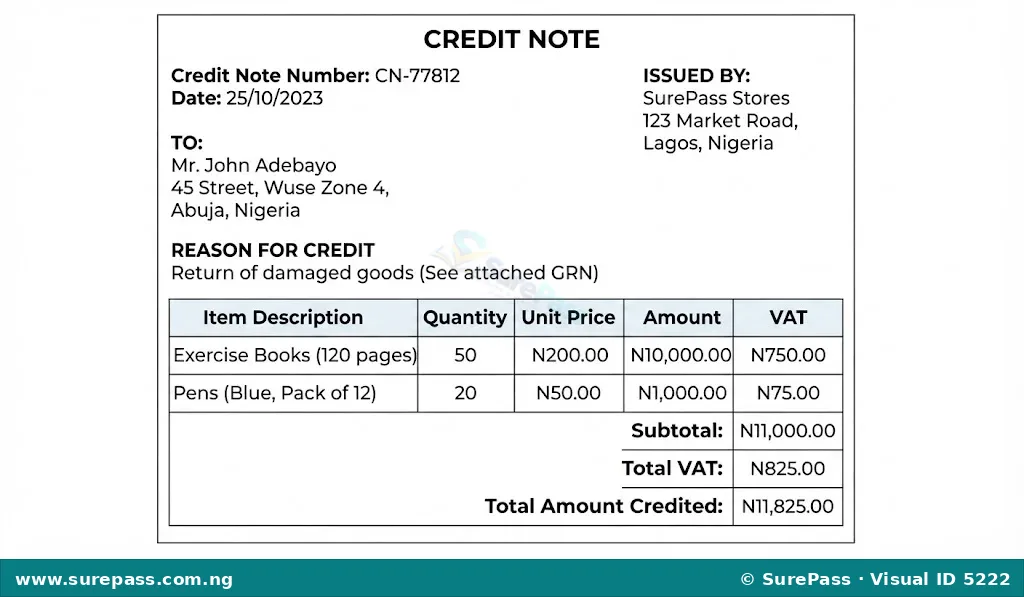
A credit note is a document issued by a seller to a buyer to reduce the amount the buyer owes, usually due to returned goods or an overcharge.
When a customer returns goods that were bought on credit, or if they were overcharged, the seller issues a credit note. This document tells the buyer that their account has been credited, meaning they owe less money.
The typical contents of a credit note include:
- The words “Credit Note” clearly displayed.
- Credit note number.
- Date of issue.
- Name and address of the seller.
- Name and address of the buyer.
- Reason for the credit (e.g., “Goods returned,” “Overcharge”).
- Description of items and amounts being credited.
- Original invoice number to which the credit relates.
- Total amount credited.
Debit Notes
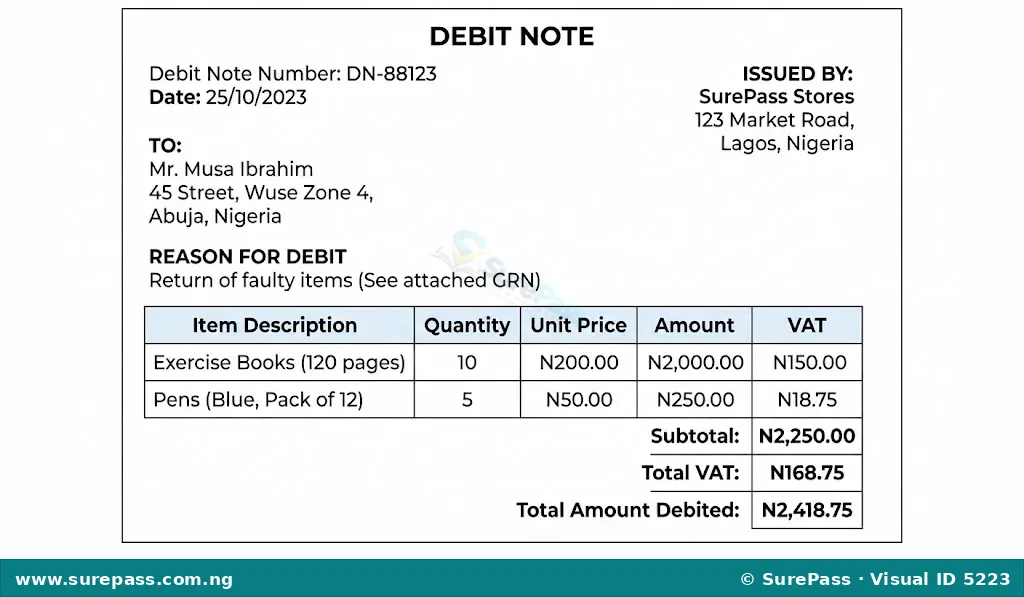
A debit note is a document issued by a buyer to a seller to formally request a credit note, or by a seller to a buyer to increase the amount the buyer owes.
A debit note is often used by a buyer to inform the seller that they are returning goods and expect a credit. Sometimes, a seller might issue a debit note to correct an undercharge on a previous invoice, increasing the amount the buyer owes.
The typical contents of a debit note include:
- The words “Debit Note” clearly displayed.
- Debit note number.
- Date of issue.
- Name and address of the issuer (buyer or seller).
- Name and address of the recipient (seller or buyer).
- Reason for the debit (e.g., “Goods returned for credit,” “Undercharge on Invoice No. 123”).
- Description of items and amounts.
- Original invoice number (if applicable).
- Total amount debited.
Cheques
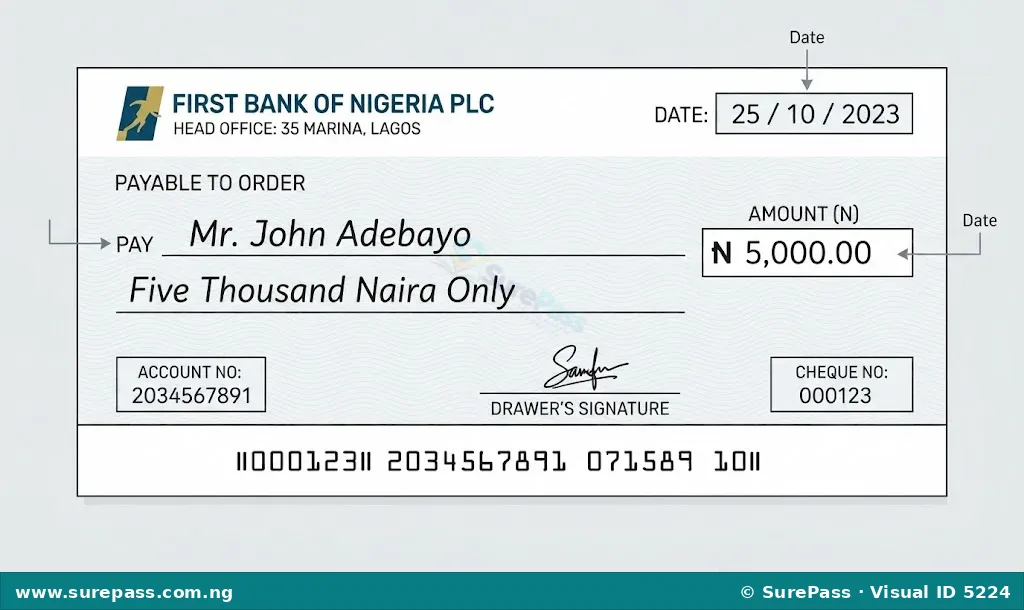
A cheque is a written order to a bank to pay a stated sum of money from the drawer’s account to the payee.
Cheques are a common method of payment, especially for larger sums, as they provide a clear record of the transaction. They are used by individuals and businesses to make payments without using physical cash.
The typical contents of a cheque include:
- The word “Cheque” or “Bank Cheque”.
- Name and logo of the bank.
- Date of issue.
- Name of the payee (the person or business to whom the money is being paid).
- Amount to be paid (in both figures and words).
- Signature of the drawer (the person or business issuing the cheque).
- Account number of the drawer.
- Cheque number.
- Bank sort code.
Preparation of Source Documents
Creating source documents is a practical skill that businesses use every day. Whether preparing a receipt for a customer or an invoice for goods sold on credit, accuracy and clarity are key. Source documents can be prepared as hard copies (physical paper documents) or soft copies (digital documents).
General Steps for Preparing Source Documents
The process of preparing a source document involves filling in all the necessary details accurately. The general steps include:
- Identify the Document Type: Determine which type of source document is needed for the transaction (e.g., receipt for cash payment, invoice for credit sale).
- Gather Information: Collect all the required details for the transaction. This includes names, addresses, dates, descriptions of items, quantities, prices, and amounts.
- Use a Template: Most businesses use pre-printed forms or digital templates for their source documents. This ensures consistency and includes all necessary fields.
- Fill in Details Accurately: Carefully write or type all the information into the correct fields. Double-check names, amounts, and dates for any errors.
- Calculate Totals: For documents like invoices, calculate subtotals and grand totals correctly.
- Sign or Authorise: For hard copies, the document usually requires a signature from the person issuing it. For soft copies, an electronic authorisation or digital signature may be used.
- Issue and Keep a Copy: The original document is given to the other party involved in the transaction (e.g., customer, supplier). A copy is always kept for business records.
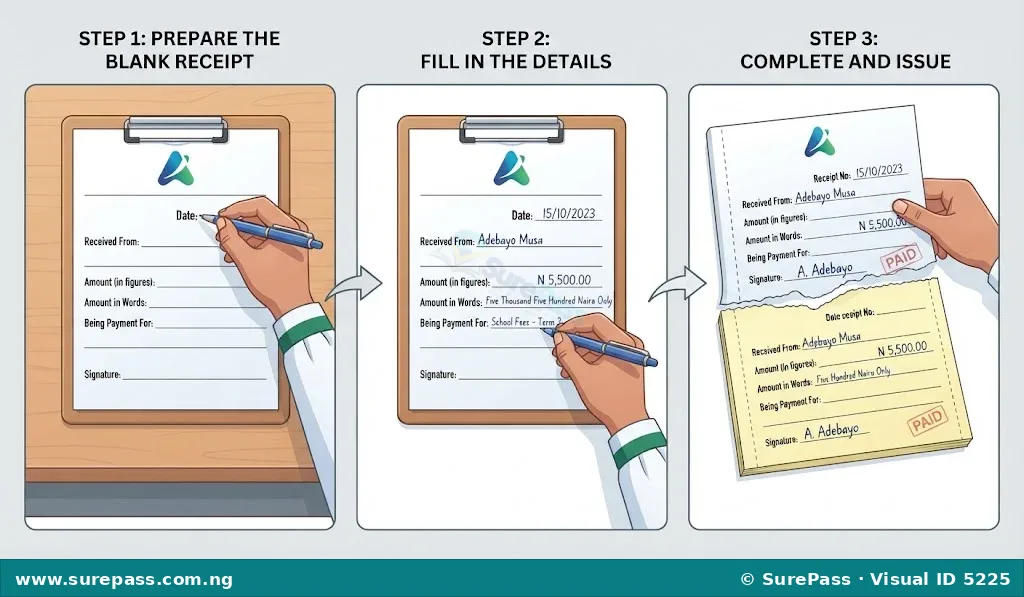
Creating a Sample Receipt (Hardcopy)
This procedure shows how to prepare a simple receipt using a physical receipt book.
The required materials are:
- A receipt book (with carbon paper or duplicate pages)
- A pen
- Information about the transaction (date, amount, payer’s name, reason for payment)
The procedure involves the following steps:
- Open the receipt book to a new receipt page. Ensure the carbon paper is correctly placed between the original and the duplicate copy, if applicable.
- Write the current date in the “Date” field.
- Write the unique receipt number, which is usually pre-printed on the receipt.
- Fill in the name of the person or business from whom the money was received in the “Received From” field.
- Write the amount of money received in figures (e.g., N5,000.00) in the designated box.
- Write the amount of money received in words (e.g., Five Thousand Naira Only) on the line provided.
- State the reason for the payment (e.g., “Payment for Business Studies Textbook”) in the “Being payment for” or “Particulars” field.
- Sign your name or the name of the business in the “Signature” or “Issued By” field.
- Carefully tear out the original receipt and give it to the payer.
- Keep the duplicate copy in the receipt book for business records.
Creating a Sample Invoice (Softcopy)
This procedure shows how to prepare a simple invoice using a digital document or spreadsheet program.
The required materials are:
- A computer or digital device
- A word processing or spreadsheet program (e.g., Microsoft Word, Google Docs, Microsoft Excel, Google Sheets)
- Information about the transaction (date, invoice number, seller’s details, buyer’s details, item descriptions, quantities, prices)
The procedure involves the following steps:
- Open a new document or spreadsheet. A pre-designed invoice template can be used if available.
- Type “INVOICE” at the top of the document.
- Enter the business’s name and address (the seller’s details) at the top left or right corner.
- Enter the buyer’s name and address below the business details.
- Create a unique invoice number (e.g., INV001) and enter the current date.
- Create a table with columns for “Item Description,” “Quantity,” “Unit Price,” and “Total.”
- List each item sold, its quantity, and its unit price in the table.
- Calculate the “Total” for each item by multiplying “Quantity” by “Unit Price.”
- Sum all the “Total” amounts to get the “Grand Total” or “Total Amount Due” at the bottom of the invoice.
- Add payment terms (e.g., “Payment due within 30 days”).
- Save the document with a clear file name (e.g., “Invoice_INV001_JohnDoe.pdf”).
- Send the digital invoice to the buyer via email or other electronic means.




0 comments
Open the discussion when you need it. Comments stay collapsed until requested so the initial article remains light.