


ARTICLE CONTENTSOn this page 8 sections
Cashless Economy
Performance Objectives
By the end of the lesson, students should be able to:
- state the meaning of cashless economy;
- state the purposes of the cashless policy;
- identify digital payment systems;
- discuss the challenges of businesses and consumers in a cashless economy;
- discuss the mitigation of challenges encountered by businesses and consumers in a cashless economy;
- use digital payment systems and platforms.
Meaning of Cashless Economy
A cashless economy is an economic system where most financial transactions are done without using physical cash like banknotes and coins.
Instead of exchanging physical money, people use electronic methods to pay for goods and services. This means that money moves between bank accounts or digital wallets through computers and mobile phones. In a cashless economy, transactions are recorded digitally, making them traceable and often faster.
Purposes of the Cashless Policy
Governments and central banks introduce a cashless policy for several important reasons. These reasons aim to improve how money is managed and used in the country.
The main purposes of the cashless policy are:
- To reduce the amount of physical cash in circulation: When less physical cash is used, the central bank spends less money on printing new notes and coins. It also makes it easier to manage the money supply in the economy.
- To promote electronic payments: The policy encourages people and businesses to use digital methods like bank transfers, debit cards, and mobile apps for payments. This makes transactions faster, more convenient, and often more secure than handling physical cash.
- To improve security: Carrying less physical cash reduces the risk of theft or loss for individuals and businesses. Electronic transactions are also easier to trace, which can help in preventing fraud, money laundering, and other financial crimes.
- To reduce the cost of managing cash: Banks and businesses spend money on handling, transporting, and securing physical cash. This includes costs for armoured vehicles, security personnel, and cash processing machines. A cashless system reduces these operational costs.
- To improve transparency: Electronic transactions leave a digital record. This makes it easier for individuals and businesses to track their spending and income. It also helps the government to monitor economic activities, identify taxable income, and collect taxes more effectively.
- To encourage financial inclusion: By making digital payment systems more accessible, the policy aims to bring more people into the formal banking system. This is especially important for individuals in rural areas or those who traditionally do not have bank accounts, giving them access to financial services.
Digital Payment Systems
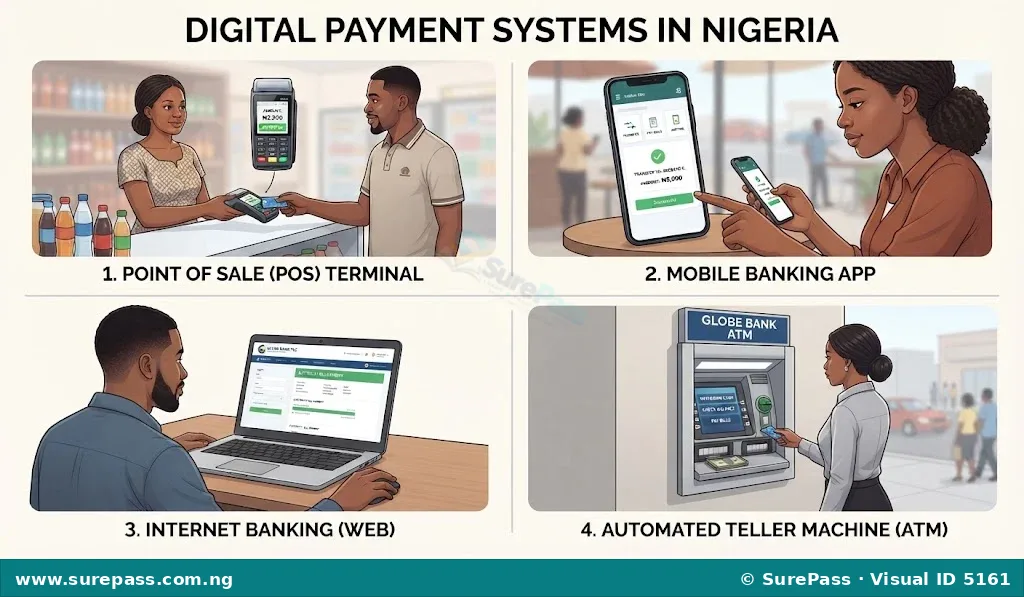
Digital payment systems are electronic methods used to make and receive payments without using physical cash. These systems rely on technology to transfer money between accounts quickly and securely.
Common digital payment systems include:
- Point of Sale (POS) Terminals: These are electronic devices found in shops, supermarkets, restaurants, and other businesses. Customers can pay for goods and services by inserting, swiping, or tapping their debit or credit cards on the POS machine. The money is then deducted directly from their bank account or charged to their credit card.
- Mobile Banking: This allows customers to perform banking transactions using their mobile phones. It can be done through:
- Bank Mobile Apps: These are applications installed on smartphones that allow users to transfer money, pay bills, check account balances, buy airtime, and perform other banking services from anywhere with internet access.
- USSD Codes: These are short codes (e.g., *737# for GTBank, *901# for Access Bank) that customers can dial on any type of mobile phone (including basic feature phones) to perform transactions like transfers, airtime top-up, and bill payments, even without internet access.
- Internet Banking: This service allows customers to access their bank accounts and perform transactions through a bank’s official website using a computer or smartphone connected to the internet. It offers a wider range of services compared to mobile apps, often including international transfers and detailed account statements.
- Automated Teller Machines (ATMs): While primarily used for cash withdrawals, ATMs also allow users to perform other digital transactions. These include transferring money between accounts, paying bills, checking account balances, and even depositing cheques using their debit cards.
- Bank Transfers: This involves sending money directly from one bank account to another. This can be done through mobile banking apps, internet banking, USSD codes, or by filling out a transfer form at a bank branch. It is a common method for paying suppliers, salaries, or sending money to family and friends.
- Debit and Credit Cards: These plastic cards are linked to bank accounts. Debit cards allow direct access to funds in a checking or savings account, meaning money is deducted immediately. Credit cards allow users to borrow money up to a certain limit, which must be repaid later. Both types of cards are widely used for payments at POS terminals, ATMs, and for online purchases.
Challenges of a Cashless Economy
While a cashless economy offers many benefits, it also comes with certain challenges for both businesses and consumers. Understanding these challenges helps in finding ways to overcome them and ensure a smoother transition.
Challenges for Businesses
Businesses, especially small and medium-sized ones, can face difficulties when operating in a cashless economy.
- Cost of Equipment: Businesses need to buy POS terminals and ensure they have a reliable internet connection to process digital payments. These devices and internet subscriptions can be expensive, especially for small businesses with limited capital.
- Network Issues: Poor network connectivity or frequent network failures can disrupt transactions. This leads to delays, frustrated customers, and potential loss of sales if payments cannot be processed.
- Lack of Digital Literacy: Some customers, particularly older individuals or those from rural areas, may not know how to use digital payment methods. This can slow down transactions or lead to lost sales if customers cannot pay using the available digital options.
- Transaction Failures: Sometimes, electronic transactions fail due to technical glitches, even with good network connectivity. This can cause inconvenience for both the business and the customer and may require manual reconciliation of accounts.
- Security Concerns: Businesses worry about cyber fraud, hacking, and other digital security threats that could lead to financial losses. Protecting customer data and business funds from online attacks is a constant challenge.
- Maintenance and Support: POS machines and other digital tools require regular maintenance and technical support when they develop faults. This can be an additional burden and cost for businesses.
Challenges for Consumers
Consumers also face their own set of challenges when adapting to a cashless system.
- Network Problems: Just like businesses, consumers can experience failed transactions or slow service due to poor network coverage, especially in rural areas. This can be frustrating when trying to make urgent payments.
- Lack of Access to Digital Tools: Not everyone owns a smartphone or has access to reliable internet. This can exclude some people from participating fully in a cashless economy, making it difficult for them to pay for goods and services.
- Fear of Online Fraud: Many consumers are worried about their money being stolen through online scams, phishing, or hacking. This fear can make them hesitant to adopt digital payment methods.
- Difficulty for Unbanked Individuals: People who do not have bank accounts find it difficult to use most digital payment systems, as most require a bank account to function. This creates a barrier to financial inclusion.
- Transaction Charges: Some digital transactions, especially transfers or POS withdrawals, may incur small fees. These charges can add up over time and discourage frequent use for small purchases, making cash seem more appealing.
- Technical Issues: Consumers may face issues like money being debited from their account but not credited to the recipient’s account. Such issues can be frustrating and require time and effort to resolve with their banks.
Mitigation of Challenges in a Cashless Economy
To make the cashless economy work smoothly, it is important to address the challenges faced by businesses and consumers. Mitigation involves taking steps to reduce the negative effects of these challenges and improve the overall experience.
Mitigation for Businesses
Businesses can take the following steps to overcome challenges in a cashless economy:
- Offer Multiple Payment Options: Provide various digital payment methods such as POS, USSD, and bank transfers to give customers choices. This reduces reliance on a single system and caters to different customer preferences.
- Ensure Reliable Internet: Invest in stable and fast internet connectivity to minimise transaction failures and delays. Having a backup internet source can also be helpful.
- Train Staff: Educate employees on how to properly use and troubleshoot digital payment systems. Staff should also be trained on how to patiently assist customers who are new to these methods.
- Educate Customers: Display clear instructions on how to use different payment methods in the business premises. Staff can also patiently guide customers through the process, especially for first-time users.
- Implement Security Measures: Use secure payment gateways and regularly update software and security protocols to protect against cyber threats and fraud. Businesses should also educate staff on how to identify and avoid scams.
- Have a Contingency Plan: Have a backup plan for when digital systems fail, such as a temporary return to cash for urgent transactions or a manual record-keeping system to track payments that need to be resolved later.
Mitigation for Consumers
Consumers can also take steps to protect themselves and adapt to the cashless system:
- Learn Digital Skills: Take time to learn how to use mobile banking apps, USSD codes, and online payment platforms safely. Many banks offer tutorials and customer support to help users.
- Protect Personal Information: Never share bank account details, ATM PINs, or mobile banking passwords with anyone. Be wary of suspicious calls, emails, or messages asking for such information, as these are often attempts at fraud.
- Use Secure Networks: Avoid making financial transactions on public Wi-Fi networks, as they may not be secure and could expose personal data. Use personal mobile data or trusted private networks instead.
- Report Issues Promptly: If a transaction fails, money is debited but not credited, or there is any suspicious activity on an account, contact the bank immediately to report the issue and seek resolution.
- Check Transaction Alerts: Always confirm that transactions are successful by checking bank alerts (SMS or in-app notifications) or account balances. This helps to quickly identify any discrepancies.
- Understand Transaction Charges: Be aware of any fees associated with digital transactions. This helps to manage finances better and choose the most cost-effective payment method for different situations.
The government and banks also play a crucial role in mitigation by improving network infrastructure, reducing transaction costs, providing financial education campaigns, and strengthening cybersecurity laws and enforcement.
Using Digital Payment Systems and Platforms
Learning how to use digital payment systems is an important skill in a cashless economy. Here are simple steps for using some common digital payment methods:
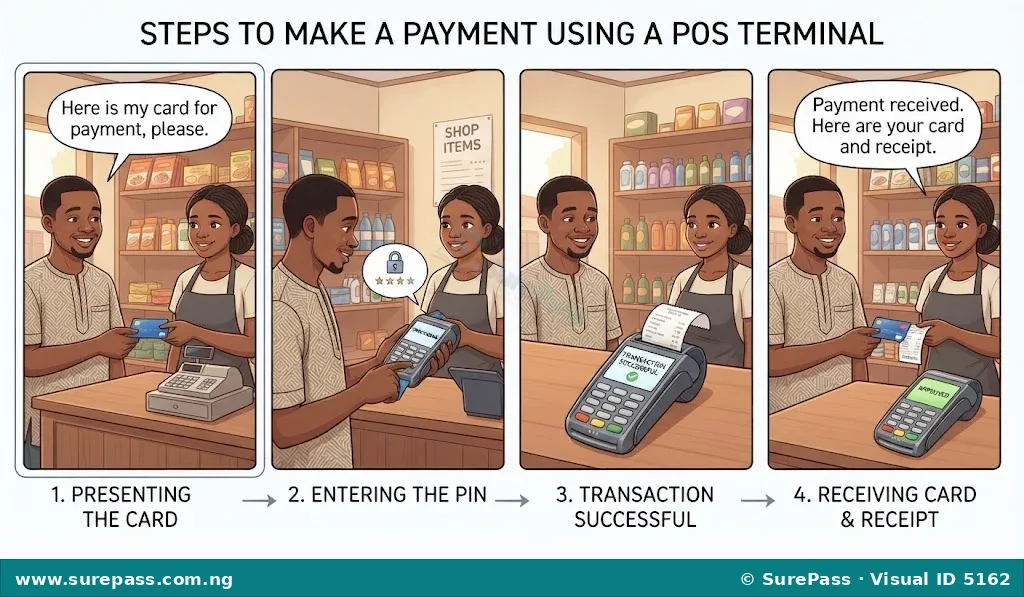
How to Pay Using a POS Terminal with a Debit Card
This method is common in shops, supermarkets, and other retail outlets.
The procedure involves the following steps:
- Present Your Card: When ready to pay, give the debit card to the cashier or insert it into the POS machine yourself. Some machines also allow tapping the card for contactless payment.
- Enter Your PIN: The POS machine will prompt for the 4-digit Personal Identification Number (PIN). It is important to cover the keypad with a hand to keep the PIN secret from others.
- Wait for Confirmation: The machine will process the transaction by communicating with the bank. Wait for a message on the screen or a printed receipt confirming that the payment was successful.
- Collect Your Receipt: Take the receipt and the card. The receipt serves as proof of payment and can be useful for tracking expenses or resolving any issues.
How to Make a Bank Transfer Using a Mobile Banking App
Mobile banking apps allow users to send money from their account to another person’s account using a smartphone, provided there is internet access.
The procedure involves the following steps:
- Open Your Bank App: Launch the bank’s official mobile application on a smartphone.
- Log In: Enter the username and password or use biometric authentication like fingerprint or face ID to log in securely.
- Select “Transfer”: Look for the “Transfer” or “Send Money” option on the app’s main menu or dashboard.
- Choose Account Type: Select whether the transfer is to an account in the same bank (intra-bank) or to an account in another bank (inter-bank).
- Enter Details: Input the recipient’s bank name, account number, and the exact amount to send. It is crucial to double-check these details carefully to avoid sending money to the wrong person.
- Add Narration (Optional): A short description of the payment can be added, such as “Payment for goods,” “Pocket money,” or “Contribution.” This helps in tracking the purpose of the transaction.
- Confirm Transaction: Review all the entered details to ensure they are correct. The app will usually ask for a transaction PIN or a one-time password (OTP) sent to the registered phone number to authorise the transfer.
- Receive Confirmation: Once successful, a confirmation message will appear on the app screen, and often an SMS alert will be received from the bank.
How to Make a Bank Transfer Using a USSD Code
USSD codes are useful for making transfers even without internet access, using any type of mobile phone.
The procedure involves the following steps:
- Dial the USSD Code: Dial the bank’s specific USSD code (e.g., *737# for GTBank, *901# for Access Bank) on the mobile phone.
- Select Transfer Option: A menu will appear on the screen. Select the option for “Transfers” or “Send Money” by typing the corresponding number.
- Enter Amount: Type in the amount of money to send.
- Enter Recipient’s Account Number: Input the account number of the person receiving the money.
- Select Recipient’s Bank: Choose the bank of the recipient from the list provided on the screen.
- Confirm Details: The system will display the recipient’s name and the amount. Confirm that these details are correct before proceeding.
- Enter Transaction PIN: Enter the USSD transaction PIN to authorise the transfer. This PIN is usually set up when activating the USSD banking service.
- Receive Confirmation: A confirmation message will be received via SMS, indicating the success of the transaction.
0 comments
Open the discussion when you need it. Comments stay collapsed until requested so the initial article remains light.