



ARTICLE CONTENTSOn this page 8 sections
Digital Portfolios
Performance Objectives
By the end of the lesson, students should be able to:
- Explain the meaning and types of digital portfolios
- Work with a simple portfolio template online
- Customize digital portfolio
Meaning of a Digital Portfolio
A digital portfolio is a curated collection of a person’s work, achievements, and skills stored and presented in an electronic format.
In fashion design and garment making, a digital portfolio is used to showcase design sketches, fabric selections, pattern drafts, and photographs of finished garments. It replaces traditional paper scrapbooks and physical folders, making it easier to share work with teachers, clients, and examiners using computers, tablets, or smartphones. It serves as a visual record of a student’s progress and skill development in garment construction.
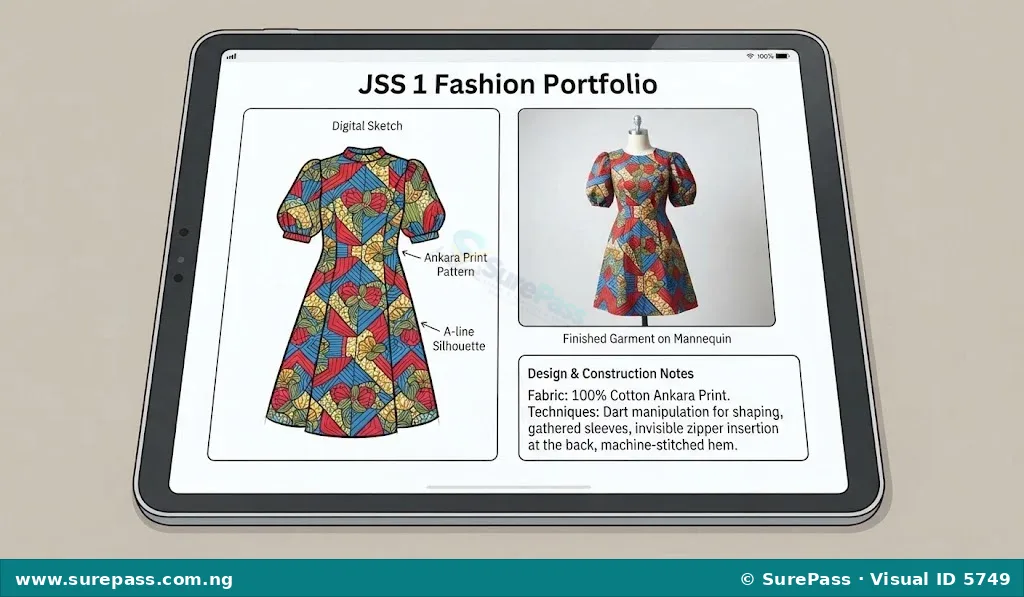
Types of Digital Portfolios
Digital portfolios are used across various creative and academic fields. The main types of digital portfolios include:
- Fashion Portfolios: These focus specifically on garment making, clothing designs, fashion illustrations, fabric swatches, and photographs of completed outfits such as school uniforms, traditional wears, and casual dresses.
- Art and Design Portfolios: These contain drawings, paintings, sculptures, and graphic design works that showcase a person’s artistic skills and creativity.
- Photography Portfolios: These consist of high-quality photographs, focusing on lighting, composition, and styling, often used by fashion photographers to showcase clothing on models.
- Academic Portfolios: These are used by students to collect class assignments, practical projects, and test results across different subjects to show academic growth over time.
Online Templates for Digital Portfolios
An online template is a pre-designed layout that serves as a starting point for creating a digital document or website.
Templates provide ready-made structures with placeholders for text, images, and videos. This allows fashion design students to create professional-looking portfolios without needing advanced computer programming or graphic design skills. Users can simply replace the placeholder content with their own garment photos and descriptions.
Common online platforms that offer free templates for digital portfolios include:
- Google Sites: A free, easy-to-use tool for building simple portfolio websites that integrate directly with Google Drive.
- Canva: A graphic design platform with numerous visual templates for presentations, slide decks, and single-page portfolios.
- Behance: A popular online platform specifically designed for creative professionals to showcase fashion, art, and design projects to a global audience.
How to Open and Create a Simple Digital Portfolio Online
Creating a digital portfolio requires a computer or a smartphone with internet access. Using a free platform like Google Sites is a highly effective way to start.
The procedure for opening a new digital portfolio involves the following steps:
- Open a web browser on a computer or smartphone.
- Type the web address for Google Sites in the address bar and press enter.
- Sign in using a valid Google account email and password.
- Look at the top of the page to find the template gallery.
- Click on the template labeled “Portfolio” or select “Blank” to start a design from the beginning.
- Type the name of the portfolio in the “Enter site name” box at the top-left corner of the screen.
How to Customize and Personalize a Digital Portfolio
Customization is the process of changing the appearance and content of a template to make it unique and personal to the designer’s style.
The procedure for personalizing a digital fashion portfolio involves the following steps:
- Click on the main header text on the homepage and type a personalized title, such as “Garment Making Projects by [Student’s Name]”.
- Click on the “Themes” tab located on the right-hand control panel to select a color scheme and font style that matches the style of the garments.
- Click on the “Insert” tab on the right panel, select “Images”, and click “Upload” to select photographs of sewn garments from the computer or phone storage.
- Drag the corners of the uploaded images to resize them so they fit neatly within the page layout.
- Click the “Text box” button from the insert panel to add a description below each garment image.
- Type details about each garment, including the type of fabric used, the measurements, the sewing machine stitches applied, and the challenges faced during sewing.
- Click the blue “Publish” button at the top-right corner of the screen to save the changes and make the portfolio accessible online.
Evaluation Guide
To assess understanding of this unit, students should perform the following tasks:
- Explain the meaning of a digital portfolio and list three types of digital portfolios that can be used to showcase creative works.
- Describe how a digital fashion portfolio is useful to a garment maker in Nigeria.
- Demonstrate the step-by-step process of opening a new portfolio template on an online platform.
- Show how to upload a photograph of a sewn garment and add a written description to a digital portfolio.



0 comments
Open the discussion when you need it. Comments stay collapsed until requested so the initial article remains light.