


ARTICLE CONTENTSOn this page 8 sections
Mobile Phone Network
Performance Objectives
By the end of the lesson, students should be able to:
- identify types of mobile phone network;
- mention common network challenges;
- use software’s to unlock foreign network;
- demonstrate unlocking of computer and mobile phone associated with network issues;
- demonstrate testing of mobile phone.
Types of Mobile Phone Networks
A mobile phone network is a wireless communication system distributed over land areas called cells, each served by at least one fixed-location transceiver known as a cell site or base station.
These networks allow mobile phones to communicate with each other and access the internet. In mobile hardware and GSM repairs, understanding the type of network a phone uses is essential for diagnosing signal and connectivity faults.
The main types of mobile phone networks are:
- GSM (Global System for Mobile Communications): This is the most widely used digital mobile network standard globally. It uses a Subscriber Identity Module (SIM) card to connect a device to the network. GSM networks operate on specific frequency bands, such as 900 MHz and 1800 MHz in Nigeria and Europe, and 850 MHz and 1900 MHz in the Americas.
- CDMA (Code Division Multiple Access): This is an older network standard where multiple transmitters can send information simultaneously over a single communication channel. Unlike GSM, CDMA devices historically did not require physical SIM cards, as the phone’s identity was programmed directly into the device hardware.
- 2G (Second Generation) Network: This network standard introduced digital voice transmission and basic data services like Short Message Service (SMS). It relies primarily on GSM technology.
- 3G (Third Generation) Network: This standard brought faster data transfer speeds, enabling video calling, mobile internet access, and GPS tracking. It uses technologies such as UMTS (Universal Mobile Telecommunications System) and WCDMA.
- 4G LTE (Fourth Generation Long-Term Evolution): This is a high-speed network standard designed primarily for data. It provides fast mobile broadband internet, high-definition video streaming, and Voice over LTE (VoLTE) services.
- 5G (Fifth Generation) Network: This is the latest mobile network standard, offering ultra-high-speed data transfer, extremely low latency, and the capacity to connect a massive number of devices simultaneously. It operates on higher frequency bands, requiring advanced antenna designs in mobile hardware.
Common Network Challenges
Mobile phones frequently experience network connectivity issues. These challenges are generally classified into hardware-related faults and software-related faults.
Hardware-Related Network Challenges
Hardware faults occur when physical components inside the mobile phone are damaged, worn out, or poorly connected.
Common hardware-related network challenges include:
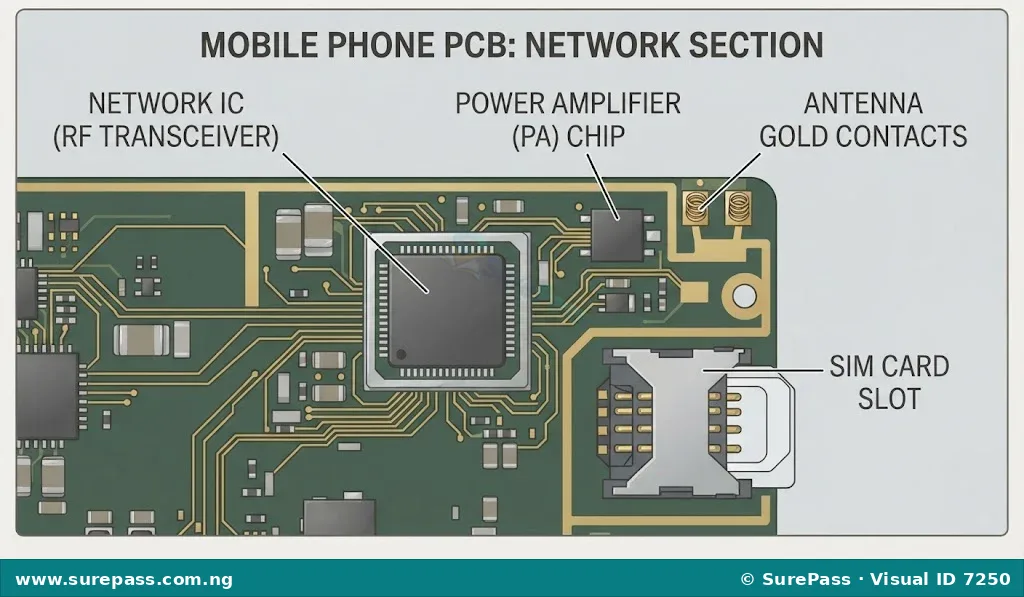
- Faulty Antenna or Antenna Contacts: The antenna is responsible for receiving and transmitting radio frequency signals. If the antenna contacts on the motherboard are dirty, bent, or broken, the phone will show weak signal bars or “No Service.”
- Damaged Network IC (Integrated Circuit): The Network IC, which includes the Radio Frequency (RF) Transceiver and the Power Amplifier (PA), processes network signals. A damaged Network IC, often caused by liquid intrusion or physical drops, prevents the phone from detecting any network.
- Damaged SIM Card Slot or Tray: If the pins inside the SIM slot are bent or broken, the phone will fail to detect the SIM card, displaying messages such as “Insert SIM” or “No SIM Card.”
- Broken PCB Tracks: The Printed Circuit Board (PCB) contains copper tracks that connect the network components. Physical impact can crack these tracks, breaking the electrical path between the antenna and the Network IC.
Software-Related Network Challenges
Software faults occur when the operating system, firmware, or security settings of the phone restrict or corrupt network communication.
Common software-related network challenges include:
- Foreign Network Lock (Carrier Lock): This occurs when a mobile phone is programmed to work only with a specific network provider, usually from another country. When a local SIM card is inserted, the phone displays “Invalid SIM,” “SIM Network Unlock PIN,” or “Network Locked.”
- Corrupted Network Settings: Misconfigured or corrupted network configuration files in the operating system can prevent the phone from registering on a local network.
- Invalid or Null IMEI: The International Mobile Equipment Identity (IMEI) is a unique 15-digit number used to identify a mobile device on a network. If the IMEI is corrupted (showing “Null” or “00000000000000”), the network provider will reject the device connection.
- Blacklisted IMEI: If a phone is reported lost or stolen, its IMEI is added to a global database of blocked devices, preventing it from connecting to any mobile network.
Software Used to Unlock Foreign Networks
Network unlocking is the process of removing the software restriction placed on a mobile phone by a service provider, allowing the device to use SIM cards from other compatible networks.
GSM technicians use specialized software tools, hardware boxes, and dongles to bypass or rewrite the security locks on mobile phones.
Common software tools and hardware boxes used for unlocking foreign networks include:
- Miracle Box: A widely used hardware flasher and software tool in GSM repairs. It supports a large variety of mobile chipsets (such as MediaTek and Spreadtrum) and is used to read unlock codes, write firmware, and repair IMEI numbers.
- Octopus Box / Octoplus: A professional device servicing tool used primarily for unlocking, flashing, and repairing Samsung, LG, and Huawei mobile devices.
- SigmaKey / Sigma Dongle: A specialized tool designed for unlocking and repairing Huawei, Motorola, ZTE, and Alcatel phones. It allows direct unlocking and code calculation.
- Chimera Tool: A software-based utility that runs on a computer to perform network unlocking, firmware updates, and bypass security locks on various Android devices.
- Network Unlock Code Calculators: Software applications that generate unlock codes based on the phone’s IMEI number and model, without requiring a physical connection to a hardware box.
How to Unlock a Mobile Phone with Network Issues
Unlocking a foreign network-locked mobile phone requires a computer, the appropriate unlocking software, and a compatible USB data cable. This procedure must be performed carefully to avoid damaging the phone’s operating system.
The required tools and materials for unlocking are:
- A computer or laptop with internet access
- The appropriate unlocking software or hardware box (e.g., Miracle Box, Chimera Tool)
- The network-locked mobile phone
- A high-quality USB data cable
- A local SIM card (e.g., MTN, Airtel, Glo, or 9mobile)
The procedure for unlocking a network-locked mobile phone involves the following steps:
- Prepare the Workstation: Turn on the computer and launch the installed unlocking software. Ensure the computer has the correct USB drivers installed for the specific mobile phone model.
- Enable USB Debugging: On the mobile phone, navigate to Settings, locate Developer Options, and enable “USB Debugging.” For some models, OEM unlocking must also be enabled.
- Connect the Phone: Connect the mobile phone to the computer using the USB data cable. Ensure the connection is stable.
- Detect the Device: In the unlocking software interface, select the correct brand, model, and chipset of the phone. Click the “Detect” or “Read Info” button to confirm that the software has established communication with the phone.
- Perform the Unlock Operation: Select the “Unlock” or “Direct Unlock” option in the software. If the software requires code calculation, select “Read Codes” instead.
- Monitor the Process: Wait for the software to complete the unlocking process. Do not disconnect the USB cable or turn off the computer during this operation. The software will display a “Success” or “Unlock Done” message when finished.
- Restart the Phone: Disconnect the phone from the computer and restart it.
Testing Mobile Phone Network Functionality
After performing a hardware repair or a software unlock, the network functionality of the mobile phone must be tested to ensure it can successfully connect to local service providers.
The procedure for testing mobile phone network functionality involves the following steps:
- Verify the IMEI Status: Turn on the phone and dial
*#06#on the keypad. Verify that a valid 15-digit IMEI number appears on the screen. If the screen displays “Null,” “Unknown,” or “00000000000000,” the network will not function, and the IMEI must be repaired. - Insert a Local SIM Card: Power off the phone, insert an active local SIM card into the SIM tray, and power the phone back on.
- Check for SIM Detection: Confirm that the phone detects the SIM card. If the phone displays “No SIM” or “Insert SIM,” check the SIM tray and slot contacts for physical damage.
- Observe the Signal Bars: Look at the top right corner of the phone screen. Observe if the signal bars appear. If the phone displays “No Service” or “Emergency Calls Only,” proceed to a manual network search.
- Perform a Manual Network Search: Go to Settings, select Network & Internet, then Mobile Networks, and choose “Search Networks” or “Operator.” Verify if the phone can detect local network operators (e.g., MTN, Airtel, Glo, 9mobile). Select the appropriate network manually to test registration.
- Place a Test Call: Dial a customer care number or an active phone number to test voice call quality. Verify that the audio is clear in both the earpiece and the microphone.
- Test Mobile Data: Turn on mobile data on the phone. Verify that the data connection icon (e.g., 3G, 4G, or 5G) appears next to the signal bars, and attempt to load a web page to confirm internet connectivity.
Summary of Tools and Equipment
A professional GSM repair workstation requires specific tools to diagnose network faults, perform hardware repairs, and run unlocking software.
The primary tools used for network repairs and unlocking include:
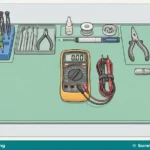
- Screwdrivers and Pliers: Used to safely disassemble and assemble the mobile phone casing to access the motherboard.
- Workstation (Hot Air Rework Station): Used to desolder and replace faulty network components, such as the Network IC or antenna contacts, on the PCB.
- Unlocking Software and Dongles: Used to interface with the phone’s operating system to remove carrier locks and repair corrupted network firmware.
- SIM Cards: Active SIM cards from different local network providers are used to test signal reception and network registration.

0 comments
Open the discussion when you need it. Comments stay collapsed until requested so the initial article remains light.