


ARTICLE CONTENTSOn this page 11 sections
Introduction to Hardware and Software
Performance Objectives
By the end of the lesson, students should be able to:
- explain hardware and software of a computer system;
- identify types of hardware;
- identify computer system and application software;
- discuss the relationship between hardware and software in system operation.
Meaning of Computer Hardware and Software
A computer system is an electronic device that processes data into useful information. To perform this function, the system relies on two fundamental, interdependent components: hardware and software. Understanding the distinction between these two components is essential for troubleshooting, maintaining, and operating computer systems and mobile devices.
What is Computer Hardware?
Computer hardware refers to the physical, tangible components of a computer system that can be seen, touched, and handled.
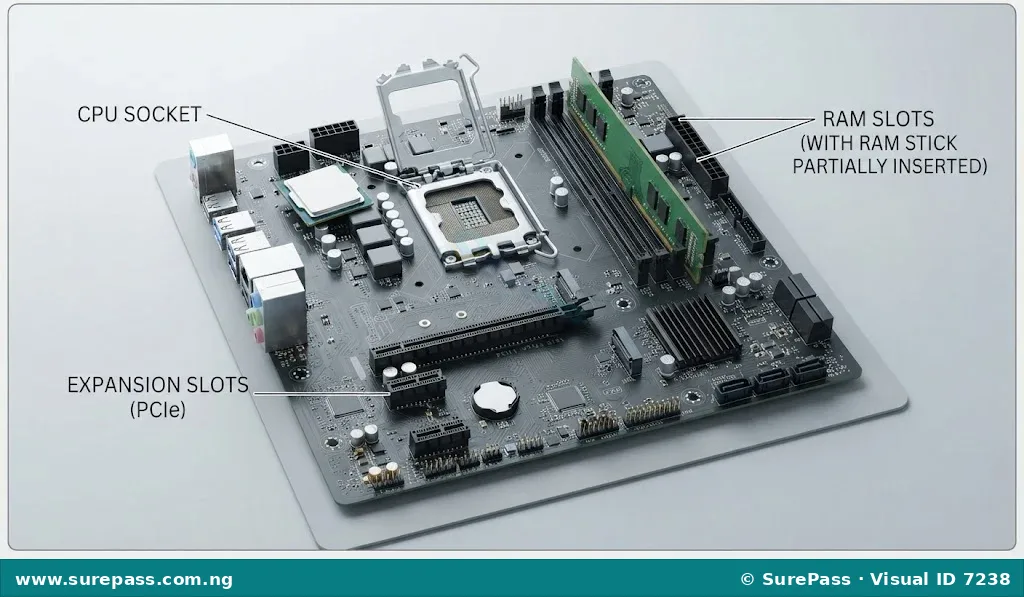
Hardware forms the physical infrastructure of the computer. It includes both the external components that are visible outside the computer case and the internal components housed within the system unit. Examples of hardware include the keyboard, mouse, monitor, central processing unit (CPU), system motherboard, random access memory (RAM), and hard disk drives.
What is Computer Software?
Computer software refers to the set of non-tangible instructions, programs, data, and protocols that direct the computer hardware to perform specific tasks.
Unlike hardware, software has no physical form and cannot be touched. It consists of lines of code written by programmers using programming languages. Software acts as the intelligence of the computer, instructing the physical hardware on what to do, how to do it, and when to do it. Examples of software include operating systems like Windows and Android, as well as applications like web browsers, word processors, and mobile games.
Types of Computer Hardware
Computer hardware is classified into four functional categories based on the role each component plays in the information processing cycle. These categories are:
- Input hardware
- Processing hardware
- Output hardware
- Storage hardware
1. Input Hardware
Input hardware consists of devices used to feed raw data, instructions, and control signals into the computer system. These devices convert human-understandable actions (such as keystrokes, voice, or hand movements) into machine-readable digital signals.
Common examples of input hardware include:
- Keyboard: A panel of keys used to input alphanumeric characters and commands into the system.
- Mouse: A handheld pointing device used to navigate graphical user interfaces by clicking, dragging, and scrolling.
- Microphone: An audio input device that captures sound waves and converts them into digital audio signals.
- Scanner: An optical device that captures physical documents or images and converts them into digital files.
2. Processing Hardware
Processing hardware consists of the internal components responsible for manipulating, calculating, and analyzing data according to the instructions provided by software. It is the computational engine of the computer.
Key examples of processing hardware include:
- Central Processing Unit (CPU): Often referred to as the brain of the computer, the CPU interprets and executes basic instructions. It consists of the Control Unit (CU) and the Arithmetic Logic Unit (ALU).
- Motherboard: The main circuit board of the computer that connects and allows communication between the CPU, memory, and all other hardware peripherals.
- Graphics Processing Unit (GPU): A specialized processor designed to rapidly manipulate and alter memory to accelerate the creation of images in a frame buffer intended for output to a display.
3. Output Hardware
Output hardware consists of devices that translate processed digital data from the computer into a form that humans can easily perceive, hear, or read.
Common examples of output hardware include:
- Monitor (Display Screen): A visual display unit that projects images, text, and video generated by the computer’s graphics card.
- Printer: A device that produces a physical copy (hard copy) of digital documents or images on paper.
- Speakers and Headphones: Audio output devices that convert digital audio signals into audible sound waves.
- Smart Boards: Interactive display screens that project computer images and allow direct interaction via touch or specialized pens.
4. Storage Hardware
Storage hardware consists of devices used to retain data, instructions, and software programs permanently or temporarily. Storage is divided into primary storage (volatile) and secondary storage (non-volatile).
Key examples of storage hardware include:
- Random Access Memory (RAM): The primary, volatile memory that temporarily holds data and instructions currently being used by the CPU. Data in RAM is lost when the computer is powered off.
- Hard Disk Drive (HDD): A magnetic secondary storage device used for permanent, high-capacity data storage.
- Solid-State Drive (SSD): A faster, modern secondary storage device that uses flash memory to store data permanently.
- Flash Drives and Memory Cards: Portable, removable solid-state storage devices used for transferring data between systems.
Computer System and Application Software
Computer software is broadly classified into two main categories based on its function and relationship to the hardware: System Software and Application Software.
System Software
System software consists of programs designed to run, control, and manage the computer’s physical hardware components and provide a platform for application software to run.
The most critical type of system software is the Operating System (OS). Without an operating system, a computer or mobile phone cannot function. The operating system manages memory, schedules tasks, controls input and output devices, and provides a user interface.
Common examples of operating systems include:
- Windows: Developed by Microsoft, this is the most widely used operating system for personal computers and laptops globally.
- macOS: Developed by Apple Inc., this operating system is designed exclusively for Apple Macintosh computers.
- Chrome OS: Developed by Google, this is a lightweight operating system designed primarily for netbooks and laptops (Chromebooks) that rely heavily on cloud-based applications.
- Ubuntu OS: A popular, open-source Linux distribution used widely on personal computers, servers, and by software developers.
- Android OS: Developed by Google, this is an open-source operating system designed primarily for touchscreen mobile devices such as smartphones and tablets.
- iOS: Developed by Apple Inc., this proprietary mobile operating system runs exclusively on Apple mobile devices, including iPhones and iPads.
Application Software
Application software consists of programs designed to help users perform specific tasks, solve problems, or do work on the computer.
Unlike system software, application software is user-centric and is installed based on the specific needs of the user. Common categories of application software include:
- Word Processing Software: Used for creating, editing, formatting, and printing text documents. Examples include Microsoft Word and Google Docs.
- Spreadsheet Software: Used for organizing, analyzing, and calculating numerical data in tabular form (rows and columns). Examples include Microsoft Excel and Google Sheets.
- Presentation Software: Used to create slide shows and visual presentations for meetings, lectures, and seminars. Examples include Microsoft PowerPoint and Google Slides.
- Graphic Design Software: Used for creating, editing, and manipulating visual images, illustrations, and layouts. Examples include CorelDraw and Adobe Photoshop.
- Computer-Aided Design (CAD) Software: Used by engineers, architects, and designers to create precise 2D and 3D technical drawings and models of physical structures or products. Examples include AutoCAD and SolidWorks.
Relationship Between Hardware and Software
Hardware and software share a symbiotic relationship; neither can function usefully without the other. Hardware represents the physical body of the system, while software represents the mind, thoughts, and instructions.
To understand this relationship, imagine a musical CD player. The CD player itself and its physical buttons represent the hardware. The music recorded on a CD represents the software. The CD player is useless without a CD to play, and the CD is useless without the physical player to read its digital tracks.
In computer and mobile phone operations, the relationship is structured in layers. The user interacts with the application software, the application software communicates its needs to the system software (operating system), the system software translates those commands into binary machine code, and the hardware executes the physical actions.
The table below highlights how hardware and software interact during common operations on computers and mobile phones:
| Operation | Hardware Involved | Software Involved | How They Work Together |
|---|---|---|---|
| Typing a document on a computer | Keyboard, Motherboard, RAM, Monitor | Word Processor (e.g., Microsoft Word), Operating System (e.g., Windows) | The keyboard (hardware) detects a keypress and sends a signal to the OS (system software). The OS passes this to the word processor (application software), which updates the document in RAM (hardware) and displays the character on the monitor (hardware). |
| Taking a photo with a mobile phone | Camera lens, Image sensor, Touchscreen, Flash storage | Camera App (Application), Android or iOS (System Software) | The user taps the screen (hardware). The camera app (application software) commands the OS (system software) to activate the camera sensor (hardware). The sensor captures light, converts it to data, and the OS saves the image file to the phone’s flash storage (hardware). |
| Printing a report | Motherboard, USB cable or Wi-Fi card, Printer | Printer Driver (System Software), Word Processor or PDF Reader (Application) | The application software sends a print command. The printer driver (system software) translates the document into instructions the specific printer hardware can understand, sending the data across the physical cable or wireless connection to start printing. |
How to Identify Hardware and Software
Developing the skill to identify hardware and software components is essential for basic computer literacy and troubleshooting. This procedure outlines how to identify physical hardware and installed software on a computer system.
The required materials for this activity are:
- A functional desktop or laptop computer running Windows or macOS
- A smartphone (Android or iOS)
- A screwdriver (optional, for viewing internal hardware under teacher supervision)
The identification procedure involves the following steps:
- Identify External Hardware: Look at the physical setup of the computer. Locate and touch the keyboard, mouse, monitor, and system unit case. These are external hardware peripherals.
- Identify Internal Hardware: With the computer powered off and unplugged, observe the internal components through a clear case panel or under teacher supervision. Locate the motherboard, the CPU cooling fan, the RAM sticks slotted into the board, and the storage drives (HDD or SSD).
- Identify System Software: Turn on the computer. Observe the boot-up screen. The logo that appears (such as the Windows logo or Apple logo) identifies the operating system, which is the primary system software.
- Identify Application Software: Once the operating system loads, look at the desktop icons or the applications menu. Locate programs like Microsoft Word, Google Chrome, or a graphic design program like CorelDraw. These are application software.
- Identify Mobile Phone Components: Pick up a smartphone. The physical screen, battery, camera lens, and outer casing are hardware. The operating system (Android or iOS) and apps like WhatsApp, the camera app, or mobile games are software.
Summary and Review
Computer hardware and software must work in harmony for any computing task to be accomplished. Hardware provides the physical capability, while software provides the instructions. A failure in either component will prevent the system from operating correctly. For example, a cracked phone screen (hardware damage) or a corrupted operating system (software error) can both render a mobile phone unusable.
Questions for Evaluation
To assess understanding of this unit, answer the following questions:
- Define computer hardware and computer software, highlighting the main difference between them.
- List the four functional categories of computer hardware and provide two examples of each.
- What is the primary function of system software, and how does it differ from application software?
- Give three examples of operating systems and three examples of application software.
- Explain, using a concrete example, how hardware and software interact when a user takes a photo with a smartphone.




0 comments
Open the discussion when you need it. Comments stay collapsed until requested so the initial article remains light.