



ARTICLE CONTENTSOn this page 8 sections
Safety Precautions and Personal Protection
Performance Objectives
By the end of the lesson, students should be able to:
- explain the meaning of workshop safety;
- discuss hazards in electronic workshop;
- demonstrate use of personal protective equipment;
- explain safety precautions in electronic workshop;
- use electronic equipment and tools appropriately;
- demonstrate safety precautions in computer and mobile phones repair.
Meaning of Workshop Safety
Workshop safety is the practice of protecting lives, health, tools, and equipment from danger, injury, or damage within a work environment.
In computer hardware and GSM (Global System for Mobile Communications) repair workshops, safety involves setting up a secure environment where technicians can work on sensitive electronic components without causing harm to themselves or damaging the devices. Since electronic devices operate on electrical energy and contain delicate microchips, safety rules must be strictly followed to prevent accidents.
The reasons why workshop safety is necessary include:
- Prevention of physical injuries such as electric shocks, burns, and cuts.
- Protection of sensitive electronic components from electrostatic discharge (ESD).
- Prevention of fire outbreaks caused by electrical faults or improper tool usage.
- Preservation of expensive repair tools and diagnostic equipment.
- Creation of an organized and efficient working environment.
Potential Hazards in an Electronic Workshop
A hazard is any source of potential damage, harm, or adverse health effects on something or someone under certain conditions at work.
Electronic workshops contain specific hazards due to the presence of electricity, heat-producing tools, and chemical substances. The two primary hazards in an electronic workshop are electrical shock and fire.
Electrical Shock
Electrical shock occurs when electric current passes through the human body. This can happen when a technician touches exposed live wires, faulty power cords, or open power supply units (PSUs) inside computers. The human body is a conductor of electricity, and a shock can cause muscle spasms, severe burns, or cardiac arrest. To avoid electrical shock, power sources must always be disconnected before opening any electronic device.
Fire
Fire hazards in an electronic workshop are highly dangerous and can be triggered by several factors. Overloaded electrical sockets, short circuits, overheating soldering irons, and damaged lithium-ion batteries in mobile phones are common causes of workshop fires. Lithium-ion batteries can swell, puncture, or overheat, leading to chemical fires that are difficult to extinguish. Proper storage of flammable materials and the presence of functional fire extinguishers are essential to manage this hazard.
Observe the standard safety warning signs shown below.
Personal Protective Equipment (PPE) for Computer and Mobile Phone Repair
Personal Protective Equipment refers to protective clothing, helmets, goggles, or other garments designed to protect the wearer’s body from injury or infection.
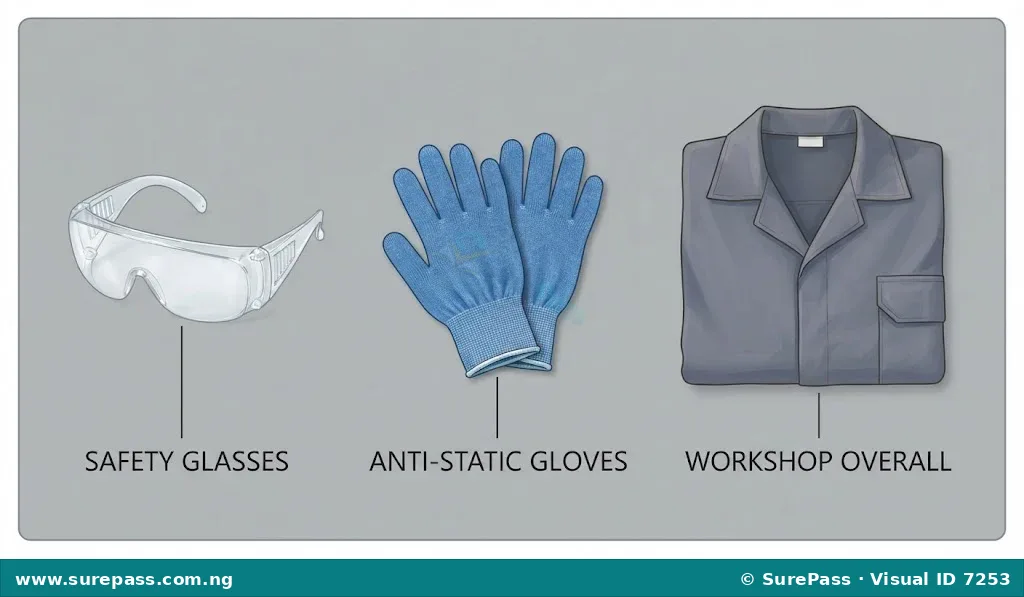
Using appropriate PPE is a fundamental requirement in computer and GSM repair workshops. The primary PPE items used by technicians include safety glasses, gloves, and overalls.
Safety Glasses
Safety glasses protect the eyes from flying debris, solder splashes, or clipped wire ends. During soldering or when cutting component leads with diagonal cutters, tiny fragments can fly off at high speeds. Safety glasses form a protective barrier over the eyes to prevent permanent vision damage.
Gloves
Gloves protect the hands from burns, cuts, and electrostatic discharge. Heat-resistant gloves are used when handling hot soldering irons or hot air rework stations. Antistatic gloves, made of conductive fibers, prevent static electricity from transferring from the technician’s body to sensitive electronic components.
Overalls
Overalls protect clothing and skin from chemical spills, dust, and minor burns. They are typically made of static-dissipative materials to prevent the buildup of static charges that could damage microchips during repairs.
Look at the personal protective equipment shown below.
Safety Precautions in the Electronic Workshop
Safety precautions are actions or measures taken beforehand to prevent accidents, injury, or damage in a workspace.
Implementing standard safety precautions minimizes risks and ensures a productive repair environment. The key safety precautions in a computer and GSM repair workshop are:
- Proper Ventilation: Soldering processes release toxic fumes from lead and flux. Proper ventilation, such as open windows or fume extractors, ensures clean air and prevents respiratory illnesses.
- Organized Workspace: A clean, clutter-free workbench prevents accidental drops, short circuits, and tripping hazards. Tools should be kept in their designated holders.
- Use of Anti-Static Strap: An anti-static wrist strap grounds the technician, preventing electrostatic discharge (ESD) from damaging sensitive microchips like CPUs and RAM.
- Avoid Overloading: Connecting too many high-power devices to a single electrical outlet can cause overheating, melting of wires, and electrical fires.
- Proper Use of Equipment and Following Manufacturer Guidelines: Tools must only be used for their intended purposes, and operating manuals must be read and followed to prevent equipment damage and personal injury.
How to Apply Safety Precautions and Use Tools Appropriately
This section provides step-by-step procedures for demonstrating safety precautions and using electronic tools appropriately during computer and mobile phone repairs.
How to Use an Anti-Static Wrist Strap
The anti-static wrist strap is used to prevent electrostatic discharge from damaging sensitive electronic components during repairs.
The required materials are:
- An anti-static wrist strap with an alligator clip
- A computer chassis or a grounded metal surface
The procedure involves the following steps:
- Wrap the adjustable band of the anti-static strap securely around the wrist.
- Ensure the metal plate on the inside of the band makes direct contact with the skin.
- Attach the alligator clip on the other end of the coiled cord to an unpainted metal surface of the computer chassis or a designated grounding point.
- Keep the strap connected throughout the process of handling internal computer components.
How to Organize a Repair Workspace
An organized workspace reduces the risk of accidents and tool damage during repair tasks.
The procedure involves the following steps:
- Clear the workbench of all non-essential items, food, and drinks.
- Arrange hand tools, such as screwdrivers and tweezers, in a designated tool holder or tray.
- Place the soldering iron in its safety stand when not in use.
- Position the anti-static mat flat on the work surface.
- Ensure all power cables are neatly routed and not hanging where they can be tripped over.
How to Use a Soldering Iron Safely
A soldering iron is a heat-producing tool used to join electronic components. It must be handled with extreme care to avoid burns and fires.
The required materials are:
- A soldering iron with a safety stand
- Solder wire
- Safety glasses
The procedure involves the following steps:
- Inspect the power cord of the soldering iron for any cracks or exposed wires before plugging it in.
- Place the soldering iron securely in its stand while it heats up.
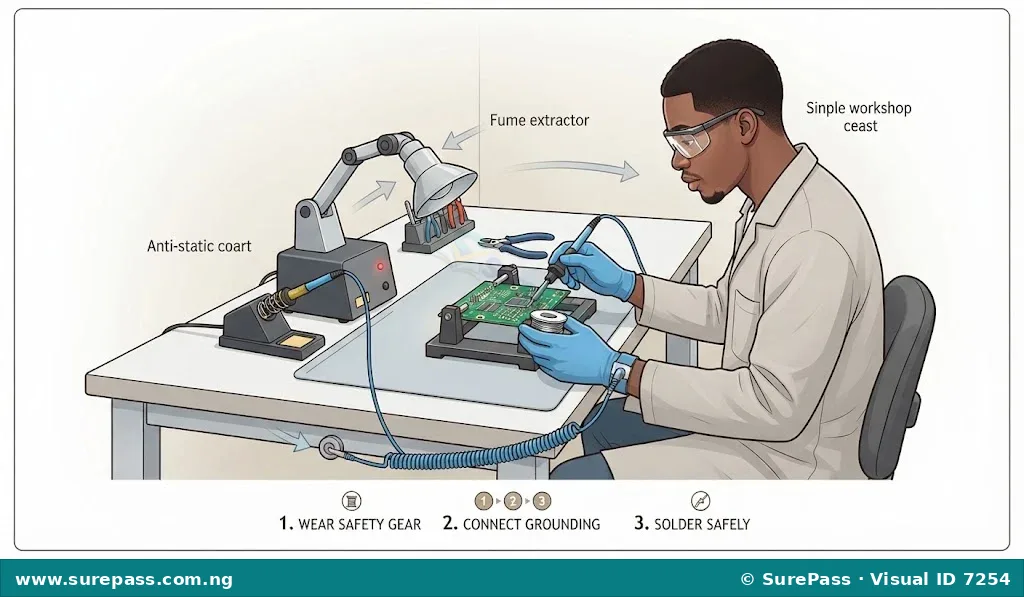
- Wear safety glasses to protect the eyes from solder splashes.
- Apply solder only to the joint, avoiding contact with skin or plastic parts of the device.
- Turn off and unplug the soldering iron immediately after use, allowing it to cool completely before storage.
Observe the correct posture and setup for soldering shown below.
Summary of Safety Rules for Computer and GSM Repairs
The essential safety rules for computer and GSM repairs are summarized below:
- Always disconnect the power source before opening any electronic device.
- Never work on electronic devices in wet or damp conditions.
- Wear safety glasses when soldering or cutting wires.
- Use an anti-static wrist strap when handling internal computer components.
- Keep liquid containers far away from the work area.
- Do not touch the heating element of a soldering iron.
- Ensure the workshop has a functional fire extinguisher and a first aid kit.





0 comments
Open the discussion when you need it. Comments stay collapsed until requested so the initial article remains light.