


ARTICLE CONTENTSOn this page 9 sections
Digital Storytelling & Presentation
Performance Objectives
By the end of the lesson, students should be able to:
- create simple digital stories and multimedia presentations using text, images, and audio;
- apply basic presentation principles for clear communication and audience engagement;
- use basic presentation design principle in creating multimedia presentations.
Introduction to Digital Storytelling
Digital storytelling is the practice of using digital tools to tell a story. It combines traditional storytelling elements like plot, characters, and emotion with multimedia elements such as images, audio, video, and text. The goal is to create an engaging and impactful narrative that can be shared easily through digital platforms.
Digital stories can be used for various purposes, including education, marketing, personal expression, and sharing information. They allow creators to present ideas in a dynamic and memorable way, often making complex topics easier to understand and more interesting for the audience.
Multimedia Elements
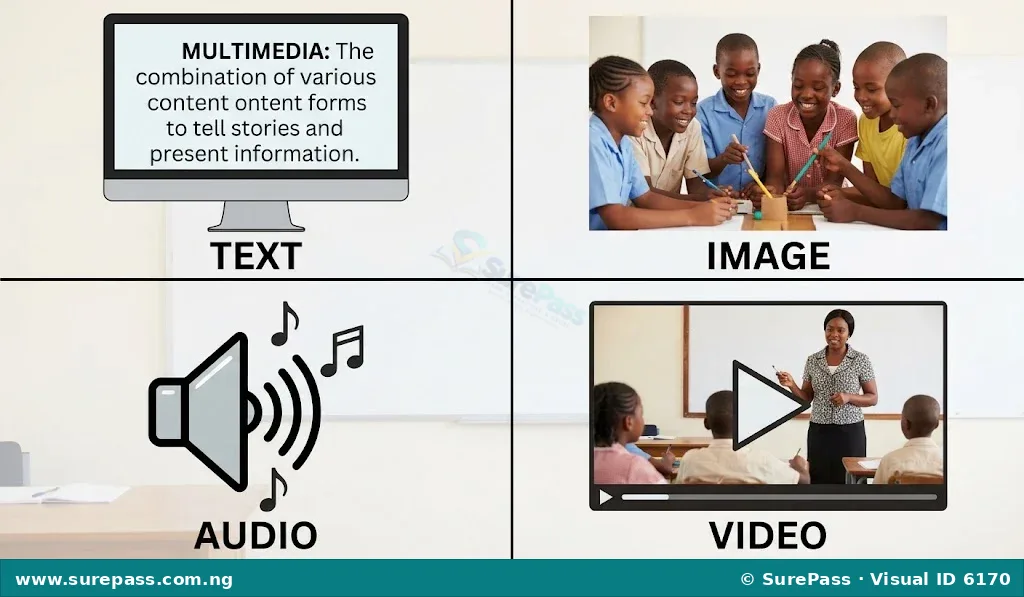
Multimedia elements are the different types of content used to create a digital story or presentation. Combining these elements helps to make the content richer, more engaging, and more effective in communicating a message.
The main multimedia elements include:
- Text: This refers to written words, sentences, and paragraphs. In digital storytelling and presentations, text is used to provide information, explain concepts, give instructions, or narrate parts of the story. It should be clear, concise, and easy to read.
- Images: These are visual elements such as photographs, drawings, charts, graphs, and illustrations. Images help to convey emotions, show examples, illustrate ideas, and break up large blocks of text, making the content more visually appealing and easier to understand.
- Audio: This includes sounds like music, voiceovers, sound effects, and narration. Audio can set the mood, provide background information, explain visuals, or add emphasis to certain parts of the story. A clear voiceover or appropriate background music can greatly enhance a digital story.
- Video: This involves moving pictures, often with accompanying sound. Video clips can show actions, demonstrations, interviews, or real-life events. They are highly engaging and can convey a lot of information in a short period, bringing a story to life.
Principles of Digital Storytelling
To create an effective digital story, certain principles should be followed. These principles ensure that the story is well-structured, easy to follow, and captivating for the audience.
The key principles of digital storytelling are:
- Narrative Flow: This refers to how smoothly the story progresses from one point to the next. A good narrative flow ensures that the audience can easily follow the sequence of events or ideas. It involves a clear beginning, middle, and end, with logical transitions between different parts of the story. The story should build up naturally, keeping the audience engaged without confusion.
- Clarity: Clarity means that the message of the story is easy to understand and free from ambiguity. Every element—text, images, audio, and video—should contribute to the main message without causing confusion. The language used should be simple and direct, and visuals should clearly illustrate the points being made. A clear story ensures the audience grasps the intended message without effort.
- Creativity: Creativity involves using imagination and original ideas to make the story unique and interesting. This can be achieved through innovative use of multimedia elements, unique perspectives, engaging visuals, or a fresh approach to a familiar topic. Creativity helps to capture and hold the audience’s attention, making the digital story memorable and impactful.
Basic Presentation Design Principles
Effective presentations are not just about the content; they also depend on how that content is presented visually. Good design principles make a presentation clear, professional, and engaging.
The basic presentation design principles include:
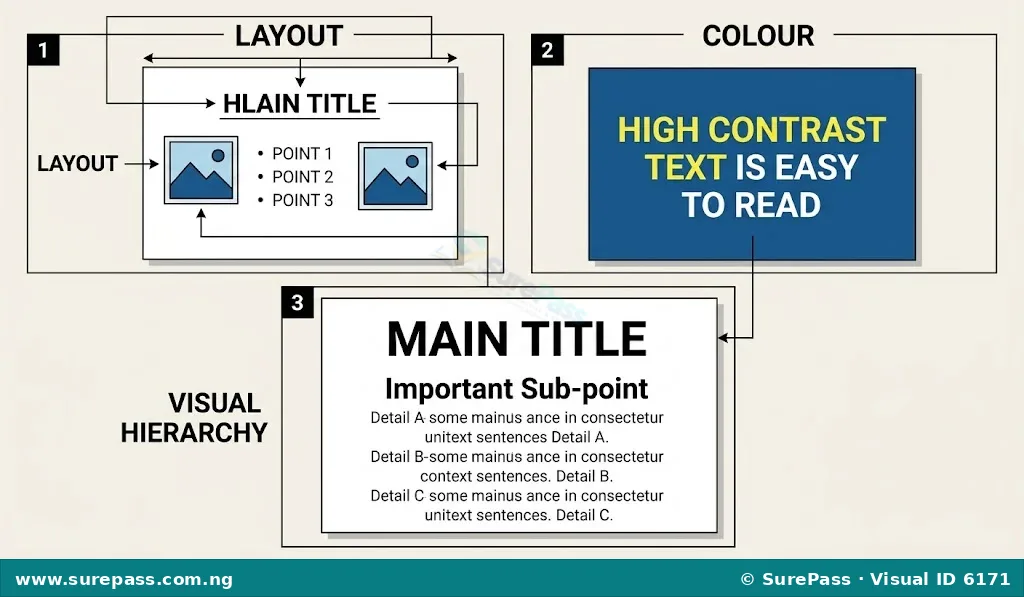
- Layout: This refers to the arrangement of text, images, and other elements on each slide. A good layout ensures that information is organised, easy to read, and visually balanced. Key considerations for layout include:
- Consistency: Use similar layouts, fonts, and colours across all slides for a cohesive look.
- Simplicity: Avoid clutter. Each slide should focus on one main idea.
- White Space: Leave empty areas around elements to make the slide look clean and less overwhelming.
- Alignment: Align text and images neatly to create a sense of order.
- Colour: Colour plays a significant role in setting the mood, highlighting important information, and enhancing readability. When choosing colours for a presentation:
- Contrast: Ensure there is enough contrast between text colour and background colour for easy reading (e.g., dark text on a light background).
- Limited Palette: Use a limited number of colours (typically 2-3 main colours) to maintain a professional look.
- Meaning: Be aware that colours can evoke different emotions or meanings. For example, blue often suggests professionalism, while green can suggest nature or growth.
- Visual Hierarchy: This principle involves arranging elements on a slide in a way that guides the audience’s eyes to the most important information first. It helps the audience understand the order and relationship of information. Visual hierarchy can be achieved through:
- Size: Larger elements (e.g., headings, important images) naturally draw more attention.
- Placement: Elements placed at the top or centre of a slide often receive more focus.
- Colour and Contrast: Using brighter or contrasting colours for key elements can make them stand out.
- Font Weight: Using bold or heavier fonts for important text.
Creating Digital Stories, Infographics, and Simple Slide Presentations
Creating digital content involves a series of steps, from planning your message to combining various elements using digital tools. The process generally follows a similar pattern, whether you are making a story, an infographic, or a slide presentation.
How to Create a Digital Story
A digital story combines narrative with multimedia to convey a message or experience. The procedure involves the following steps:
- Define Your Story: Choose a topic, identify your main message, and decide on the key points you want to convey. Think about the emotions or ideas you want to evoke.
- Write a Script or Outline: Develop a simple script that includes the narration, descriptions of visuals, and ideas for sound effects or music. This helps to structure your narrative flow.
- Gather Multimedia Elements: Collect or create the necessary text, images, audio clips (e.g., voiceover, background music), and short video clips. Ensure all elements are relevant to your story.
- Choose a Digital Tool: Select a suitable software or online platform for creating your digital story. Examples include Google Slides, Microsoft PowerPoint, or simple video editing tools.
- Assemble Your Story:
- Import your collected multimedia elements into your chosen tool.
- Arrange the images and video clips in the correct sequence according to your script.
- Record or add your narration and background music.
- Add text overlays or captions where necessary to support the visuals.
- Review and Refine: Play through your digital story. Check for clarity, narrative flow, and overall impact. Make adjustments to timing, volume, or visual elements as needed.
- Share Your Story: Export your digital story in a suitable format (e.g., video file) and share it with your audience.
How to Create an Infographic
An infographic is a visual representation of information or data, designed to present complex information quickly and clearly. The procedure involves the following steps:
- Identify Your Data/Information: Determine the key facts, statistics, or concepts you want to present.
- Outline Your Message: Decide on the main message or story your infographic will tell. Organise your information logically.
- Choose a Digital Tool: Select an infographic creation tool. Canva is a popular and user-friendly option.
- Select a Template: Many tools offer pre-designed templates. Choose one that suits your data and message.
- Add Your Content:
- Input your text, ensuring it is concise and easy to read.
- Use icons, charts, and graphs to represent data visually.
- Incorporate relevant images to make the infographic more engaging.
- Apply Design Principles: Pay attention to layout, colour scheme, and visual hierarchy to ensure clarity and appeal.
- Review and Export: Check for accuracy, readability, and visual appeal. Export your infographic as an image file (e.g., JPEG, PNG).
How to Create a Simple Slide Presentation
Slide presentations are commonly used to deliver information visually and orally. The procedure involves the following steps:
- Determine Your Topic and Audience: Clearly define what your presentation is about and who you are presenting to.
- Outline Your Content: Break down your topic into main points and supporting details. Each main point can become a separate slide or a section of slides.
- Choose a Presentation Software: Use tools like Microsoft PowerPoint or Google Slides.
- Select a Design Theme: Choose a simple, professional theme that provides a consistent look for your slides.
- Create Your Slides:
- Start with a title slide.
- For each main point, create a new slide.
- Add concise text (e.g., bullet points) and relevant images or charts.
- Ensure each slide focuses on one idea to avoid overwhelming the audience.
- Apply Design Principles: Use clear layouts, contrasting colours, and visual hierarchy to make your slides easy to understand and engaging.
- Practice Your Delivery: Rehearse your presentation to ensure smooth transitions and clear oral communication.
- Save and Present: Save your presentation and be ready to display it using a projector or smartboard.
Using Multimedia Components Effectively in Presentations
Simply including multimedia elements is not enough; they must be used effectively to enhance communication and audience engagement. Each component has a role in making your presentation impactful.
- Text:
- Keep it Concise: Use bullet points and short phrases instead of long paragraphs. The slides should support your spoken words, not replace them.
- Readability: Choose clear, legible fonts and ensure sufficient font size for easy reading from a distance.
- Highlight Key Information: Use bolding or different colours sparingly to draw attention to crucial words or phrases.
- Images:
- Relevance: Use images that directly relate to your content and help illustrate your points. Avoid decorative images that do not add value.
- High Quality: Use clear, high-resolution images. Blurry or pixelated images look unprofessional.
- Placement: Position images strategically to complement text and maintain a balanced layout.
- Captions: Add short captions if an image needs further explanation.
- Audio:
- Clarity of Narration: If using voiceovers, ensure the audio is clear, free from background noise, and spoken at an appropriate pace and volume.
- Appropriate Music: Select background music that matches the tone of your presentation and is not distracting. Keep the volume low so it does not overpower narration.
- Sound Effects: Use sound effects sparingly and only when they genuinely enhance a point or create a desired atmosphere.
- Video:
- Short and Focused: Use short video clips that directly support your message. Long videos can distract or bore the audience.
- Integration: Ensure videos are smoothly integrated into your presentation flow. Test them beforehand to avoid technical issues.
- Purposeful Use: Only use video when it is the best way to convey information, such as demonstrating a process or showing a real-life example.
Communicating Ideas Visually and Orally Using Digital Tools
Digital tools provide powerful ways to communicate ideas, both visually through presentations and orally through narration or live speaking. Effective communication involves combining these aspects skillfully.
- Visual Communication:
- Clear Visuals: Use high-quality images, charts, and diagrams that are easy to understand at a glance. Avoid overcrowding slides with too many visuals.
- Minimal Text: Let your visuals and spoken words do most of the work. Text on slides should be brief, serving as cues for you and the audience.
- Consistent Design: Maintain a consistent look and feel across all your slides using uniform fonts, colours, and layouts. This makes the presentation appear professional and organised.
- Visual Hierarchy: Guide the audience’s attention to the most important information on each slide using size, colour, and placement.
- Oral Communication:
- Clear Speaking: Speak clearly, confidently, and at a moderate pace. Articulate your words well so the audience can easily follow your message.
- Engaging Delivery: Use appropriate tone, pitch, and volume to keep the audience interested. Make eye contact if presenting live.
- Storytelling: Even in a formal presentation, incorporating storytelling techniques can make your message more memorable and relatable.
- Practice: Rehearse your presentation multiple times. This helps you to become familiar with the content, manage your time, and deliver your message smoothly.
- Using Digital Tools for Communication:
- Presentation Software: Tools like Microsoft PowerPoint, Google Slides, and Canva allow you to create visually appealing slides that support your oral delivery.
- Audio Recording: For digital stories, an audio recorder or microphone is essential for clear voiceovers and narration.
- Projectors/Smartboards: These devices are used to display your digital presentations to a larger audience, ensuring everyone can see your visuals clearly.




0 comments
Open the discussion when you need it. Comments stay collapsed until requested so the initial article remains light.