


ARTICLE CONTENTSOn this page 11 sections
Basics of Python Programming
Performance Objectives
By the end of the lesson, students should be able to:
- state the difference between a program and an algorithm using examples;
- construct valid python expressions with variables;
- troubleshoot and debug a program with logical, syntax, and semantic errors;
- write a python program that demonstrates the use of sequencing and selection;
- write a program that uses iteration (for loops and while loops);
- locate and correct errors in programs.
Introduction to Programming
Digital technologies rely on instructions to perform tasks. These instructions are given to computers in a specific language that they can understand. Learning to program means learning to write these instructions.
What is a Program?
A program is a set of instructions that a computer follows to perform a specific task.
Programs are written using programming languages like Python, Java, or C++. When a computer runs a program, it executes these instructions step-by-step to achieve a desired outcome. For example, a calculator application is a program that performs mathematical calculations, and a video game is a program that provides interactive entertainment.
What is an Algorithm?
An algorithm is a step-by-step procedure or a set of rules for solving a problem or accomplishing a task.
Algorithms are like recipes. They describe the exact steps needed to achieve a result, without necessarily specifying how those steps are implemented in a computer language. Before writing a program, a programmer usually designs an algorithm to outline the logic and sequence of operations. This helps to ensure that the program will correctly solve the problem.
Examples of algorithms include:
- A recipe for cooking jollof rice.
- Instructions for withdrawing money from an ATM.
- Steps to solve a mathematical problem.
- Directions to get from one location to another.
Difference Between a Program and an Algorithm
While closely related, a program and an algorithm are not the same. An algorithm is the logical plan or blueprint for solving a problem, while a program is the actual implementation of that plan using a specific programming language that a computer can execute.
Think of it this way: an algorithm is the idea or concept of how to solve a problem, written in plain language or pseudocode. A program is that idea translated into code that a computer can run.
Consider the task of calculating the sum of two numbers:
Algorithm:
- Start.
- Get the first number.
- Get the second number.
- Add the two numbers together.
- Display the result.
- End.
Python Program:
# This program calculates the sum of two numbers

num1 = 10
num2 = 20
sum_result = num1 + num2
print("The sum is:", sum_result)
The algorithm describes the general steps, while the Python program provides the exact syntax and commands for a computer to follow.
Basic Python Syntax
Python has specific rules for writing code, known as its syntax. Understanding these rules is crucial for writing correct and functional programs.
Variables
A variable is a named storage location in a computer’s memory used to hold data that can change during program execution.
In Python, variables are created when a value is assigned to them. They do not need to be declared with a specific type before use. Python automatically determines the data type based on the assigned value.
Rules for naming variables in Python:
- Variable names must start with a letter (a-z, A-Z) or an underscore (_).
- They cannot start with a number.
- Variable names can only contain alpha-numeric characters (A-Z, a-z, 0-9) and underscores (_).
- Variable names are case-sensitive (e.g., `age`, `Age`, and `AGE` are three different variables).
- Reserved keywords (like `if`, `for`, `while`, `print`) cannot be used as variable names.
Examples of variable assignment:
name = "Alice"       # A string variable
age = 17             # An integer variable
height = 1.65        # A floating-point variable
is_student = True    # A boolean variable
Indentation
Indentation refers to the spaces or tabs at the beginning of a line of code.
Unlike many other programming languages that use curly braces `{}` to define blocks of code, Python uses indentation. This means that lines of code that belong to the same block (e.g., inside an `if` statement, a `for` loop, or a function) must have the same level of indentation. Typically, four spaces are used for each level of indentation.
Incorrect indentation will lead to a `SyntaxError` in Python.
Example of correct indentation:
if age >= 18:
    print("You are an adult.")
    print("You can vote.")
else:
    print("You are a minor.")
In this example, the `print` statements under `if` are indented, and the `print` statement under `else` is also indented, showing they belong to their respective blocks.
Comments
Comments are lines of text within a program that are ignored by the Python interpreter.
The purpose of comments is to make the code more understandable for humans. Programmers use comments to explain what the code does, why a certain approach was taken, or to temporarily disable parts of the code during testing.
In Python, comments start with a hash symbol (`#`). Any text following the `#` on that line is considered a comment.
Examples of comments:
# This is a single-line comment
# It explains the next line of code

name = "Chike"  # This comment explains the variable 'name'

# Multi-line comments can be written by using multiple single-line comments
# Or by using triple quotes, though this is technically a string literal
# that is not assigned to a variable, so it acts like a comment.
"""
This is a multi-line comment.
It can span across several lines.
"""
Statements and Expressions
A statement is a complete instruction that the Python interpreter can execute.
Statements perform actions. Examples include assigning a value to a variable, printing something to the screen, or controlling the flow of the program.
Examples of statements:
- `x = 10` (Assignment statement)
- `print(“Hello, Python!”)` (Print statement)
- `if x > 5:` (Conditional statement)
An expression is a combination of values, variables, operators, and function calls that Python evaluates to produce a single result.
Expressions produce a value. They can be part of a statement.
Examples of expressions:
- `10 + 5` (Evaluates to 15)
- `age * 2` (Evaluates to the value of `age` multiplied by 2)
- `”Hello” + ” World”` (Evaluates to “Hello World”)
- `x > 5` (Evaluates to `True` or `False`)
In the statement `result = 10 + 5`, `10 + 5` is an expression, and `result = 10 + 5` is a statement.
Programming Errors
Programming errors, also known as bugs, are mistakes in the code that prevent a program from running correctly or at all.
Identifying and fixing these errors is a crucial part of programming called debugging.
Types of Programming Errors
-
Syntax Errors:
A syntax error occurs when the program violates the grammatical rules of the Python language.
These are the easiest errors to find because the Python interpreter detects them before the program even starts running and stops execution. The interpreter usually points to the line where the error occurred and provides a hint about the type of error.
Examples of syntax errors include:
- Missing a colon (`:`) at the end of an `if` statement or loop.
- Misspelling a keyword (e.g., `prnt` instead of `print`).
- Using incorrect indentation.
- Missing quotation marks for a string.
Example:
# Syntax Error: Missing colon
if x > 10
    print("x is greater than 10")
To correct this, add a colon after `10`:
if x > 10: print("x is greater than 10") -
Logical Errors:
A logical error occurs when the program runs without crashing, but it produces an incorrect or unexpected result because of a flaw in the program’s logic.
These errors are harder to find because the interpreter does not report them. The program appears to work, but it does not do what the programmer intended. Debugging logical errors often involves carefully checking the algorithm, tracing the program’s execution with sample inputs, and examining variable values at different points.
Examples of logical errors include:
- Using the wrong mathematical operator (e.g., subtraction instead of addition).
- Incorrectly setting up a condition in an `if` statement or loop.
- Performing calculations in the wrong order.
Example: A program intended to calculate the average of two numbers, but it subtracts instead of adds.
# Logical Error: Incorrect operation for average
num1 = 10
num2 = 20
average = (num1 - num2) / 2 # Should be (num1 + num2) / 2
print("Average:", average) # Output will be -5.0, which is incorrect
To correct this, change the subtraction to addition:
num1 = 10 num2 = 20 average = (num1 + num2) / 2 print("Average:", average) # Output will be 15.0, which is correct -
Semantic Errors:
A semantic error occurs when the code is syntactically correct but does not make sense to the interpreter at runtime, or it leads to an unintended meaning or action that causes the program to crash or behave unexpectedly.
These errors are often related to runtime issues, such as trying to perform an operation on an incompatible data type, accessing a variable that hasn’t been defined, or dividing by zero. While the syntax is correct, the meaning or intent of the operation is invalid or impossible at the moment of execution.
Examples of semantic errors include:
- Trying to add a number to a string without converting the string to a number.
- Attempting to divide a number by zero.
- Using a variable before it has been assigned a value.
Example:
# Semantic Error: Trying to add a number and a string
age = 17
message = "Your age is: " + age # This will cause a TypeError at runtime
print(message)
To correct this, convert the number to a string before concatenation:
age = 17
message = "Your age is: " + str(age) # Convert age to string
print(message)
Conditional Executions (Control Statements)
Control statements are programming constructs that determine the order in which instructions are executed in a program.
They allow programs to make decisions, repeat actions, and execute code blocks in a non-sequential manner, making programs dynamic and powerful.
Types of Control Statements
-
Sequencing:
Sequencing is the default execution flow where instructions are executed one after another in the order they appear in the program.
Most simple programs follow a sequential flow. Each statement is executed in the order it is written, from top to bottom.
Example:
# Sequencing example print("Step 1: Get input") num = 5 print("Step 2: Process input") result = num * 2 print("Step 3: Display output") print("Result:", result) -
Selection (Decision Making):
Selection allows a program to choose between different paths of execution based on whether a certain condition is true or false.
This is achieved using `if` statements, which evaluate conditions and execute specific blocks of code only if those conditions are met.
-
Iteration (Looping):
Iteration allows a program to repeat a block of code multiple times.
This is useful for tasks that need to be performed repeatedly, such as processing items in a list or performing a calculation until a certain condition is met. Python uses `for` loops and `while` loops for iteration.
Logical Operators
Logical operators are used to combine conditional statements or to invert the truth value of a condition.
They are essential for building complex conditions in `if` statements and loops.
The main logical operators in Python are:
-
`and` operator: Returns `True` if both conditions are true; otherwise, it returns `False`.
Example: `(age > 10) and (age < 20)` is `True` if `age` is between 11 and 19.
-
`or` operator: Returns `True` if at least one of the conditions is true; otherwise, it returns `False`.
Example: `(day == “Saturday”) or (day == “Sunday”)` is `True` if `day` is either Saturday or Sunday.
-
`not` operator: Inverts the truth value of a condition. If a condition is `True`, `not` makes it `False`, and vice versa.
Example: `not (is_raining)` is `True` if `is_raining` is `False`.
Relational Operators
Relational operators are used to compare two values and determine the relationship between them.
They always return a Boolean value (`True` or `False`). These operators are fundamental for creating conditions in control statements.
The relational operators in Python are:
- `==` (Equal to): Checks if two values are equal.
- `!=` (Not equal to): Checks if two values are not equal.
- `>` (Greater than): Checks if the left value is greater than the right value.
- `<` (Less than): Checks if the left value is less than the right value.
- `>=` (Greater than or equal to): Checks if the left value is greater than or equal to the right value.
- `<=` (Less than or equal to): Checks if the left value is less than or equal to the right value.
Examples of relational operators:
x = 10
y = 5

print(x == y)  # False
print(x != y)  # True
print(x > y)   # True
print(x = y)  # True
print(x <= y)  # False
Selection Control Statements
Selection statements allow a program to execute different blocks of code based on conditions.
The `if` Statement (One-Way Selection)
The `if` statement executes a block of code only if a specified condition is `True`.
If the condition is `False`, the code block inside the `if` statement is skipped, and the program continues with the statements after the `if` block.
Syntax:
if condition:
    # Code to execute if condition is True
Example:
score = 75
if score >= 70:
    print("Excellent! You got an A.")
print("End of program.")
In this example, “Excellent! You got an A.” will be printed because `score >= 70` is `True`.
The `if-else` Statement (Two-Way Selection)
The `if-else` statement provides two alternative paths of execution. One block of code is executed if the condition is `True`, and a different block is executed if the condition is `False`.
Syntax:
if condition:
    # Code to execute if condition is True
else:
    # Code to execute if condition is False
Example:
age = 16
if age >= 18:
    print("You are eligible to vote.")
else:
    print("You are not yet eligible to vote.")
In this case, “You are not yet eligible to vote.” will be printed because `age >= 18` is `False`.
The `if-elif-else` Statement (Multi-Way Selection)
The `if-elif-else` statement is used when there are multiple conditions to check. It allows the program to test several conditions sequentially and execute the code block corresponding to the first `True` condition.
Syntax:
if condition1:
    # Code to execute if condition1 is True
elif condition2:
    # Code to execute if condition2 is True
elif condition3:
    # Code to execute if condition3 is True
else:
    # Code to execute if none of the above conditions are True
Example: A program to check if a number is positive, negative, or zero.
number = -7

if number > 0:
    print("The number is positive.")
elif number < 0:
    print("The number is negative.")
else:
    print("The number is zero.")
For `number = -7`, the output will be “The number is negative.”
Nested `if` Statements
Nested `if` statements involve placing an `if` or `if-else` statement inside another `if` or `else` block.
This allows for more complex decision-making where a condition needs to be checked only after another condition has already been met.
Example: Checking eligibility for a discount based on age and purchase amount.
age = 25
purchase_amount = 12000

if age >= 18:
    print("Eligible for general offers.")
    if purchase_amount > 10000:
        print("You qualify for a special discount!")
    else:
        print("No special discount for this purchase amount.")
else:
    print("Not eligible for adult offers.")
In this example, since `age >= 18` is `True`, the inner `if` statement is checked. Since `purchase_amount > 10000` is also `True`, “You qualify for a special discount!” will be printed.
Iteration Control Statements (Loops)
Iteration statements, or loops, allow a block of code to be executed repeatedly.
The `for` Loop
A `for` loop is used to iterate over a sequence (like a list, tuple, string, or range) or other iterable objects.
It executes a block of code once for each item in the sequence.
Syntax:
for item in sequence:
    # Code to execute for each item
The `range()` function is often used with `for` loops to generate a sequence of numbers. `range(start, stop, step)` generates numbers from `start` up to (but not including) `stop`, with an optional `step`.
Example 1: Iterating through a list of names.
names = ["Aisha", "Bayo", "Chika"]
for name in names:
    print("Hello,", name)
Example 2: Counting from 1 to 5 using `range()`.
for i in range(1, 6): # Generates numbers 1, 2, 3, 4, 5
    print(i)
The `while` Loop
A `while` loop repeatedly executes a block of code as long as a given condition is `True`.
The loop continues to run until the condition becomes `False`. It is important to ensure that the condition eventually becomes `False` to avoid an infinite loop.
Syntax:
while condition:
    # Code to execute as long as condition is True
Example: Counting down from 5 to 1.
count = 5
while count > 0:
    print(count)
    count = count - 1 # Decrement count, so the condition eventually becomes False
print("Blast off!")
This loop will print 5, 4, 3, 2, 1, and then “Blast off!”.
Writing Simple Python Programs
The following examples demonstrate how to combine the concepts learned to write functional Python programs.
Program 1: Demonstrating Sequencing and Selection
This program takes a student’s score as input and prints their grade based on a simple grading system. It uses sequencing for input and output, and selection (`if-elif-else`) for grading.
# Program to determine a student's grade

# 1. Sequencing: Get input
# The input() function reads text, so we convert it to an integer using int()
score_str = input("Enter the student's score: ")
score = int(score_str)

# 2. Selection: Determine grade based on score
if score >= 70:
    grade = "A"
elif score >= 60:
    grade = "B"
elif score >= 50:
    grade = "C"
elif score >= 40:
    grade = "D"
else:
    grade = "F"

# 3. Sequencing: Display output
print("The student's score is:", score)
print("The student's grade is:", grade)
Program 2: Demonstrating Iteration (Login Simulation)
This program simulates a simple login system using a `while` loop to allow multiple attempts and `if-else` for checking credentials.
# Simple login simulation

correct_username = "admin"
correct_password = "password123"
max_attempts = 3
attempts = 0

print("Welcome to the login system.")

# Use a while loop for multiple login attempts
while attempts < max_attempts:
    username = input("Enter username: ")
    password = input("Enter password: ")

    # Use if-else for selection (checking credentials)
    if username == correct_username and password == correct_password:
        print("Login successful! Welcome.")
        break # Exit the loop if login is successful
    else:
        attempts = attempts + 1 # Increment attempts
        remaining_attempts = max_attempts - attempts
        if remaining_attempts > 0:
            print(f"Invalid credentials. You have {remaining_attempts} attempts left.")
        else:
            print("Invalid credentials. No attempts left.")

# This part executes after the loop finishes (either by break or max attempts reached)
if attempts == max_attempts:
    print("Account locked. Please contact support.")
Program 3: Using a `for` Loop to Calculate Sum of Numbers
This program calculates the sum of numbers from 1 to a user-specified number using a `for` loop.
# Program to calculate sum of numbers up to N

# Get input from the user
limit_str = input("Enter a positive integer: ")
limit = int(limit_str)

total_sum = 0

# Use a for loop to iterate from 1 up to the limit
for i in range(1, limit + 1): # range(1, N+1) includes N
    total_sum = total_sum + i # Add each number to total_sum

# Display the result
print(f"The sum of numbers from 1 to {limit} is: {total_sum}")
Locating and Correcting Errors in Programs (Debugging)
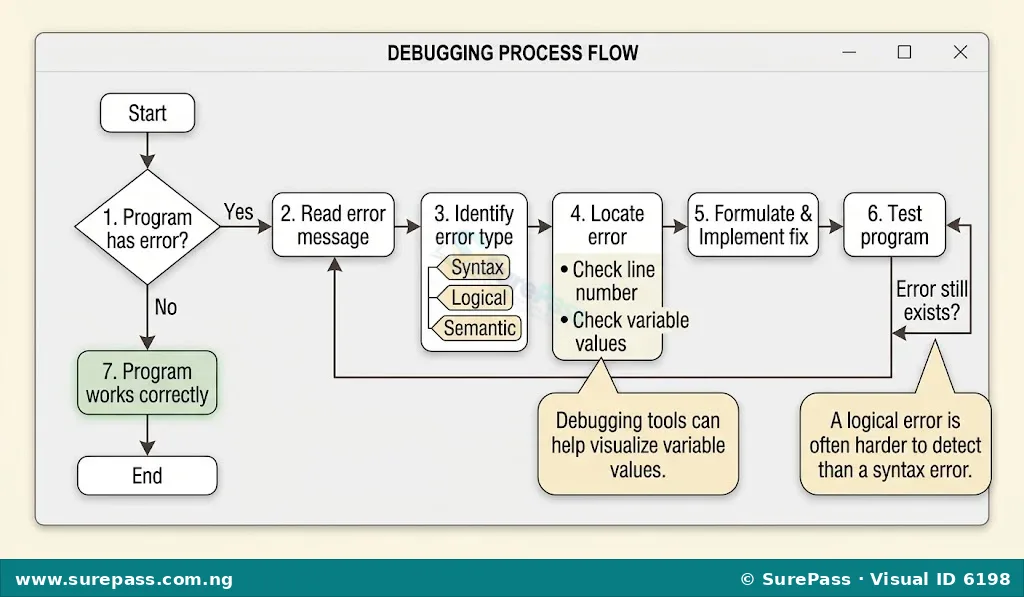
Debugging is the process of finding and fixing errors (bugs) in computer programs. It is an essential skill for any programmer.
Steps to effectively locate and correct errors:
-
Understand the Error Message:
When a syntax or semantic (runtime) error occurs, Python usually provides an error message (a “traceback”). Read this message carefully. It often tells you the type of error (e.g., `SyntaxError`, `TypeError`, `NameError`) and the line number where the error occurred. This is your first clue.
Example of a `SyntaxError` message:
File "my_program.py", line 3
    if x > 10
             ^
SyntaxError: expected ':'
This message clearly indicates a `SyntaxError` on line 3 and suggests that a colon (`:`) is expected.
-
Check the Line Number:
Go directly to the line number indicated in the error message. The error is often on that line or the line immediately preceding it.
-
Examine the Code Around the Error:
Look closely at the code on the identified line and the lines around it. Check for common mistakes related to the error type:
- For Syntax Errors: Look for missing colons, incorrect indentation, misspelled keywords, unmatched parentheses or quotes.
- For Semantic Errors (Runtime Errors): Check variable names (is it defined?), data types (are you trying to add a number to a string?), division by zero, or incorrect function arguments.
- For Logical Errors: These are trickier. The program runs, but the output is wrong.
-
Use `print()` Statements for Logical Errors:
To debug logical errors, strategically place `print()` statements in your code to display the values of variables at different points during execution. This helps you see how values change and where the logic might be going wrong.
Example: If a calculation is wrong, print the intermediate values:
num1 = 10 num2 = 20 # Suppose we suspect an issue with average calculation # print("num1:", num1, "num2:", num2) # Debugging print statement average = (num1 - num2) / 2 # print("Calculated average (before final check):", average) # Another debug print print("Average:", average) -
Test with Sample Inputs:
Run your program with different inputs, especially edge cases (e.g., zero, negative numbers, very large numbers, empty strings). This can help reveal logical errors that only appear under specific conditions.
-
Isolate the Problem:
If you have a large program, try to comment out sections of code or simplify parts until the error disappears. This helps you narrow down the exact section causing the problem.
-
Correct the Error:
Once you identify the cause, make the necessary correction. For example, add the missing colon, change the operator, or convert data types.
-
Retest:
After making a correction, run the program again to ensure the original error is fixed and no new errors have been introduced.




0 comments
Open the discussion when you need it. Comments stay collapsed until requested so the initial article remains light.