



ARTICLE CONTENTSOn this page 7 sections
Web Development
Performance Objectives
By the end of the lesson, students should be able to:
- describe web development;
- identify examples of web development products;
- describe the types of web development;
- explain the functions of core technologies for web development;
- state the tools for web development.
Meaning of Web Development
Web development is the process of creating and maintaining websites and web applications that run on the internet.
This process involves several stages, from designing the layout and appearance of a website to writing the code that makes it function. Web developers work to build everything a user sees and interacts with on a website, as well as the hidden systems that ensure the website works correctly.
Examples of Web Development Products
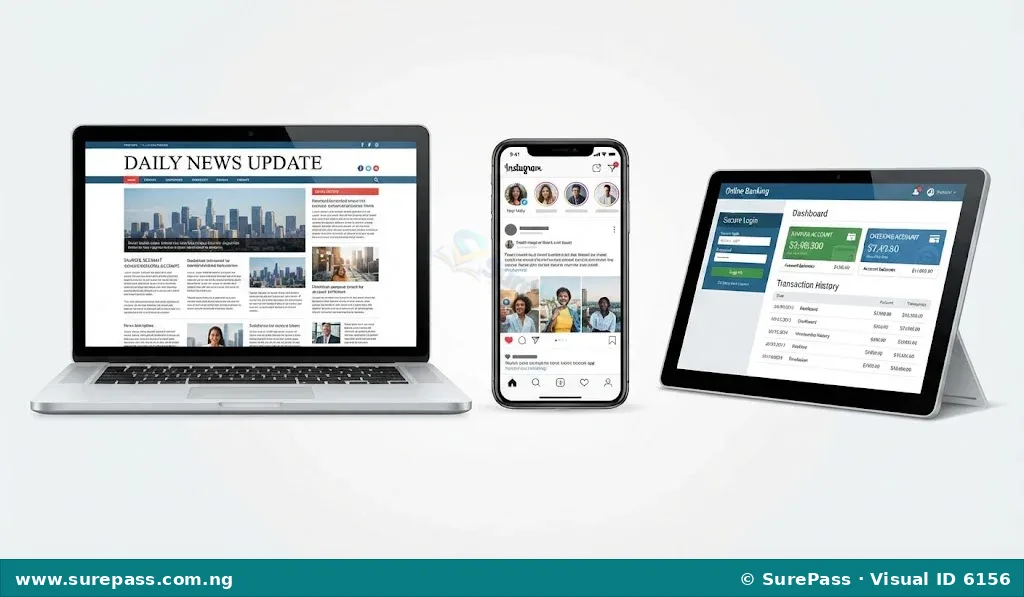
Web development produces various digital products that people use daily. These products are accessed through web browsers on devices like computers, tablets, and mobile phones.
The main examples of web development products include:
-
Websites: These are collections of related web pages, images, videos, and other digital assets that are hosted on web servers and can be accessed via the internet. Websites are typically used to display information, share news, or provide services.
Examples of websites include:
- News websites (e.g., Premium Times, Vanguard)
- Educational websites (e.g., SurePass, university portals)
- Company websites (e.g., Dangote Group, MTN Nigeria)
- Personal blogs
-
Web Applications: These are software programs that run on a web server and are accessed by users through a web browser. Unlike traditional desktop applications, web applications do not need to be installed on a user’s device. They often allow users to perform specific tasks or interact with data.
Examples of web applications include:
- Online banking portals (e.g., GTBank online, Zenith Bank internet banking)
- Email services (e.g., Gmail, Yahoo Mail)
- Social media platforms (e.g., Facebook, Twitter/X)
- E-commerce platforms (e.g., Jumia, Konga)
- Online productivity tools (e.g., Google Docs, Microsoft 365 online)
Types of Web Development
Web development can be divided into different areas, each focusing on a specific part of building a web product. These areas often require different skills and technologies.
The main types of web development are:
-
Front-End Development: This type of development focuses on the part of the website that users see and interact with directly. It is also known as client-side development. Front-end developers build the visual elements, layout, and interactive features that make a website user-friendly and appealing.
Front-end development involves creating the structure, style, and interactive elements that appear in a web browser. This includes everything from text and images to buttons, navigation menus, and forms.
-
Back-End Development: This type of development deals with the server-side of a website, which users do not see. It involves managing the server, databases, and application logic that power the website. Back-end developers ensure that the website functions correctly, stores data securely, and responds to user requests.
Back-end development handles tasks such as storing user information, processing transactions, and sending data to the front-end. It is the “brain” of the website, working behind the scenes to make everything happen.
-
Full-Stack Development: A full-stack developer is skilled in both front-end and back-end development. They can work on all parts of a web product, from designing the user interface to managing the server and database. Full-stack developers have a broad understanding of the entire web development process.
This type of developer can build a complete web application from start to finish, making them versatile and valuable in many development teams.
Functions of Core Technologies for Web Development
Three core technologies form the foundation of almost every website and web application. These technologies work together to create the structure, appearance, and interactivity of web content.
The functions of these core technologies are:
-
HyperText Markup Language (HTML) – for structuring: HTML is the standard markup language used to create web pages. It provides the basic structure and content of a web page.
HTML uses a system of “tags” to define different elements on a page, such as headings, paragraphs, images, links, and lists. It tells the web browser what content to display and how that content is organised. Think of HTML as the skeleton or framework of a building, defining where the rooms, walls, and doors will be.
-
Cascading Style Sheets (CSS) – for styling: CSS is a style sheet language used to describe the presentation of a document written in HTML. It controls the visual appearance of web pages.
CSS is used to style the HTML elements, determining their colours, fonts, spacing, layout, and overall visual design. It allows developers to make web pages look attractive and consistent. Using the building analogy, CSS is like the paint, wallpaper, furniture, and interior design that makes the building look good.
-
JavaScript (JS) – for interactivity: JavaScript is a programming language that enables interactive web pages. It allows developers to add dynamic features and behaviours to websites.
JavaScript makes web pages interactive, meaning they can respond to user actions. This includes features like animated graphics, interactive maps, form validation, dynamic content updates, and games. In the building analogy, JavaScript is like the electrical wiring, plumbing, and smart systems that make the building functional and responsive, such as lights turning on or doors opening automatically.
Web Development Tools
Web developers use various tools to create, manage, and maintain websites and web applications. These tools simplify the development process and help developers work more efficiently.
Common web development tools include:
-
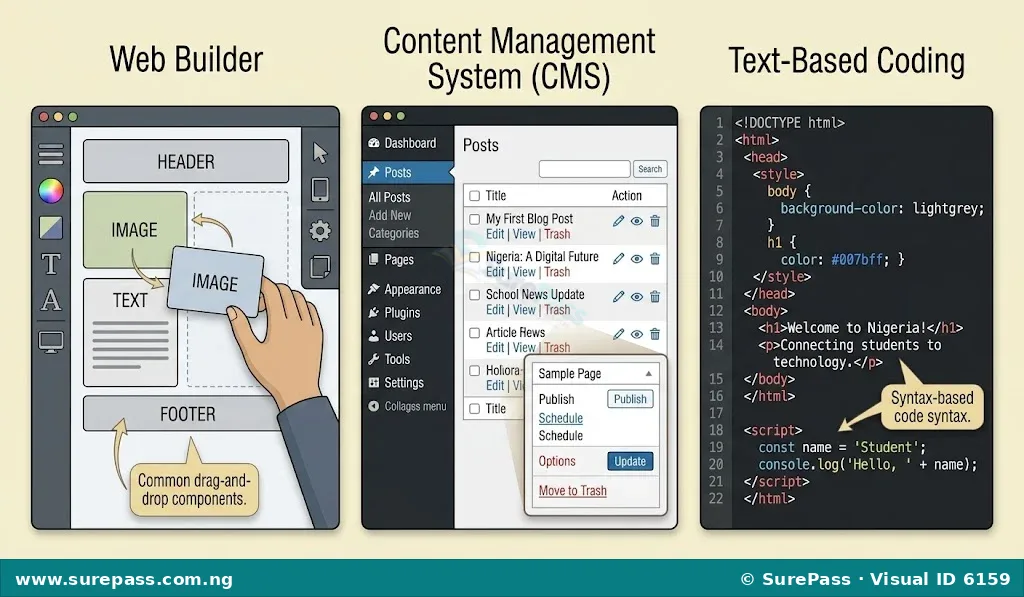
Web Builders: These are online platforms that allow users to create websites without needing to write code. They typically offer drag-and-drop interfaces, pre-designed templates, and easy-to-use editors.
Web builders are ideal for individuals or small businesses that need a simple website quickly and do not have extensive coding knowledge. Examples include Wix, Squarespace, and GoDaddy Website Builder.
-
Content Management Systems (CMS): A CMS is a software application that helps users create, manage, and modify content on a website without specialised technical knowledge. It provides a user-friendly interface for publishing, editing, and organising web content.
CMS platforms are widely used for blogs, news sites, and e-commerce stores. The most popular example is WordPress, but others include Joomla and Drupal.
-
Text-Based Coding: This method involves writing the actual code (HTML, CSS, JavaScript, and other programming languages) using a text editor. Developers write the code line by line, giving them full control over the website’s functionality and design.
Text-based coding requires knowledge of programming languages and is used by professional web developers to build complex and highly customised web applications. Popular text editors and Integrated Development Environments (IDEs) for coding include Visual Studio Code, Sublime Text, and Atom.



0 comments
Open the discussion when you need it. Comments stay collapsed until requested so the initial article remains light.