


ARTICLE CONTENTSOn this page 7 sections
Website Design
Performance Objectives
By the end of the lesson, students should be able to:
- explain the meaning of website design;
- explain components of a website;
- identify different types of websites;
- classify different websites.
Introduction to Website Design
In today’s digital world, websites are everywhere. They are used for learning, shopping, entertainment, and connecting with people. A website is like a digital home for information or services on the internet. Creating these digital homes involves a process called website design.
Website design focuses on how a website looks, feels, and works. It combines creativity with technical skills to build an online experience that is easy to use and visually appealing for visitors.
Meaning of Website Design
Website design refers to the process of planning, conceptualising, and arranging content online. It involves creating the visual appearance, layout, and user interface of a website to make it functional and attractive.
This process includes choosing colours, fonts, images, and deciding where different elements like text, buttons, and navigation menus will be placed. The goal is to create a website that is easy for people to navigate and understand, while also serving its intended purpose, whether it is to inform, sell products, or entertain.
Components of Websites
A website is made up of several essential parts that work together to deliver content to users. Understanding these components helps in grasping how websites function.
Webpages
A webpage is a single document on the World Wide Web, typically written in HTML, that can be viewed in a web browser.
Each webpage contains specific information, such as text, images, videos, and links to other pages. A website is essentially a collection of interconnected webpages, all accessible under a single domain name. For example, when visiting a news website, each article is usually a separate webpage.
Domain Name and Hosting
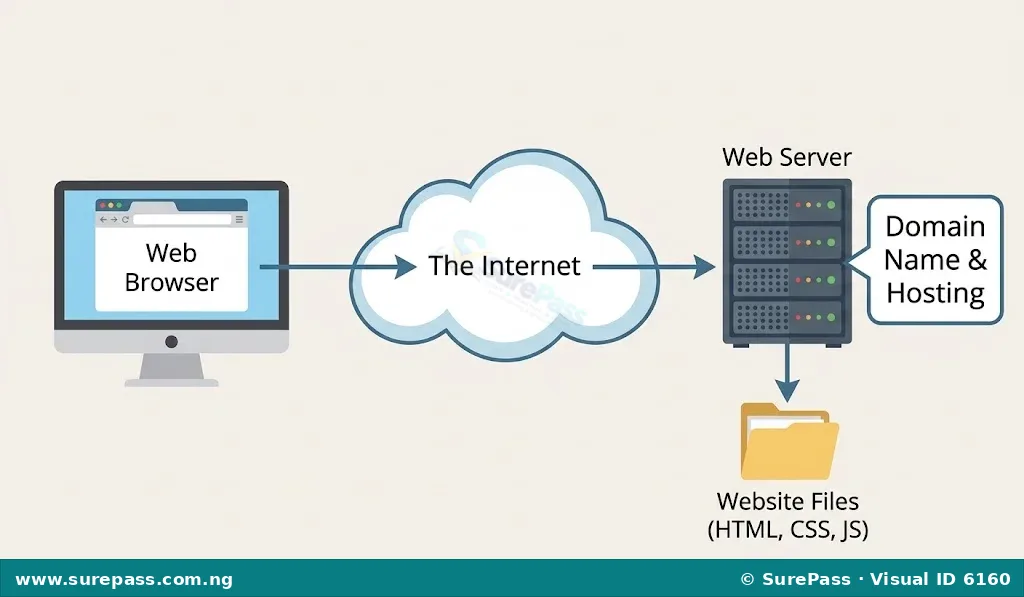
These two components are crucial for a website to be accessible on the internet.
A domain name is the unique, easy-to-remember address that people type into their web browser to find a website (e.g., surepass.ng, konga.com).
It acts like a street address for a house on the internet, making it simple for users to locate a specific website without needing to remember complex numerical IP addresses.
Web hosting is the service that provides the space on a server for a website’s files to be stored and made available on the internet.
When a website is hosted, all its webpages, images, videos, and other content are stored on powerful computers called web servers. These servers are always connected to the internet, ensuring that the website is available to visitors worldwide at any time.
Web Server
A web server is a computer program that stores website files and delivers web content to users’ web browsers upon request.
When a user types a domain name into their browser, the browser sends a request to the web server associated with that domain. The web server then finds the requested webpage and sends it back to the user’s browser, which displays the page. Web servers are powerful computers designed to handle many requests simultaneously.
Development Technologies (HTML, CSS, JS)
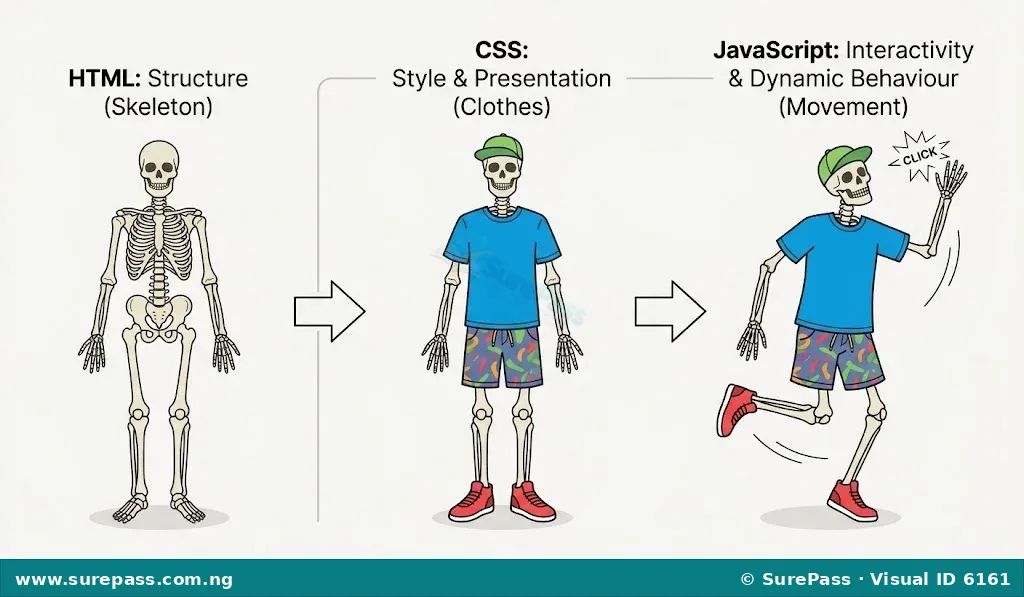
These are the fundamental languages and technologies used to build the structure, appearance, and interactivity of webpages.
-
HTML (HyperText Markup Language): This is the standard markup language for creating web pages and web applications.
HTML provides the structure and content of a webpage, defining elements like headings, paragraphs, images, and links. It is the skeleton of every webpage.
-
CSS (Cascading Style Sheets): This is a style sheet language used for describing the presentation of a document written in HTML.
CSS controls the visual appearance of a webpage, including colours, fonts, spacing, layout, and how elements are displayed on different screen sizes. It is like the clothing and decoration for the HTML skeleton.
-
JS (JavaScript): This is a programming language that enables interactive web pages.
JavaScript adds dynamic and interactive features to a webpage, such as animations, form validation, interactive maps, and content that changes without reloading the entire page. It brings the webpage to life.
Types and Examples of Websites
Websites serve various purposes, leading to different types. Each type is designed to meet specific user needs and goals.
-
Informational Websites: These websites are designed primarily to provide information, facts, news, or educational content to visitors.
They often feature articles, reports, guides, and contact details. An example is the National Educational Research and Development Council (NERDC) website, which provides information on educational curricula and policies in Nigeria.
-
E-commerce Websites: These websites are platforms where users can buy and sell products or services online.
They include features like product catalogues, shopping carts, secure payment gateways, and order tracking. Konga is a popular Nigerian e-commerce website where people can purchase various goods.
-
Entertainment Websites: These websites are created to provide leisure, fun, and amusement to users.
They often host videos, music, games, movies, and other forms of media. Netflix is a well-known entertainment website that offers streaming movies and TV shows.
-
Social Media Websites: These platforms allow users to connect, interact, and share content with friends, family, and the wider community.
They enable users to create profiles, post updates, share photos and videos, and join groups. Facebook is a widely used social media website globally.
-
Personal Websites: These websites are created by individuals to showcase their personal interests, portfolios, blogs, or resumes.
They serve as an online identity for the individual, allowing them to share their work, thoughts, or experiences with a wider audience. Many professionals, artists, and writers maintain personal websites.

Classification of Websites
Websites can also be classified based on how their content is generated and how they interact with users. This classification helps to understand the underlying technology and functionality.
Static Websites
A static website is one where the content of each webpage is fixed and does not change unless a web developer manually updates the HTML code.
These websites are typically built using plain HTML, CSS, and sometimes JavaScript for simple client-side effects. When a user requests a static webpage, the web server sends the exact same file to every user. They are generally faster, more secure, and cheaper to host, making them suitable for small businesses or personal portfolios that do not require frequent content updates or user interaction.
Dynamic Websites
A dynamic website is one where the content of the webpages can change and be generated in real-time based on various factors, such as user input, time, or information from a database.
These websites use server-side programming languages (like PHP, Python, Java) and databases to create content. When a user requests a dynamic webpage, the web server processes the request, retrieves data from a database, and generates the HTML for the page before sending it to the user’s browser. E-commerce sites, social media platforms, and news websites are typically dynamic because their content is constantly updated and personalised for users.
Interactive Websites
An interactive website is designed to allow users to actively engage and participate with the content, often involving user input and real-time responses.
While dynamic websites often have interactive elements, an interactive website specifically focuses on creating a rich user experience where the user’s actions directly influence what they see or experience. This can include features like online forms, quizzes, games, comment sections, live chat, or tools that allow users to customise content. Many modern websites, especially social media and entertainment platforms, are highly interactive to keep users engaged.



0 comments
Open the discussion when you need it. Comments stay collapsed until requested so the initial article remains light.