


ARTICLE CONTENTSOn this page 7 sections
Artificial Intelligence (AI) and Image Recognition
Performance Objectives
By the end of the lesson, students should be able to:
- state the meaning and applications of AI;
- explain the importance of machine learning, model, data training and prediction in AI;
- describe how AI uses data to recognise patterns in images;
- train a simple image classification model using online tools;
- test and evaluate the accuracy of their AI model.
Understanding Artificial Intelligence (AI)
Artificial Intelligence, or AI, refers to the ability of machines to perform tasks that typically require human intelligence. These tasks include learning, problem-solving, decision-making, understanding language, and recognising patterns.
AI systems are designed to think and act like humans, or at least to perform tasks in a way that seems intelligent. They can process large amounts of information and identify relationships or patterns that might be difficult for humans to spot.
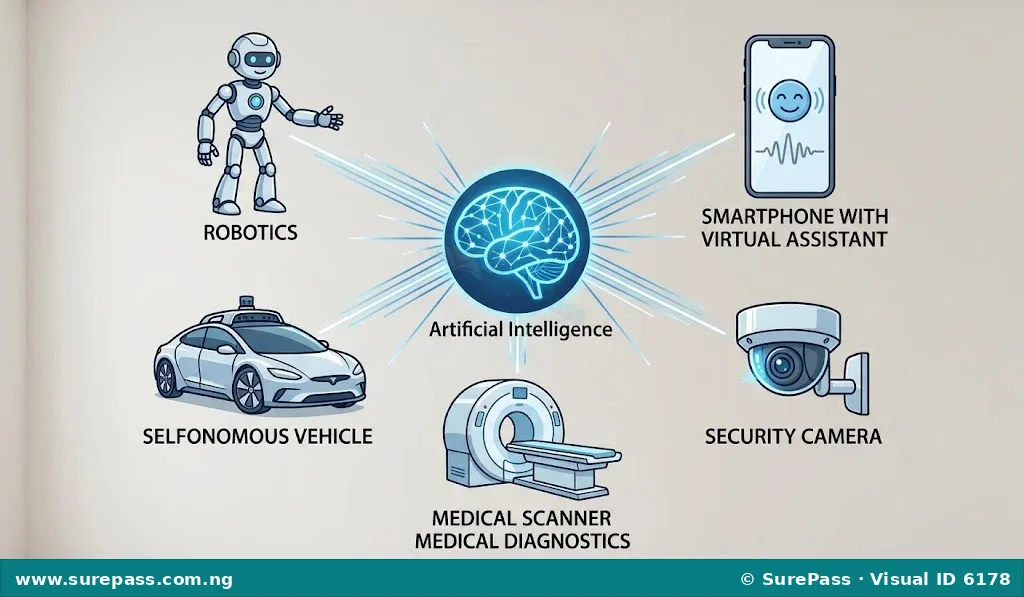
Applications of Artificial Intelligence
AI is used in many areas of life, making tasks easier and more efficient. Its applications are constantly expanding across various sectors.
Common applications of AI include:
- Smart Assistants: Virtual assistants like Siri, Google Assistant, and Alexa use AI to understand voice commands, answer questions, and perform tasks.
- Social Media: AI helps social media platforms recommend content, filter spam, and recognise faces in photos.
- Self-Driving Cars: AI enables vehicles to perceive their surroundings, navigate roads, and make driving decisions without human input.
- Medical Diagnosis: AI assists doctors in analysing medical images (like X-rays and MRI scans) to detect diseases early and accurately.
- Security and Surveillance: AI-powered cameras can identify suspicious activities or recognise individuals in public spaces.
- Online Shopping: AI recommends products to customers based on their past purchases and browsing history.
- Fraud Detection: Financial institutions use AI to identify unusual transactions that might indicate fraud.
Core Concepts in Artificial Intelligence
To understand how AI works, especially in tasks like image recognition, it is important to know some key concepts.
Machine Learning
Machine Learning (ML) is a subset of AI that allows systems to learn from data without being explicitly programmed. Instead of being given step-by-step instructions for every possible situation, an ML system is fed a lot of data and learns to identify patterns and make decisions on its own.
The importance of machine learning in AI is significant because it enables AI systems to adapt and improve over time. Without machine learning, AI systems would be rigid and unable to handle new or unexpected situations. ML allows AI to learn from experience, much like humans do, making it possible for AI to perform complex tasks like recognising faces or understanding speech.
Model
In the context of AI and machine learning, a model is the output of the training process. It is essentially the learned representation of patterns, rules, or relationships derived from the training data.
The importance of a model is that it is the “brain” of the AI system that makes predictions or decisions. Once a model is trained, it can be used to process new, unseen data and provide an output based on what it has learned. For example, an image recognition model, once trained, can identify objects in new images.
Data Training
Data training is the process of feeding a large amount of data to a machine learning algorithm to help it learn patterns and build a model. This data is often labelled, meaning that the correct answers or classifications are already known.
The importance of data training is fundamental because the quality and quantity of the training data directly affect how well the AI model performs. A well-trained model, built on diverse and accurate data, will be more effective and reliable in making predictions. Without sufficient and relevant training data, an AI model cannot learn effectively.
Prediction
Prediction, in AI, refers to the output or decision made by a trained AI model when it is given new, unseen data. It is the model’s attempt to classify, identify, or forecast based on the patterns it learned during training.
The importance of prediction is that it is the ultimate goal of many AI systems. Whether it is predicting the weather, identifying a face in a crowd, or recommending a product, the ability of AI to make accurate predictions allows it to solve real-world problems and provide valuable insights.
Key Stages of AI Image Interpretation Process
AI systems interpret images by breaking down the complex task into several manageable stages. This process allows the AI to “understand” what is in an image.
Data Acquisition and Preprocessing
This is the first stage where images are collected and prepared for the AI system. Data acquisition involves gathering a large dataset of images relevant to the task. For example, if the AI needs to recognise cats, many images of cats and other animals would be collected.
Preprocessing involves cleaning and preparing these images. This can include resizing images to a standard size, adjusting brightness or contrast, and removing noise or irrelevant parts. Preprocessing ensures that the data is consistent and of good quality, which helps the AI model learn more effectively.
Feature Extraction
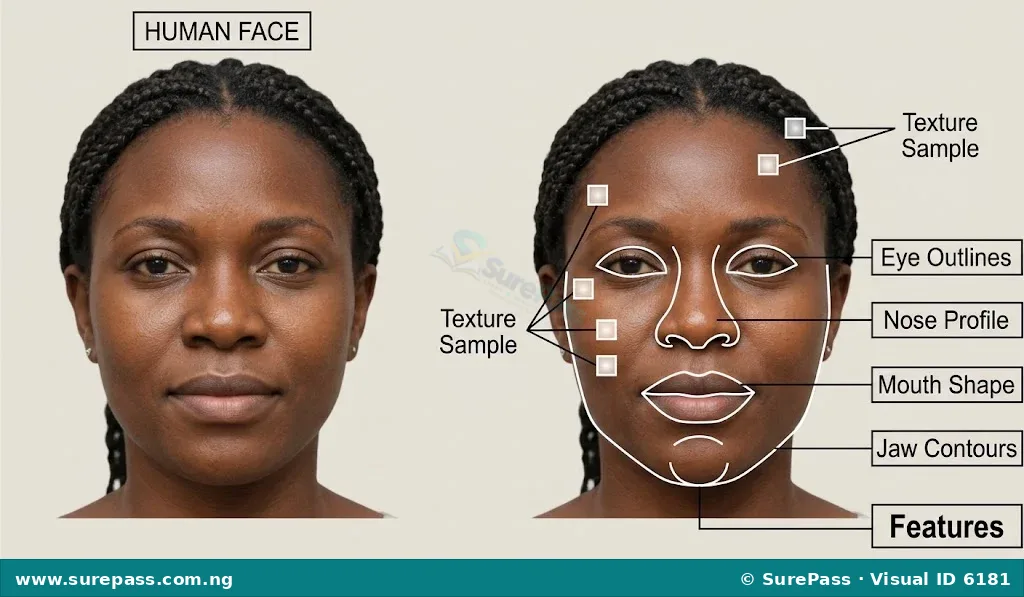
After preprocessing, the AI system needs to identify important features within the images. Features are the distinct characteristics or patterns that help differentiate one object from another. For example, when recognising a face, features might include the shape of the eyes, the curve of the nose, or the outline of the jaw.
AI algorithms automatically extract these features. Instead of looking at every single pixel, the AI focuses on these key features to build a representation of the image. This step is crucial because it helps the AI to recognise objects even if they appear in different sizes, positions, or lighting conditions.
Model Training
Once features are extracted, the AI uses them to train its model. In this stage, the AI is fed many images along with their correct labels (e.g., “this image contains a dog,” “this image contains a cat”). The AI learns to associate specific combinations of features with particular labels.
During training, the model adjusts its internal parameters to minimise errors in its predictions. It learns to recognise the unique patterns of features that define each category. This iterative process continues until the model can accurately classify new images based on the patterns it has learned.
Interpretation
After the model is trained, it can be used for interpretation. When a new, unseen image is fed into the trained model, the model first extracts its features. Then, it compares these extracted features to the patterns it learned during training.
Based on this comparison, the model makes a prediction or classification. For example, if the features of the new image closely match the patterns associated with “cat” during training, the model will interpret the image as containing a cat. This final step is where the AI “understands” and labels the content of the image.
Training an AI Image Classification Model
Training an AI image classification model involves teaching a computer to recognise and categorise different types of images. This practical skill allows learners to see how the concepts of machine learning, data training, and prediction come together.
Online tools like Teachable Machine or Microsoft Lobe provide user-friendly interfaces to train simple AI models without needing to write complex code. The following steps outline a general procedure for training an image classification model:
How to Train a Simple Image Classification Model
The procedure involves the following steps:
- Choose an Online Tool: Select an accessible online tool for machine learning, such as Teachable Machine by Google. Open the tool in a web browser.
- Start a New Project: On the tool’s homepage, select “Get Started” or “New Project.” Choose “Image Project” as the type of model you want to create.
- Define Classes: Create different categories (classes) that your AI model will learn to distinguish. For example, you might create classes like “Empty Hand,” “Thumbs Up,” and “Peace Sign” if you want the AI to recognise hand gestures.
- Acquire Training Data: For each class, provide the AI with examples. You can use a webcam to capture live images or upload images from your computer.
- For “Empty Hand” class: Hold your hand open in front of the webcam and record several images.
- For “Thumbs Up” class: Make a thumbs-up gesture and record several images.
- For “Peace Sign” class: Make a peace sign gesture and record several images.
- Train the Model: Once you have collected enough images for all your classes, click the “Train Model” button. The tool will process your data, extract features, and build the classification model. This process may take a few minutes depending on the amount of data and your internet speed.
- Test the Model: After training is complete, the tool will usually provide a preview window where you can test your model. Use your webcam to show new images or gestures that the model has not seen before.
- Evaluate Accuracy: Observe how accurately the model classifies the new images. If you show an “Empty Hand,” does it correctly identify it as “Empty Hand”? If it makes mistakes, consider adding more training data, especially for the categories it struggles with, and then retrain the model.
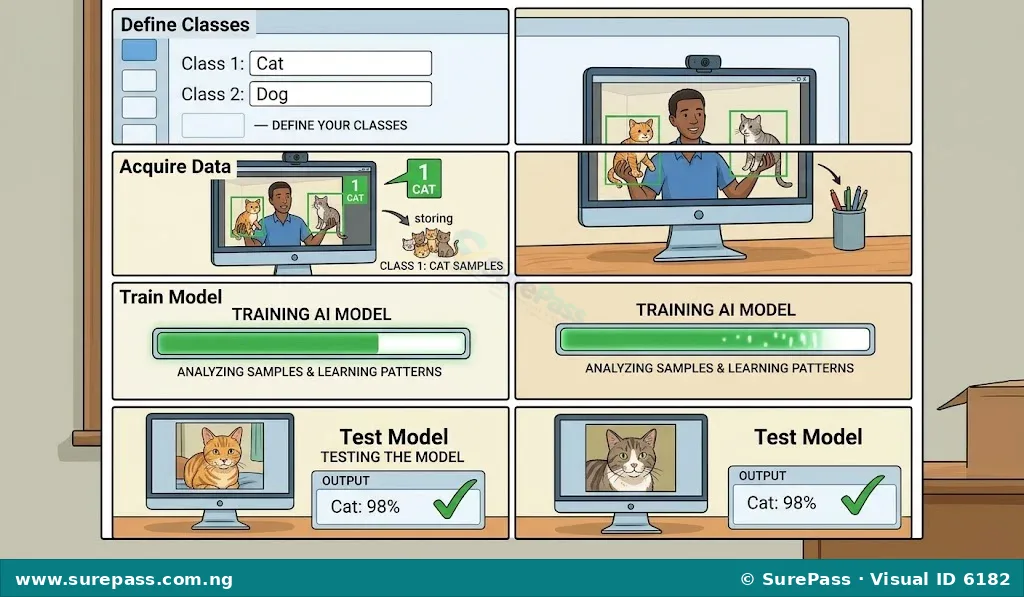
By following these steps, you can gain hands-on experience in how AI models are trained to recognise patterns in images and make classifications.



0 comments
Open the discussion when you need it. Comments stay collapsed until requested so the initial article remains light.