



ARTICLE CONTENTSOn this page 10 sections
Digital Citizenship
Performance Objectives
By the end of the lesson, students should be able to:
- identify the basic requirements for becoming a digital citizen;
- deduce the characteristic behaviours of a digital citizen from the rules;
- formulate a digital citizenship pledge;
- apply digital citizens rules while communicating online.
What is Digital Citizenship?
Digital citizenship refers to the responsible and ethical use of technology and the internet. It involves understanding and practising safe, legal, and ethical behaviour in the digital world.
Just as there are rules and responsibilities for being a good citizen in a community or country, there are also rules and responsibilities for being a good citizen in the digital space. This includes how people interact with others online, what information they share, and how they protect themselves and others.
Basic Requirements for Digital Citizenship
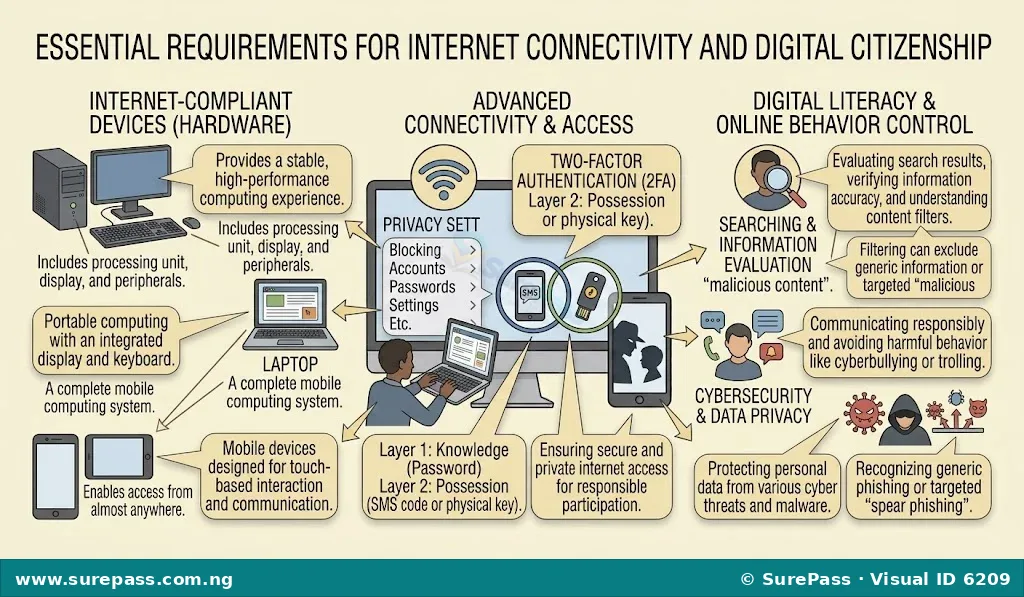
To participate in the digital world and become a digital citizen, certain fundamental requirements must be met. These requirements enable individuals to access, interact with, and contribute to online environments.
The basic requirements for becoming a digital citizen include:
- Access to the Internet: This is the primary requirement. Without internet access, an individual cannot connect to the digital world. Access can be through various means, such as home broadband, public Wi-Fi, or mobile data.
- Internet-Compliant Devices: These are the tools used to connect to the internet. Examples include personal computers (desktops and laptops), smartphones, tablets, and other smart devices. These devices must be capable of running web browsers or applications that connect to online services.
- Connectivity: This refers to the ability of a device to establish and maintain a connection to the internet. It involves having a working internet service provider (ISP) and a stable network connection, whether wired or wireless. Reliable connectivity ensures smooth access to online resources and communication.
Digital Citizenship Rules
Digital citizenship is guided by a set of rules that promote positive and safe online interactions. These rules help individuals navigate the digital world responsibly and ethically.
The key rules of digital citizenship are:
-
Protect Self-Image and Identity: This rule emphasises the importance of being careful about the personal information and images shared online. Once something is posted on the internet, it can be difficult to remove completely and can be seen by many people.
Protecting self-image means thinking before posting photos, videos, or comments that might negatively affect one’s reputation or future opportunities. Protecting identity involves safeguarding personal details like full names, addresses, phone numbers, and school information from strangers or malicious users.
-
Be Mindful of Digital Footprints and Reputation: Every action taken online leaves a “digital footprint.” This footprint is the trail of data left behind from online activities, such as websites visited, emails sent, social media posts, and online purchases.
A digital footprint can be permanent and can influence one’s online reputation. Being mindful means understanding that employers, universities, and others may review online activities. Therefore, it is important to ensure that one’s digital footprint reflects a positive and responsible image.
-
Appreciate and Value the Privacy and Security of Online Users: A good digital citizen respects the privacy of others and helps maintain online security. This means not sharing other people’s private information without their permission, not accessing their accounts, and not spreading rumours or gossip.
It also involves using strong, unique passwords for online accounts, being cautious about clicking suspicious links, and reporting any online threats or harassment. Valuing privacy and security helps create a safer online environment for everyone.
-
Utilise Online Services Responsibly: Online services such as email, newsgroups (online forums), and blogs are powerful tools for communication and information sharing. Responsible use means using these services for their intended purposes and in a manner that is respectful and ethical.
Examples of responsible use include sending professional and polite emails, contributing constructively to online discussions, and sharing accurate and appropriate content on blogs. It also means avoiding spam, cyberbullying, and the spread of misinformation.
Characteristic Behaviours of a Digital Citizen
Based on the rules of digital citizenship, several characteristic behaviours define a responsible digital citizen. These behaviours demonstrate an understanding of online ethics and safety.
Characteristic behaviours of a digital citizen include:
- Thoughtful Sharing: A digital citizen thinks carefully before sharing any personal information, photos, or opinions online, considering the potential impact on their own and others’ privacy and reputation.
- Respectful Communication: They communicate online with politeness, empathy, and respect, avoiding offensive language, cyberbullying, or harassment.
- Privacy Protection: They protect their own personal information and respect the privacy of others by not sharing private details without consent.
- Security Awareness: They use strong passwords, are wary of suspicious links, and take steps to secure their online accounts and devices.
- Positive Digital Footprint Management: They are aware that their online actions create a lasting record and strive to maintain a positive and professional online presence.
- Responsible Use of Online Tools: They use online services like email, social media, and forums constructively and ethically, contributing positively to online communities.
- Critical Information Evaluation: They critically assess information found online, distinguishing between reliable and unreliable sources, and avoid spreading misinformation.
- Reporting Inappropriate Content: They know how to identify and report cyberbullying, harassment, or other inappropriate content to relevant authorities or platform administrators.
Evaluating Information Safe to Share Online
One crucial skill for a digital citizen is evaluating what information is safe to share online. Not all information is suitable for public viewing, and sharing sensitive details can lead to risks such as identity theft, cyberbullying, or privacy breaches.
When deciding what information to share, consider the following:
-
Personal Identifiable Information (PII): Avoid sharing your full name, home address, phone number, school name, date of birth, or national identification numbers. This information can be used by malicious individuals to impersonate you or locate you.
For example, instead of posting your full name, you might use a username or a first name only, especially on public platforms.
-
Location Information: Be cautious about sharing your current location in real-time through GPS tags on photos or check-ins. This can alert strangers to your whereabouts and potentially put your physical safety at risk.
It is safer to share location details after you have left a place, or only with trusted friends and family.
-
Private Photos and Videos: Think twice before posting photos or videos that reveal too much personal information, such as your school uniform, house exterior, or private family moments. Once these are online, they can be copied and shared widely without your control.
Consider if the image could be misinterpreted or used against you in the future.
-
Financial Information: Never share bank account details, credit card numbers, or other financial information online, especially on unsecured websites or through unverified messages. This is highly sensitive information that can lead to financial fraud.
-
Passwords: Absolutely never share your passwords with anyone, not even friends or family. Passwords are the keys to your digital accounts and should be kept private and secure.
-
Emotional or Sensitive Content: Avoid posting highly emotional, angry, or sensitive content that you might regret later. Such posts can be used to judge you, or they might attract negative attention.
Always ask yourself: “Who can see this information? How might it be used? Will I be comfortable with this information being public forever?” If you have any doubts, it is best not to share it.
Communicating Respectfully and Ethically in Digital Environments
Effective and responsible digital communication is essential for maintaining positive relationships and a healthy online community. Communicating respectfully and ethically means following a set of guidelines often referred to as “netiquette.”
Key principles for respectful and ethical online communication include:
-
Be Polite and Courteous: Treat others online as you would in person. Use polite language, avoid shouting (typing in all capital letters), and be mindful of your tone, as it can be easily misunderstood in text-based communication.
-
Respect Differences: People online come from diverse backgrounds and cultures. Respect different opinions, beliefs, and perspectives, even if you do not agree with them. Avoid making discriminatory or offensive comments.
-
Avoid Cyberbullying and Harassment: Never engage in cyberbullying, which involves using digital technology to repeatedly harass, threaten, or embarrass someone. This includes spreading rumours, posting hurtful comments, or sharing embarrassing photos without consent.
If you witness cyberbullying, report it and support the victim.
-
Think Before You Post: Before sending a message or posting a comment, pause and consider its impact. Ask yourself if it is true, kind, necessary, and helpful. Once posted, it is difficult to retract.
-
Respect Privacy: Do not share private messages, photos, or information about others without their explicit permission. This includes forwarding private emails or screenshots of private conversations.
-
Cite Sources: When sharing information or ideas that are not your own, give credit to the original source. This shows respect for intellectual property and avoids plagiarism.
-
Be Forgiving: Everyone makes mistakes. If someone makes an error in online communication, consider giving them the benefit of the doubt rather than immediately reacting negatively.
How to Open a Secure E-mail Account
Opening a secure email account is a fundamental skill for digital citizens, as email is a primary tool for online communication. A secure account helps protect your personal information and communications.
The procedure involves the following steps:
-
Choose a Reputable Email Provider: Select a well-known and trusted email service provider such as Gmail, Outlook, or Yahoo Mail. These providers offer strong security features.
-
Go to the Provider’s Website: Open a web browser and navigate to the website of your chosen email provider (e.g., mail.google.com for Gmail).
-
Click “Create Account” or “Sign Up”: Look for a button or link that allows you to create a new account. This is usually clearly labelled.
-
Enter Your Personal Information: You will be asked to provide details such as your first name, last name, and desired username. Choose a username that is professional and easy to remember.
-
Create a Strong Password: This is a critical step for security. Your password should be:
- At least 12 characters long.
- A mix of uppercase and lowercase letters.
- Include numbers and symbols (e.g., !, @, #, $).
- Not easily guessable (avoid using your name, birth date, or common words).
Do not share this password with anyone.
-
Provide a Recovery Email or Phone Number: This is important for account recovery if you forget your password or if your account is compromised. Ensure the recovery information is current and accessible only to you.
-
Agree to Terms and Conditions: Read the service provider’s terms and conditions and privacy policy. If you agree, accept them to proceed.
-
Complete Verification (if required): Some providers may ask you to verify your identity through a phone number or by solving a CAPTCHA to prove you are not a robot.
-
Set Up Two-Factor Authentication (2FA): Once your account is created, enable 2FA in the security settings. This adds an extra layer of security by requiring a second form of verification (like a code sent to your phone) in addition to your password when you log in.
-
Review Privacy Settings: Check the privacy settings of your new email account and adjust them to your preferences, ensuring that your information is shared only as you intend.
Formulating a Digital Citizenship Pledge
A digital citizenship pledge is a personal commitment to uphold the principles of responsible and ethical behaviour in the digital world. Formulating a pledge helps reinforce understanding and commitment to these rules.
To formulate a digital citizenship pledge, consider the following steps:
-
Understand the Core Principles: Review the digital citizenship rules and characteristic behaviours. Identify the most important aspects that resonate with you, such as respecting privacy, being safe online, or communicating kindly.
-
Start with a Commitment Statement: Begin your pledge with a clear statement of intent, such as “As a digital citizen, I pledge to…” or “I promise to be a responsible user of technology by…”
-
Include Specific Actions: List specific actions you will take to demonstrate good digital citizenship. These actions should reflect the rules and behaviours discussed.
Examples of actions to include are:
- I will protect my personal information and identity online.
- I will be mindful of my digital footprint and maintain a positive online reputation.
- I will respect the privacy and security of others.
- I will communicate respectfully and ethically in all digital environments.
- I will use online services responsibly and for positive purposes.
- I will think before I post and consider the impact of my words and actions.
- I will report cyberbullying or inappropriate content.
- I will seek help from a trusted adult if I encounter problems online.
-
Keep it Concise and Personal: Your pledge should be clear, easy to understand, and reflect your personal commitment. It does not need to be very long, but it should cover the essential aspects of digital citizenship.
-
Sign and Share (Optional): Once formulated, you can sign your pledge as a personal commitment. Sharing it with family or friends can also help reinforce your dedication to being a good digital citizen.
An example of a digital citizenship pledge could be:
“As a responsible digital citizen, I pledge to use the internet and technology wisely and respectfully. I will protect my personal information and identity, and I will be mindful of my digital footprint. I promise to respect the privacy and security of others online and to communicate kindly and ethically. I will use online services responsibly and seek help if I face any challenges. I commit to being a positive and safe presence in the digital world.”





0 comments
Open the discussion when you need it. Comments stay collapsed until requested so the initial article remains light.