


ARTICLE CONTENTSOn this page 8 sections
Computational Thinking (CT) for Automation
Performance Objectives
By the end of the lesson, students should be able to:
- explain computational thinking and its importance;
- describe the components of computational thinking;
- state the functions of computational thinking tools;
- draw IPO charts, flowcharts, and pseudocode for problem solving.
Introduction to Computational Thinking
Computational thinking is a problem-solving approach that involves breaking down complex problems into smaller, more manageable parts, identifying patterns, abstracting details, and creating step-by-step solutions. It is a way of thinking that helps people understand problems and design solutions that can be carried out by a computer or even by humans.
This approach is not just for computer scientists or programmers. It is a fundamental skill that can be applied in various aspects of daily life, from planning a trip to organising a school event or even preparing a meal. Computational thinking helps in developing logical and systematic ways to tackle challenges.
Importance of Computational Thinking
Computational thinking is important for several reasons:
- Enhances Problem-Solving Skills: It provides a structured way to approach and solve problems, making complex tasks seem less daunting.
- Prepares for the Digital World: In an increasingly digital world, understanding how computers “think” helps individuals interact more effectively with technology and develop digital solutions.
- Fosters Creativity and Innovation: By breaking down problems and identifying patterns, individuals can find new and creative ways to solve existing challenges.
- Supports Automation: It is the foundation for designing automated systems. When a problem is broken down into clear steps, it can be automated using technology.
- Develops Logical Reasoning: The process of creating algorithms and evaluating solutions strengthens logical thinking and critical analysis.
Components of Computational Thinking
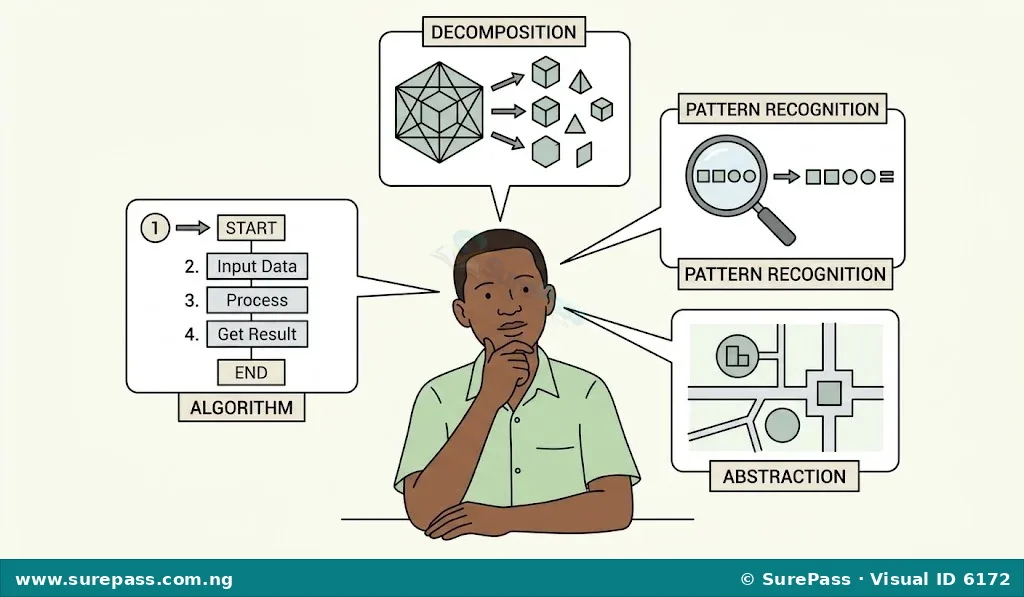
Computational thinking consists of several key components that work together to solve problems effectively. These components are decomposition, pattern recognition, abstraction, algorithms, and evaluation and refinement.
Decomposition
Decomposition is the process of breaking down a complex problem or system into smaller, more manageable parts. Each smaller part can then be solved or understood individually, making the overall problem easier to handle.
For example, if the problem is to plan a birthday party, decomposition would involve breaking it down into sub-tasks such as creating a guest list, choosing a venue, sending invitations, planning food, and arranging entertainment.
Pattern Recognition
Pattern recognition involves identifying similarities, trends, or regularities within a problem or across different problems. Recognising patterns can help in making predictions, simplifying solutions, and reusing existing solutions.
For instance, if a student needs to calculate the average score for three subjects, and then later needs to calculate the average score for five subjects, they might recognise a pattern in how averages are calculated (sum of values divided by the number of values). This pattern can be applied to both situations.
Abstraction
Abstraction is the process of focusing on the essential details of a problem while ignoring irrelevant information. It involves creating a general idea or model of the problem without getting bogged down by specific, unnecessary details.
Consider a map of a city. It shows major roads, landmarks, and public transport routes, but it does not show every tree, building, or small detail. The map abstracts away unnecessary information to help people navigate effectively. In problem-solving, abstraction helps to simplify the problem and focus on what truly matters for the solution.
Algorithms
An algorithm is a set of precise, step-by-step instructions for solving a problem or completing a task. Algorithms must be clear, unambiguous, and finite, meaning they must have a definite start and end.
A cooking recipe is a good example of an algorithm. It provides a sequence of steps to follow to prepare a dish. Similarly, giving directions to a friend is an algorithm, guiding them from one point to another in a series of clear steps.
Evaluation and Refinement
Evaluation and refinement involve checking if the developed solution (algorithm) works correctly and efficiently, and then making improvements. This component ensures that the solution is robust, accurate, and meets the desired objectives.
After creating an algorithm, it is important to test it with different inputs to see if it produces the correct output. If errors are found or if the solution can be made better, refinement involves modifying the algorithm to improve its performance or correctness. This iterative process helps in perfecting the solution.
Computational Thinking Tools
Various tools are used to apply computational thinking principles and develop solutions. These tools can be conceptual, programming-based, or analytical.
Conceptual Tools
Conceptual tools help in planning and visualising solutions before writing actual code. They are used to represent algorithms and problem-solving steps in a clear and understandable way.
IPO Model
The IPO (Input-Process-Output) model is a simple conceptual tool used to describe the flow of data in a system or algorithm. It identifies what data goes into the system (Input), what operations are performed on that data (Process), and what results are produced (Output).
The IPO model helps to clearly define the requirements and expected outcomes of a problem. For example, to calculate the area of a rectangle, the Input would be length and width, the Process would be multiplying length by width, and the Output would be the area.
Flowcharts
Flowcharts are graphical representations of algorithms or processes. They use standard symbols to depict different types of operations, decisions, and data flow, making the logic of a solution easy to understand visually.
Common flowchart symbols include:
- Terminator (Oval): Represents the start or end of a process.
- Process (Rectangle): Represents an operation or action.
- Input/Output (Parallelogram): Represents data input or output.
- Decision (Diamond): Represents a point where a decision is made, usually with “Yes” or “No” branches.
- Arrow (Flowline): Shows the direction of flow.
Flowcharts are useful for visualising the sequence of steps and decision points in an algorithm.
Pseudocode
Pseudocode is an informal, high-level description of an algorithm or a computer program. It uses a combination of natural language and programming-like constructs to outline the steps of a solution without adhering to the strict syntax rules of any specific programming language.
Pseudocode is easier to read and understand than actual code, and it helps programmers plan the logic of their programs before writing them. It bridges the gap between human language and programming language.
An example of pseudocode for calculating the area of a rectangle:
START
  GET length
  GET width
  CALCULATE area = length * width
  DISPLAY area
END
Programming Tools (Python)
Programming tools are software applications that allow users to write, test, and debug computer programs. They are used to translate algorithms developed using conceptual tools into executable code that computers can understand and run.
Python is a popular programming language known for its simplicity and readability. It is widely used for various applications, including web development, data analysis, artificial intelligence, and automation. In computational thinking, Python can be used to implement algorithms and test their functionality.
The function of Python as a computational thinking tool is to provide a practical means to turn a conceptual algorithm (like one designed with a flowchart or pseudocode) into a working program that can solve problems automatically.
Analytical Tools (Spreadsheets)
Analytical tools are software applications designed to help users organise, analyse, and visualise data. They are useful for identifying patterns, performing calculations, and managing information efficiently.
Spreadsheets, such as Microsoft Excel or Google Sheets, are powerful analytical tools. They consist of rows and columns where data can be entered, stored, and manipulated using formulas and functions. In computational thinking, spreadsheets can be used to:
- Organise Data: Arrange large datasets in a structured manner.
- Identify Patterns: Use sorting, filtering, and conditional formatting to spot trends and patterns in data.
- Perform Calculations: Apply formulas to automate calculations, such as averages, sums, and percentages, which are essentially simple algorithms.
- Model Problems: Create simple models to test different scenarios and evaluate potential solutions.
The function of spreadsheets as a computational thinking tool is to help in data management, pattern recognition, and the implementation of simple, data-driven algorithms through formulas.
Steps to Solve a Problem Using Computational Thinking
Solving a problem using computational thinking involves a systematic approach that integrates all the components. Here are the steps:
- Conceptualise a Task and Represent Visually:
Begin by clearly understanding the problem. What is the goal? What are the inputs and expected outputs? Try to represent the problem visually or in a simplified form to grasp its essence. This initial step helps in defining the scope of the problem.
Example: Problem: Calculate the average score of three subjects for a student. Conceptualisation: We need three scores (Input), perform an average calculation (Process), and get one average score (Output).
- Break the Task into Sub-tasks Showing Dependencies (Decomposition):
Once the problem is understood, break it down into smaller, more manageable sub-problems. Identify how these sub-tasks relate to each other and which ones depend on the completion of others.
Example: Sub-task 1: Get the score for Subject 1. Sub-task 2: Get the score for Subject 2. Sub-task 3: Get the score for Subject 3. Sub-task 4: Calculate the sum of the three scores. (Depends on Sub-tasks 1, 2, 3) Sub-task 5: Divide the sum by 3 to get the average. (Depends on Sub-task 4) Sub-task 6: Display the average score. (Depends on Sub-task 5)
- Identify and Reuse Patterns Across Tasks (Pattern Recognition):
Look for similarities or repeated elements within the sub-tasks or in similar problems solved previously. Recognising patterns can lead to more efficient solutions and avoid redundant work.
Example: The process of getting a score is repeated for each subject. The calculation of an average (sum divided by count) is a common pattern that can be reused.
- Apply Abstraction to Separate Essential Details:
Focus on the critical information needed to solve each sub-task and ignore any irrelevant details. Generalise the problem to its core components.
Example: For calculating the average, the specific names of the subjects (e.g., Mathematics, English, Physics) are less important than the fact that there are three numerical scores. We abstract “Subject 1 Score” to simply “Score1”.
- Create Algorithms for the Solution:
Develop a step-by-step sequence of instructions (an algorithm) for each sub-task and then combine them to form a complete solution for the overall problem. The algorithm should be clear, unambiguous, and lead to the desired outcome.
Example: An algorithm for calculating the average score:
- Start.
- Get Score1.
- Get Score2.
- Get Score3.
- Calculate Sum = Score1 + Score2 + Score3.
- Calculate Average = Sum / 3.
- Display Average.
- End.
- Evaluate and Refine Developed Algorithms:
Test the algorithm with different inputs to ensure it works correctly and efficiently. If there are errors or if the solution can be improved, go back and refine the algorithm. This iterative process helps in optimising the solution.
Example: Test 1: Scores = 70, 80, 90. Sum = 240. Average = 80. (Correct) Test 2: Scores = 50, 60, 70. Sum = 180. Average = 60. (Correct) Consider edge cases: What if a score is 0? The algorithm still works. Refinement: Could the algorithm handle any number of subjects? Not yet, it’s fixed for three. For this problem, it is sufficient, but for a more general problem, refinement would be needed.
Developing Algorithms for Problem Solving
This section demonstrates how to apply computational thinking to develop an algorithm for a specific problem and represent it using conceptual tools.
Problem: Calculate the Area of a Circle
A student needs to write an algorithm to calculate the area of a circle, given its radius. The formula for the area of a circle is A = πr², where A is the area, π (pi) is a constant approximately 3.142, and r is the radius.
1. Conceptualise and Decompose:
The problem requires an input (radius), a process (applying the formula), and an output (area). Sub-tasks:
- Get the radius.
- Use the constant value for pi.
- Calculate the square of the radius.
- Multiply pi by the squared radius.
- Display the result.
2. Pattern Recognition and Abstraction:
The calculation involves multiplication and squaring, which are common mathematical operations. We abstract the specific value of pi to a constant, and the radius to a variable ‘r’.
3. Create the Algorithm:
The step-by-step instructions are:
- Start.
- Define PI as 3.142.
- Get the value of the radius (r).
- Calculate Radius_Squared = r * r.
- Calculate Area = PI * Radius_Squared.
- Display Area.
- End.
4. Representing the Algorithm with Conceptual Tools:
IPO Chart for Area of a Circle
The IPO chart for this problem is:
- Input: Radius (r)
- Process:
- Define PI = 3.142
- Calculate Radius_Squared = r * r
- Calculate Area = PI * Radius_Squared
- Output: Area
Flowchart for Area of a Circle
The flowchart visually represents the steps:
Pseudocode for Area of a Circle
The pseudocode for this algorithm is:
START
  DECLARE PI = 3.142
  GET radius
  CALCULATE Radius_Squared = radius * radius
  CALCULATE Area = PI * Radius_Squared
  DISPLAY Area
END
5. Evaluation and Refinement:
Test with an example: If radius = 2.
- PI = 3.142
- radius = 2
- Radius_Squared = 2 * 2 = 4
- Area = 3.142 * 4 = 12.568
- Display 12.568
The algorithm works correctly for this input. Further testing with different radius values would confirm its robustness.


0 comments
Open the discussion when you need it. Comments stay collapsed until requested so the initial article remains light.