


ARTICLE CONTENTSOn this page 8 sections
Cyberspace Relationship and Communication
Performance Objectives
By the end of the lesson, students should be able to:
- discuss the dos and don’ts for staying safe online;
- practice safe tagging of online contents and contacts;
- outline the benefits and risks of cyber space relationships.
Understanding Cyberspace Relationships and Communication
Cyberspace refers to the online world where people interact, share information, and communicate through digital devices and the internet. It is a vast network of computers and digital systems that allows for global connections. Cyberspace relationships are the connections people form with others through online platforms, social media, messaging apps, and other digital channels. These relationships can range from casual acquaintances to close friendships or professional networks.
Online communication involves exchanging messages, ideas, and information using digital tools. This can happen through text chats, video calls, emails, comments on social media posts, and many other forms. While cyberspace offers many opportunities for connection, it is important to understand how to navigate it safely and responsibly.
Dos and Don’ts for Staying Safe Online
To ensure a positive and secure experience in cyberspace, it is important to follow certain guidelines. These “Dos and Don’ts” help protect personal information, maintain privacy, and foster respectful interactions.
Dos for Online Safety
The following actions are recommended for safe online behaviour:
- Use Strong Passwords: Create unique and complex passwords for all online accounts. Combine uppercase and lowercase letters, numbers, and symbols.
- Keep Personal Information Private: Avoid sharing sensitive details like your full home address, phone number, school name, or daily routines with strangers online.
- Verify Information: Always question information found online, especially before sharing it. Check multiple sources to confirm its accuracy.
- Be Respectful: Treat others online with the same respect you would show them in person. Avoid cyberbullying, hate speech, or offensive language.
- Think Before You Post: Consider the potential impact of your posts, comments, and shares. Once something is online, it can be difficult to remove completely.
- Adjust Privacy Settings: Regularly review and update the privacy settings on your social media accounts and other online platforms to control who sees your information.
- Report Suspicious Activity: If you encounter anything suspicious, inappropriate, or threatening online, report it to a trusted adult, platform administrators, or relevant authorities.
- Log Out of Accounts: Always log out of your online accounts, especially when using public or shared computers.
Don’ts for Online Safety
The following actions should be avoided to ensure online safety:
- Don’t Share Passwords: Never share your passwords with anyone, not even close friends.
- Don’t Click Suspicious Links: Avoid clicking on links from unknown senders or those that look suspicious, as they may lead to malware or phishing sites.
- Don’t Meet Online Strangers in Person: Never agree to meet someone you only know online in person without the knowledge and presence of a trusted adult.
- Don’t Accept Friend Requests from Strangers: Be cautious about accepting friend requests from people you do not know in real life.
- Don’t Engage in Cyberbullying: Do not participate in or encourage cyberbullying. If you see it happening, report it.
- Don’t Download from Untrusted Sources: Avoid downloading files or software from websites that are not reputable, as they may contain viruses.
- Don’t Share Location in Real-Time: Be careful about sharing your real-time location through apps or social media, as this can compromise your safety.
Tagging Online Contents and Contacts
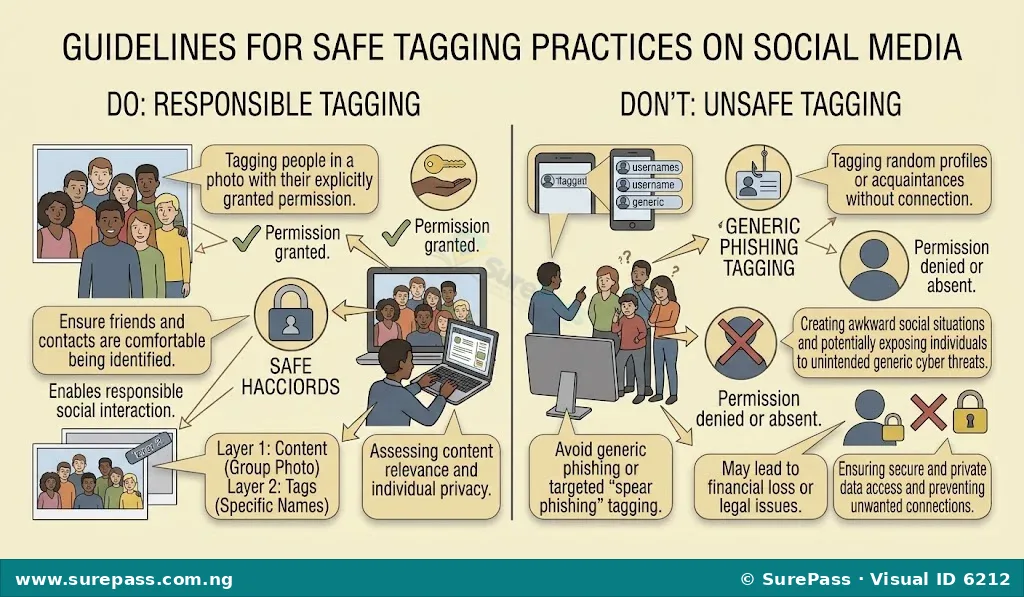
Tagging is the act of adding a label or a name to online content, such as photos, videos, or posts, or to other users (contacts). When you tag someone in a photo, for example, their name becomes linked to that photo, and it often appears on their profile or in their friends’ feeds. Tagging can be useful for identifying people or topics, but it must be done carefully to protect privacy and avoid misunderstandings.
What to Tag
It is generally appropriate to tag content or contacts in the following situations:
- People You Know and Have Permission From: Tag friends or family members in photos or posts only if they have given you permission to do so.
- Content Directly Related to the Person: Tag someone if the content clearly features them or is directly about them, and they are comfortable with it.
- Relevant Topics or Locations: Use tags to categorise your content by topic (e.g., #schoolproject, #football) or location (e.g., #Lagos, #Nigeria) to make it discoverable.
What Not to Tag
Avoid tagging content or contacts in these situations:
- Without Permission: Never tag someone in a photo or post without their explicit permission, especially if the content is personal or potentially embarrassing.
- Strangers or Unknown Individuals: Do not tag people you do not know, even if they appear in a public photo.
- Inappropriate or Sensitive Content: Avoid tagging anyone in content that is offensive, private, or could put them in a negative light.
- To Spam or Annoy: Do not tag multiple people in irrelevant posts just to get their attention or to promote something.
- Private Locations or Events: Be cautious about tagging people in locations or events that might reveal their private activities or whereabouts without their consent.
Self-Reflect Before Self-Reveal: Stop, THINK, Connect
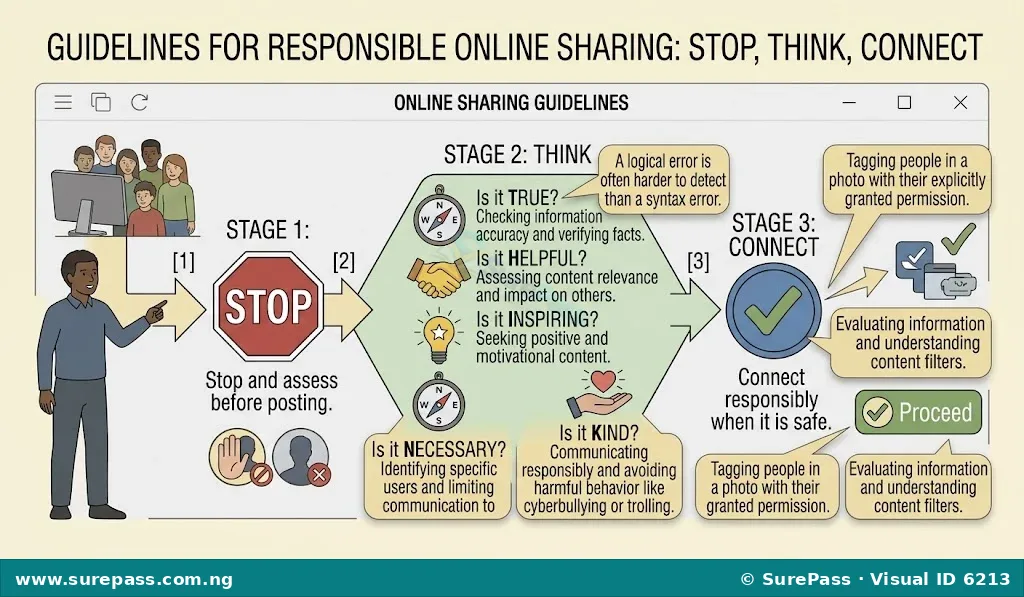
Before sharing any information about yourself or others online, it is crucial to pause and consider the implications. This practice is known as “Self-reflect before self-reveal” and can be guided by the “Stop, THINK, Connect” framework.
STOP
Before you post, comment, or share anything online, take a moment to pause. Do not act impulsively. This brief pause allows you to consider the potential consequences of your actions.
THINK
Ask yourself the following questions about the content you are about to share:
- T – Is it True? Is the information accurate and factual? Spreading false information can be harmful.
- H – Is it Helpful? Does this content contribute positively to the conversation or to someone’s day? Is it constructive?
- I – Is it Inspiring? Does it uplift or encourage others? Does it promote positive values?
- N – Is it Necessary? Is this information truly important to share? Is it relevant to the audience?
- K – Is it Kind? Will this content be hurtful or offensive to anyone? Does it show empathy and respect?
Connect
After you have stopped and thought about your post, if you are confident that it is true, helpful, inspiring, necessary, and kind, then you can proceed to share it. This thoughtful approach helps ensure that your online interactions are positive and safe for yourself and others.
Benefits and Risks of Cyberspace Relationships
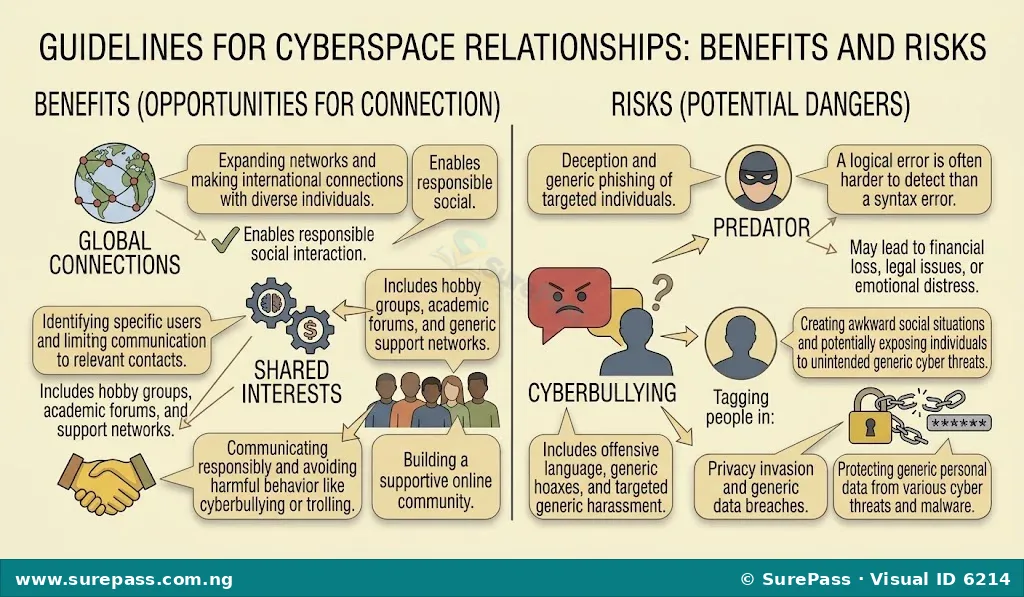
Cyberspace relationships offer numerous advantages but also come with potential dangers. Understanding both sides helps individuals make informed decisions about their online interactions.
Benefits of Cyberspace Relationships
The advantages of forming relationships in cyberspace include:
- Expanded Social Circles: Online platforms allow individuals to connect with people from different locations, cultures, and backgrounds, broadening their social networks.
- Shared Interests and Support: People can find communities and groups based on common hobbies, interests, or challenges, providing a sense of belonging and mutual support.
- Access to Information and Resources: Online connections can lead to sharing of valuable information, educational resources, and professional opportunities.
- Maintaining Long-Distance Connections: Cyberspace makes it easier to stay in touch with friends and family who live far away, strengthening existing relationships.
- Developing Communication Skills: Interacting with diverse individuals online can help improve communication, empathy, and understanding of different perspectives.
- Anonymity for Sensitive Topics: For some, the relative anonymity of online spaces can make it easier to discuss sensitive personal issues or seek advice without fear of immediate judgment.
Risks of Cyberspace Relationships
Despite the benefits, there are significant risks associated with cyberspace relationships:
- Misinformation and Deception: People online may not always be who they claim to be. Individuals can create fake profiles or provide false information, leading to deception.
- Cyberbullying and Harassment: Online interactions can sometimes turn negative, leading to cyberbullying, harassment, or hate speech, which can have serious emotional and psychological impacts.
- Privacy Invasion: Sharing too much personal information online can lead to privacy breaches, identity theft, or unwanted attention from strangers.
- Exposure to Inappropriate Content: Online relationships can expose individuals to content that is unsuitable for their age or harmful in nature.
- Online Predators: Malicious individuals may use online platforms to target vulnerable people, especially younger users, for exploitation or harm.
- Addiction and Time Consumption: Spending excessive time on online relationships can lead to addiction, neglect of real-life responsibilities, and social isolation.
- Emotional Distress: Misunderstandings, arguments, or breakups in online relationships can cause significant emotional distress, similar to offline relationships.
How to Practice Safe Tagging of Online Contents and Contacts
Practicing safe tagging involves being mindful of privacy, consent, and the potential impact of your actions on others. This procedure outlines how to tag responsibly.
The procedure involves the following steps:
- Identify the Content: Look at the photo, video, or post you intend to share. Determine if it contains other people or specific locations that might be relevant for tagging.
- Consider the People Involved: If other individuals are clearly visible or mentioned in the content, think about whether they would want to be tagged.
- Seek Permission: Before tagging anyone, especially in photos or posts that are personal or could be seen by many people, send a private message or ask them directly if they are comfortable with being tagged. Respect their decision if they decline.
- Check Privacy Settings: Be aware of your own privacy settings and those of the platform. Understand who will see the content once it is tagged.
- Perform the Tagging: Use the platform’s tagging feature to add the names of individuals who have given permission. For content, add relevant hashtags (e.g., #schooltrip, #digitaltech) to categorise it.
- Review Before Posting: Double-check all tags and the content itself before finalising the post. Ensure there are no accidental tags or inappropriate content.
- Monitor Comments and Reactions: After posting, monitor comments and reactions. If someone expresses discomfort with a tag, remove it promptly.
- Remove Tags When Requested: If someone asks you to remove a tag, do so immediately and without argument. Their privacy and comfort are paramount.




0 comments
Open the discussion when you need it. Comments stay collapsed until requested so the initial article remains light.