


ARTICLE CONTENTSOn this page 10 sections
E-Commerce
Performance Objectives
By the end of the lesson, students should be able to:
- explain the meaning and forms of e- commerce;
- trace the historical development of e- commerce from traditional trade to digital trade;
- describe the major components of e- commerce;
- explain the benefits and challenges of e- commerce;
- use digital tools for commercial activities.
Meaning of E-Commerce
E-commerce, short for electronic commerce, refers to the buying and selling of goods and services, or the transmitting of funds or data, over an electronic network, primarily the internet.
It involves commercial transactions conducted electronically. Instead of visiting a physical shop, customers can browse products, place orders, and make payments using a computer or smartphone connected to the internet. Businesses can reach a wider customer base beyond their local area.
Evolution and Growth of E-Commerce
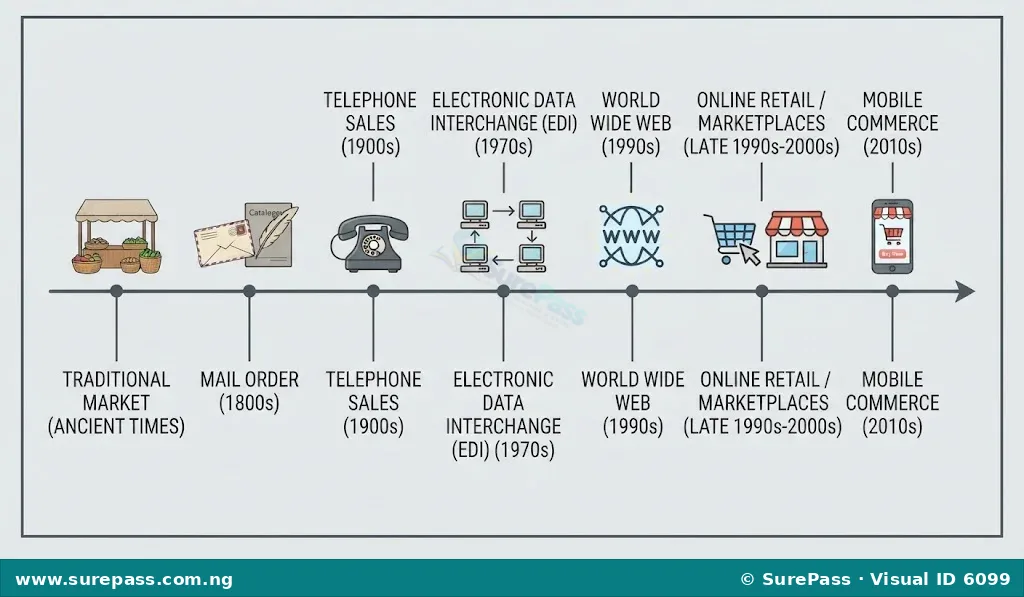
The development of e-commerce is closely linked to the advancements in technology, particularly the internet. Before e-commerce, trade was primarily traditional, involving physical interactions between buyers and sellers.
Traditional Trade
Traditional trade involves face-to-face interactions in physical locations such as markets, shops, and stalls. Buyers and sellers meet in person, inspect goods physically, negotiate prices, and exchange money for goods directly. This method of trade has been practised for centuries and relies on geographical proximity and direct human contact.
Transition to Digital Trade
The journey from traditional trade to digital trade began with the invention of computers and the internet. Early forms of electronic transactions involved Electronic Data Interchange (EDI) in the 1970s, which allowed businesses to exchange documents like purchase orders and invoices electronically. However, this was mainly for large businesses and not accessible to the general public.
The real growth of e-commerce began in the 1990s with the widespread adoption of the World Wide Web. The internet made it possible for businesses to create online storefronts and for consumers to access them from anywhere. Key milestones include the launch of online marketplaces and retail websites, secure online payment systems, and improved internet speeds.
Technological advancements such as faster internet connections, more powerful computers, and the development of smartphones have significantly contributed to the rapid growth of e-commerce. Mobile commerce (m-commerce), which involves transactions conducted via mobile devices, has become a major part of e-commerce, allowing people to shop and sell on the go.
Forms of E-Commerce
E-commerce can take various forms depending on the parties involved in the transaction. The main forms include:
-
Business-to-Consumer (B2C): This is the most common form of e-commerce, where businesses sell products or services directly to individual consumers. Examples include online retail stores where customers buy clothes, electronics, or groceries.
Examples of B2C e-commerce platforms include:
- Jumia
- Konga
- Amazon
-
Business-to-Business (B2B): This form involves transactions between two businesses. For instance, a manufacturer selling raw materials to another business, or a software company selling its services to other companies. B2B transactions often involve larger volumes and more complex processes than B2C.
Examples of B2B e-commerce activities include:
- A company buying office supplies from an online wholesaler.
- A restaurant purchasing food ingredients from an online supplier.
-
Consumer-to-Consumer (C2C): In C2C e-commerce, consumers sell products or services directly to other consumers. This often happens through online marketplaces or auction sites where individuals can list items for sale.
Examples of C2C e-commerce platforms include:
- Jiji
- eBay
- Online classifieds websites
-
Consumer-to-Business (C2B): This form involves individuals selling their products or services to businesses. An example is a freelance graphic designer offering design services to a company, or a photographer selling photos to a stock image website.
Examples of C2B e-commerce activities include:
- A writer offering content creation services to a marketing agency.
- An individual selling unique craft items to a boutique store online.
Components of E-Commerce
For e-commerce to function effectively, several key components must work together seamlessly. These components create the infrastructure that supports online transactions.
-
E-commerce Website or Platform: This is the online storefront where products are displayed, and customers can browse, select, and purchase items. It can be a dedicated website for a single business or a marketplace hosting multiple sellers.
-
Payment Gateway: This is a service that authorises online payments for e-businesses. It securely processes credit card, debit card, or other electronic payment information between the customer, the bank, and the merchant.
-
Logistics and Fulfilment: This component involves managing the storage, packaging, and delivery of products to the customer. It includes warehousing, inventory management, shipping, and tracking services.
-
Customer Service: Providing support to customers before, during, and after a purchase is crucial. This can be through email, live chat, phone support, or frequently asked questions (FAQs) sections on the website.
-
Marketing and Promotion: Attracting customers to an e-commerce platform requires online marketing strategies such as search engine optimisation (SEO), social media marketing, email marketing, and online advertisements.
-
Security Measures: Protecting customer data and financial information is vital. This involves using encryption technologies (like SSL certificates), fraud detection systems, and secure servers to ensure safe transactions.
These components work together to create a complete online shopping experience. For example, a customer visits an e-commerce website, selects products, proceeds to checkout where the payment gateway processes the payment, and then the logistics system ensures the product is delivered. Throughout this process, customer service is available to assist.
Tools for E-Commerce
Various digital tools are essential for conducting e-commerce activities. These tools enable businesses to set up online stores, process payments, manage orders, and communicate with customers.
-
Computers and Smartphones: These are the primary devices used by both buyers and sellers to access e-commerce platforms. Computers offer a larger screen and more robust functionality, while smartphones provide convenience and mobility.
-
Internet Connectivity: A stable internet connection is fundamental for accessing websites, processing transactions, and communicating online.
-
E-commerce Platforms/Software: These are applications or services that allow businesses to build and manage their online stores. Examples include Shopify, WooCommerce, and Magento.
-
Payment Gateways and Processors: Tools like Paystack, Flutterwave, PayPal, and Stripe enable secure online transactions by facilitating the transfer of funds from the customer’s bank to the merchant’s bank.
-
Digital Marketing Tools: These include tools for social media management (e.g., Buffer, Hootsuite), email marketing (e.g., Mailchimp), and search engine optimisation (e.g., Google Analytics, SEMrush) to promote products and reach customers.
-
Logistics and Shipping Software: Tools that help manage inventory, track shipments, and automate delivery processes, often integrating with courier services.
-
Customer Relationship Management (CRM) Software: Systems that help businesses manage customer interactions and data throughout the customer lifecycle, improving customer service and retention.
Benefits and Importance of E-Commerce
E-commerce offers numerous advantages for both businesses and consumers, contributing significantly to modern commerce.
-
Wider Reach for Businesses: E-commerce allows businesses to sell their products and services to customers beyond their local geographical area. An online store can be accessed by anyone with internet access, opening up national and international markets.
-
Convenience for Customers: Consumers can shop at any time (24/7) and from any location, without the need to travel to a physical store. This offers flexibility and saves time.
-
Greater Product Variety: Online stores can offer a much larger selection of products than physical stores, as they are not limited by shelf space. Customers have more choices and can easily compare products from different sellers.
-
Reduced Costs for Businesses: Setting up and maintaining an online store can be less expensive than a physical retail outlet. Businesses can save on rent, utility bills, and staffing costs, which can sometimes lead to lower prices for consumers.
-
Easy Price Comparison: E-commerce platforms make it easy for customers to compare prices from different sellers, helping them find the best deals and make informed purchasing decisions.
-
Personalised Shopping Experience: E-commerce websites can use customer data to offer personalised product recommendations and promotions, enhancing the shopping experience.
-
Direct Communication: Businesses can communicate directly with customers through email, chat, or social media, allowing for quick feedback and improved customer service.
Challenges and Limitations of E-Commerce
Despite its many benefits, e-commerce also faces certain challenges and limitations that businesses and consumers must consider.
-
Security Concerns: Online transactions involve sharing personal and financial information, which can be vulnerable to cyber-attacks, fraud, and data breaches. Customers may be hesitant to share sensitive data.
-
Lack of Physical Inspection: Customers cannot physically touch, feel, or try on products before purchasing them online. This can lead to dissatisfaction if the product does not meet expectations upon arrival.
-
Delivery and Logistics Issues: Problems such as delayed deliveries, damaged goods during transit, or incorrect orders can occur. Managing logistics, especially in remote areas, can be complex and costly.
-
Returns and Refunds: The process of returning unwanted or faulty products and obtaining refunds can sometimes be complicated and inconvenient for customers.
-
Digital Divide: Not everyone has access to the internet, computers, or smartphones, especially in rural areas or among lower-income populations. This limits the reach of e-commerce to those without digital access.
-
Intense Competition: The low barrier to entry in e-commerce means businesses face fierce competition from numerous online sellers, making it challenging to stand out.
-
Technical Glitches: Websites can experience technical issues, such as slow loading times, payment system failures, or server crashes, which can disrupt the shopping experience and lead to lost sales.
Using Digital Tools for Commercial Activities
Using digital tools for commercial activities involves applying the knowledge of e-commerce components and tools to perform buying and selling tasks online. This skill is crucial in today’s digital economy.
Steps for Online Shopping (Buyer’s Perspective)
When a consumer wants to purchase an item online, the process typically involves the following steps:
-
Access an E-commerce Platform: Open a web browser on a computer or smartphone and navigate to an e-commerce website (e.g., Jumia, Konga) or open a shopping app.
-
Search for Products: Use the search bar or browse categories to find the desired product. Read product descriptions, view images, and check customer reviews.
-
Add to Cart: Once a suitable product is found, add it to the virtual shopping cart.
-
Proceed to Checkout: When all desired items are in the cart, click on the “checkout” or “buy now” button.
-
Provide Shipping Information: Enter the delivery address, contact details, and choose a preferred shipping method.
-
Select Payment Method: Choose a payment option, such as debit card, credit card, bank transfer, or mobile money. Enter payment details securely through the payment gateway.
-
Confirm Order: Review the order summary, including products, prices, shipping costs, and total amount. Confirm the purchase.
-
Receive Confirmation: An order confirmation email or message is usually sent, containing details and a tracking number for the shipment.
-
Track Delivery: Use the provided tracking number to monitor the delivery status of the package until it arrives.
Steps for Setting Up an Online Store (Seller’s Perspective – Simplified)
For a business to sell products online, a simplified process using digital tools might include:
-
Choose an E-commerce Platform: Select a suitable e-commerce platform (e.g., Shopify, WooCommerce) that fits the business needs and budget.
-
Set Up the Online Store: Register an account, choose a store name, and design the website layout. Many platforms offer templates for easy setup.
-
Add Products: Upload product images, write detailed descriptions, set prices, and manage inventory levels for each product.
-
Integrate Payment Gateway: Connect a secure payment gateway (e.g., Paystack, Flutterwave) to allow customers to make online payments.
-
Set Up Shipping Options: Define shipping zones, costs, and delivery methods. Partner with logistics providers if necessary.
-
Market the Store: Use digital marketing tools like social media, email campaigns, and online advertisements to promote the online store and attract customers.
-
Manage Orders and Customer Service: Regularly check for new orders, process them, and provide customer support for inquiries, returns, or complaints.
By understanding and applying these steps, individuals and businesses can effectively participate in e-commerce, leveraging digital tools for various commercial activities.


0 comments
Open the discussion when you need it. Comments stay collapsed until requested so the initial article remains light.