



ARTICLE CONTENTSOn this page 6 sections
Use of dictionary
Performance Objectives
By the end of the lesson, students should be able to:
- Identify and interpret the features of a dictionary;
- use a dictionary to find meanings, pronunciation, parts of speech, word origin and other information
Introduction to Dictionaries
The English language contains a vast number of words, and it is common for speakers and writers to encounter unfamiliar words or to be unsure about the correct usage of familiar ones. A dictionary is an essential tool for anyone who wants to improve their English language skills, whether for speaking, reading, or writing.
Dictionaries provide a wealth of information about words, helping learners to understand their meanings, how they are pronounced, and how they are used in sentences. Mastering dictionary skills is a fundamental step towards achieving grammatical accuracy and expanding vocabulary.
Meaning and Purpose of a Dictionary
A dictionary is a reference book or electronic resource that lists words in alphabetical order and provides information about them.
The primary purpose of a dictionary is to serve as a comprehensive guide to words. It helps users to:
- Find the meaning of unfamiliar words.
- Check the spelling of words.
- Learn how to pronounce words correctly.
- Understand the grammatical function (part of speech) of words.
- Discover the origin or history of words (etymology).
- Find synonyms (words with similar meanings) and antonyms (words with opposite meanings).
- Understand how words are used in different contexts, including idioms and phrases.
- Identify different forms of a word, such as plural forms of nouns or past tense forms of verbs.
Features of a Dictionary
Dictionaries, whether in print or electronic format, share several common features that help users navigate and interpret the information provided. Understanding these features is crucial for effective dictionary use.
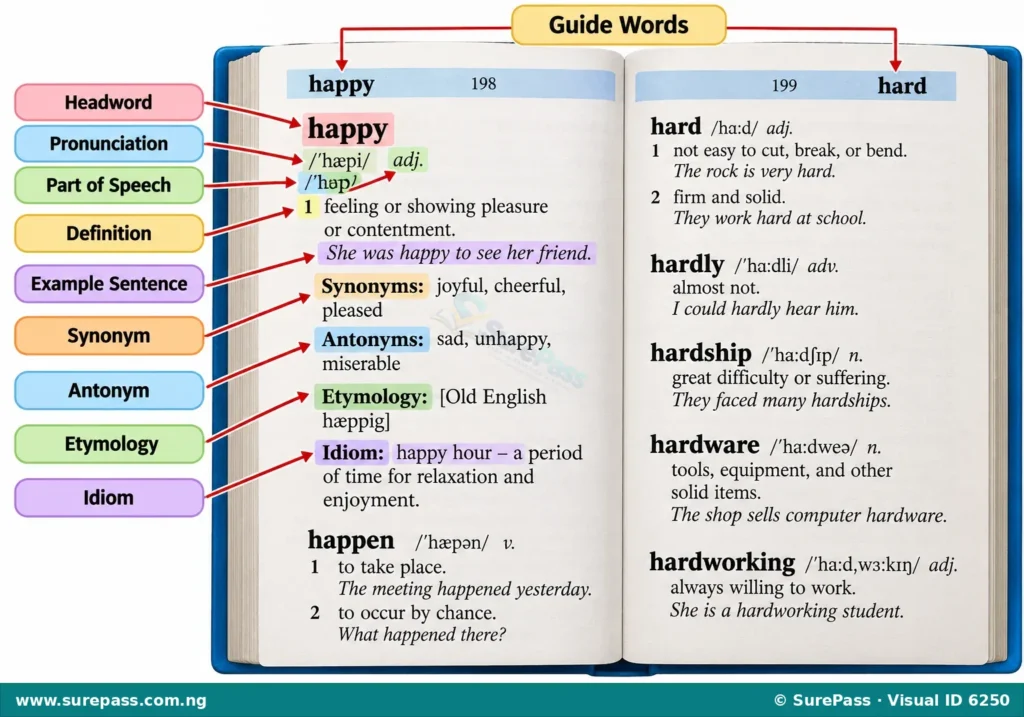
The main features of a dictionary entry include:
- Guide Words: These are words printed at the top of each page. The guide word on the left indicates the first word on that page, and the guide word on the right indicates the last word on that page. They help users quickly locate words by showing the alphabetical range of words on a particular page.
- Headword: This is the word being defined. It is usually printed in bold type and appears at the beginning of each entry.
- Pronunciation: After the headword, there is usually a phonetic transcription that shows how the word is pronounced. This uses special symbols, often from the International Phonetic Alphabet (IPA), to represent sounds.
- Part of Speech: This indicates the grammatical category of the word, such as noun (n.), verb (v.), adjective (adj.), adverb (adv.), pronoun (pron.), preposition (prep.), conjunction (conj.), or interjection (interj.). It is usually given as an abbreviation.
- Definitions/Meanings: These are the explanations of what the word means. Many words have multiple meanings, which are often numbered or lettered within the entry.
- Example Sentences: Dictionaries often provide example sentences to show how the word is used correctly in context. This helps to clarify the meaning and usage.
- Word Origin (Etymology): This section explains the history of the word, including the language it came from and how its meaning has evolved over time. It is often enclosed in square brackets or parentheses.
- Synonyms and Antonyms: Some dictionary entries list words that have similar meanings (synonyms) or opposite meanings (antonyms). These are useful for expanding vocabulary and choosing the most appropriate word.
- Idioms and Phrases: If a word is part of a common idiom or phrase, the dictionary entry may include these expressions and their meanings.
- Usage Notes: Some dictionaries provide additional information about how a word is typically used, including common collocations, register (formal or informal), or warnings about potentially confusing uses.
- Inflected Forms: For nouns, dictionaries may show plural forms (e.g., child, children). For verbs, they may show past tense and past participle forms (e.g., run, ran, run).
Using the Dictionary to Find Information
Using a dictionary effectively involves knowing how to navigate its features to find specific information. This applies to both print and electronic dictionaries, though the methods of access differ.
Finding Meanings
To find the meaning of a word, follow these steps:
- Locate the Headword: In a print dictionary, use the alphabetical order and guide words to find the page where the word is listed. In an electronic dictionary, type the word into the search bar.
- Read the Definitions: Once you find the headword, read through all the definitions provided. Many words have more than one meaning.
- Choose the Correct Meaning: Consider the context in which you encountered the word. Select the definition that best fits that context. For example, the word “bank” can mean the side of a river or a financial institution.
- Check Example Sentences: If available, read the example sentences to see how the word is used in different contexts, which can help clarify its meaning.
Finding Pronunciation
To find the pronunciation of a word:
- Locate the Phonetic Transcription: After the headword, look for the symbols enclosed in slashes (e.g., /hæpi/) or parentheses.
- Interpret the Symbols: Refer to the pronunciation key, usually found at the beginning of the dictionary, to understand what each phonetic symbol represents. For example, /ʃ/ represents the “sh” sound in “shoe,” and /θ/ represents the “th” sound in “thin.”
- Note Stress Marks: Pay attention to stress marks (e.g., /’hæpi/), which indicate which syllable in a multi-syllable word should be emphasised.
- Use Audio (Electronic Dictionaries): Electronic dictionaries often provide an audio button that allows you to hear the word pronounced by a native speaker, which is a very helpful feature.
Finding Parts of Speech
To identify the part of speech of a word:
- Locate the Abbreviation: After the headword and pronunciation, look for the abbreviation (e.g., n., v., adj., adv.).
- Interpret the Abbreviation: Understand what each abbreviation stands for. For instance, ‘n.’ means noun, ‘v.’ means verb, ‘adj.’ means adjective, and ‘adv.’ means adverb.
- Note Multiple Parts of Speech: Some words can function as more than one part of speech (e.g., “run” can be a verb or a noun). The dictionary will list each part of speech separately with its corresponding definitions.
Finding Word Origin (Etymology)
To find the origin of a word:
- Locate the Etymology Section: Look for a section, often enclosed in square brackets or parentheses, that provides information about the word’s history. This usually appears after the definitions.
- Identify Source Languages: This section will indicate the language from which the word was derived (e.g., Old English, Latin, Greek, French).
- Understand Historical Context: The etymology can sometimes explain why a word has a particular meaning or how its meaning has changed over centuries.
Finding Synonyms and Antonyms
To find words with similar or opposite meanings:
- Locate the Synonyms/Antonyms Section: Some dictionary entries include a specific section for synonyms (often marked “Syn.”) and antonyms (often marked “Ant.”).
- Review the List: Read through the suggested words.
- Consider Nuances: Remember that synonyms rarely have exactly the same meaning. Choose the synonym or antonym that best fits the specific context you need.
Finding Idioms and Other Information
To find idioms or other usage details:
- Scan the Entry: Look for phrases or expressions that include the headword, often listed under a separate subheading or at the end of the entry.
- Read Usage Notes: Pay attention to any notes that explain specific contexts, grammatical constructions, or common errors associated with the word.
Using Print Dictionaries
Print dictionaries require a systematic approach:
- Alphabetical Order: All words are arranged from A to Z.
- Guide Words: Use the guide words at the top of each page to quickly narrow down your search to the correct page. For example, if you are looking for “dictionary” and the guide words are “difficult” and “digestion,” you know the word is not on that page.
- Scanning: Once on the correct page, scan the headwords in the column until you find the word you are looking for.
Using Electronic Dictionaries
Electronic dictionaries (digital dictionaries on computers or phones, and online dictionaries) offer speed and convenience:
- Search Bar: Simply type the word you are looking for into the search bar. The results usually appear instantly.
- Hyperlinks: Many electronic dictionaries allow you to click on words within a definition to look them up, making cross-referencing very easy.
- Audio Pronunciation: As mentioned, this is a significant advantage for learning correct pronunciation.
- Additional Features: Some electronic dictionaries offer features like word games, vocabulary lists, or translation services.





0 comments
Open the discussion when you need it. Comments stay collapsed until requested so the initial article remains light.